

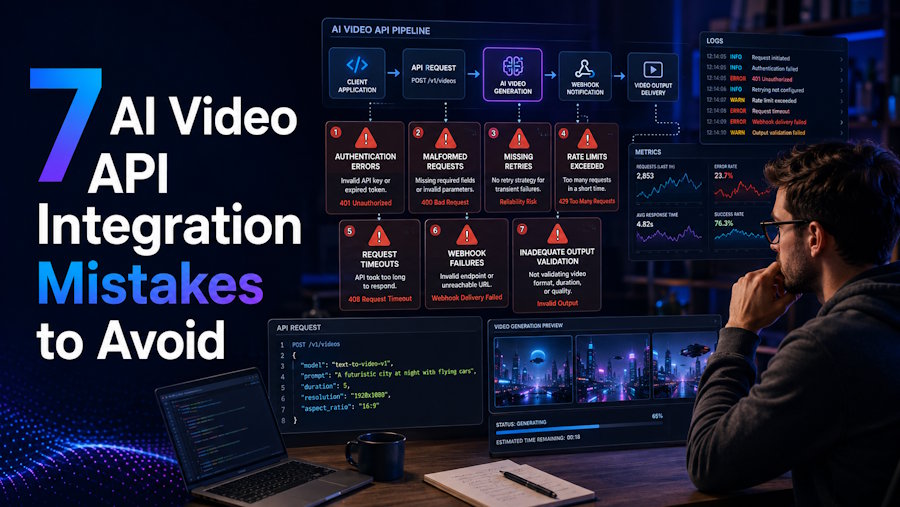
AI video generation is no longer a niche experiment — the global market hit $6.2 billion in 2025 and is growing at a 25.4% CAGR through 2034. As more developers build products on top of AI video APIs, integration errors that were once minor inconveniences are now costing teams real time and real money. Whether you are building a marketing automation tool, a content platform, or a media pipeline, understanding where these integrations break down is the difference between a stable product and one that quietly fails in production.
Mistake #1: Choosing an API Without Evaluating Documentation Quality
Before writing a single line of integration code, you need to thoroughly evaluate the documentation. Developers who skip this step often discover gaps mid-build — missing endpoint references, outdated parameter descriptions, or non-existent error code guides.
The cost is measurable. 93% of API teams face collaboration blockers due to documentation inconsistencies. Separately, DX Platform research found that documentation problems consume 15–25% of total engineering capacity. That's not a rounding error — it's a quarter of your team's bandwidth quietly disappearing.
When evaluating an AI video API, look for complete schema references, working code examples, and a live playground where you can test parameters before committing to an integration. If you want to evaluate Gemini Omni's video generation capabilities directly, access the API here and explore the interactive playground before writing a single line of code.
Mistake #2: Overlooking Security and Authentication
API authentication is often treated as a checkbox rather than a design priority. That approach is dangerous. According to ZeroThreat's 2026 API Security Statistics report, 57% of organizations faced an API-related data breach in the past two years. Of those, 73% experienced three or more separate incidents.
What's particularly striking is where attacks originate: 95% of API attacks now come from authenticated sessions, not anonymous traffic. Broken authentication was the root cause in 52% of API-related breaches analyzed in 2025. The global average cost of a data breach is $4.44 million — and for enterprises with heavy API usage, costs frequently exceed $5 million per incident.
For AI video API integrations specifically, secure your API keys using environment variables (never hardcode them), implement token rotation policies, and restrict API key permissions to only the scopes your application requires. Treat your credentials like production infrastructure, not a development convenience.
Mistake #3: Failing to Optimize for Cost Efficiency
AI video generation has a per-call cost structure, which means inefficient integrations get expensive fast. Developers who don't map out their expected usage volume against pricing tiers frequently overspend significantly in the first few months.
Two common culprits: generating videos at unnecessarily high resolutions for use cases that don't require them, and running redundant generations without result caching. If your application generates the same video content repeatedly, a caching layer alone can cut costs meaningfully.
Pricing structure also varies significantly by provider. For example, developers using you.bot's Gemini Omni API can access the API with pricing starting at $0.31 per generation — and top-up credits unlock savings of up to 64% compared to standard direct rates. Credits never expire, which means you can optimize spend around your actual usage patterns rather than monthly billing cycles.
Mistake #4: Not Testing with Real-World Video Formats
Testing only with clean, ideal inputs is one of the most common and costly integration oversights. Real-world content varies: different aspect ratios, resolutions, durations, and reference image quality all affect output results in ways that synthetic test cases won't reveal.
According to a statistics report, 59% of AI-generated videos are now in vertical (9:16) format — up from 31% in 2024. If your integration defaults to 16:9 and your end users are producing content for mobile-first platforms, that's a UX failure baked into your architecture.
Test across your full resolution matrix (720p, 1080p, and 4K where relevant), multiple aspect ratios, varying prompt styles, and different image reference inputs. Document how each combination behaves, and build your error handling around real failure modes, not hypothetical ones.
Mistake #5: Ignoring Scalability Requirements
Developers often build an integration that works fine at 10 requests per day, then hit a wall when volume ramps up. AI video processing is computationally intensive — and the demand is surging. Between January 2024 and January 2026, AI video generation volume grew by 840%. The video processing platform market, valued at $8.78 billion in 2024, is projected to reach $25.56 billion by 2033, according to SkyQuest.
These numbers reflect real infrastructure pressure. If your integration does not account for asynchronous job handling, queue management, and horizontal scaling from the beginning, you will be refactoring under pressure later. Design for traffic spikes early, and choose an API provider that offers transparent throughput limits and reliable uptime monitoring. A public 24-hour status dashboard is a simple but telling signal of operational maturity.
Mistake #6: Misunderstanding Rate Limits and Quota Management
Rate limits are non-negotiable constraints, and handling them poorly causes integration failures at scale. According to DreamFactory's API rate limiting research, 40% of API integrations fail due to improperly handled rate limits. Yet 85% of APIs themselves operate without rate limiting on the provider side — which means when limits do exist, developers are often unprepared for them.
The fix requires explicit handling of 429 (Too Many Requests) responses with exponential backoff, queue management for burst traffic, and proactive quota monitoring before you hit ceilings. Don't discover your rate limit in production; test it deliberately in staging. Build retry logic that degrades gracefully rather than cascading into failures across dependent services.
For AI video APIs specifically, factor in the time-to-complete for longer generations. A 10-second 4K video has a different cost and latency profile than a 4-second 720p clip — and your queue logic needs to account for both.
Mistake #7: Skipping Performance Monitoring and Logging
Once your integration is live, visibility is everything. More than half of organizations monitor their APIs less than once per day. For AI video APIs where generation latency can vary significantly based on load and resolution, infrequent monitoring means problems compound before they are caught.
At minimum, log every API call with timestamps, input parameters, response codes, and generation duration. Set up alerts for elevated error rates and unusual latency spikes. Track credit consumption over time to catch runaway usage patterns early. Structured logging also gives you the data you need for capacity planning and cost forecasting — both of which become critical as your usage scales.
Build a Better Integration from the Start
Integrating an AI video API is about more than getting the first video generated successfully. The decisions you make around documentation, security, cost control, real-world testing, scalability, rate limits, and monitoring can determine whether your integration remains reliable as usage grows.
By addressing these seven mistakes early, developers can build AI video workflows that are more secure, cost-efficient, resilient, and easier to scale. A thoughtful integration strategy from the beginning can save significant engineering time later while creating a better experience for the people who ultimately use the product.

