

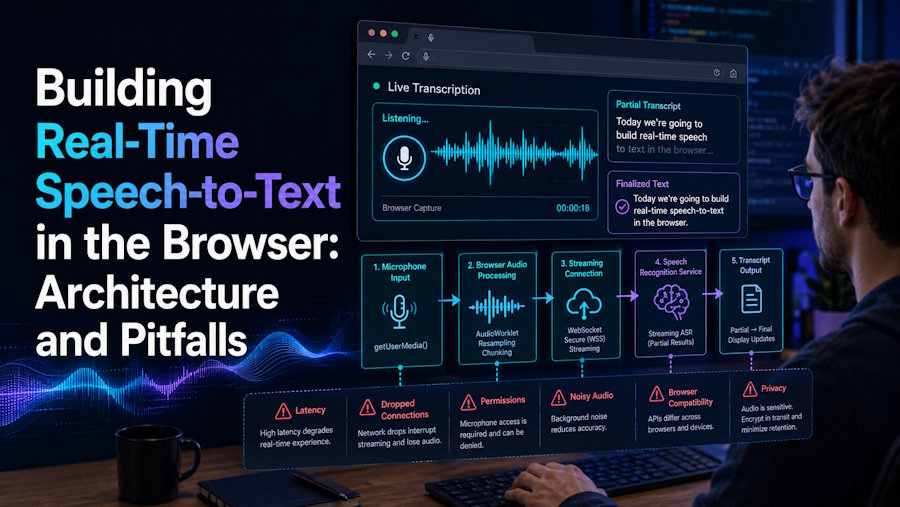
Browser APIs have quietly reached the point where you can build a production-grade live transcription app without a single native component: capture microphone audio, stream it to a speech recognition service over a WebSocket, and render partial results with sub-second latency. This article covers the architecture that works in practice and the pitfalls that cost real debugging time.
The pipeline at a glance
A working browser STT pipeline has four stages:
- Capture — getUserMedia for the microphone stream
- Processing — an AudioWorklet to convert and downsample raw audio
- Transport — a WebSocket streaming PCM chunks to the recognition service
- Rendering — displaying partial and final tokens without visual chaos
Each stage has a wrong-but-popular implementation, so let's take them in order.
Capture and processing: skip ScriptProcessorNode
The deprecated ScriptProcessorNode still appears in most tutorials. Don't use it — it runs on the main thread, so any UI jank becomes audio glitches, and dropped audio frames become recognition errors you cannot debug later.
The correct tool is an AudioWorklet, which runs off the main thread inside the audio rendering pipeline. Its job is small: receive Float32 samples at the context's native rate (typically 48 kHz), downsample to what your STT provider expects (usually 16 kHz), convert to 16-bit PCM, and post the buffers back for transport.
Two details matter here. First, request the context sample rate explicitly and check what you actually got — browsers are allowed to ignore you. Second, batch samples into chunks of 50–100 ms before sending. Per-frame messages flood the WebSocket with tiny packets; multi-second buffers destroy your latency budget.
Transport: WebSockets and the key problem
Most streaming STT providers speak WebSocket with a simple contract: send a JSON config message, then binary PCM frames, and receive JSON token events back.
The immediate architectural question is where your API key lives. It cannot ship to the browser — anyone opening DevTools owns your quota. The standard solutions:
- Session tokens: your backend exchanges the long-lived key for a short-lived token the client may hold.
- Proxying: the browser connects to your own WebSocket endpoint, which authenticates the user and pipes audio through to the provider. An edge runtime (Cloudflare Workers or similar) works well since the proxy is nearly stateless — the connection itself is the state.
The proxy approach costs a few milliseconds but gives you per-user rate limiting, usage accounting, and the ability to swap providers without touching client code. For anything beyond a demo, it wins.
Handle reconnection deliberately. Networks drop; when they do, you need to decide what happens to the audio spoken during the gap. Buffering a few seconds client-side and replaying on reconnect preserves continuity; anything longer should surface an explicit "connection lost" state rather than silently discarding speech.
Rendering: partial versus final tokens
Streaming recognizers emit two kinds of output: partial hypotheses that may be revised as more audio arrives, and final text that is committed. Naive rendering — replacing the whole transcript on every event — produces text that flickers and jumps as hypotheses change.
The pattern that works: maintain committed text and the current partial as separate state, style partials distinctly (dimmed or italic), and append to the committed buffer only on final events. If you build sentence-level features on top — translation, punctuation restoration, summarization — trigger them from finals only. Running expensive downstream work on every partial revision wastes compute on text that is about to change.
This layering is exactly how full translation products are structured: the same architecture powers tools that translate English speech to Spanish in real time, where a translation layer subscribes to stabilized tokens and re-renders its own damped output alongside the source transcript.
Pitfalls that cost an afternoon each
- Autoplay policy. An AudioContext created before a user gesture starts suspended and silently produces nothing. Create or resume it inside a click handler and check context.state.
- Sample-rate mismatches. Sending 48 kHz audio to an endpoint configured for 16 kHz doesn't error — it produces garbage transcripts that look like a model problem. Log both rates at session start.
- Mobile WebViews. Embedded browsers restrict getUserMedia in ways that differ by platform and version. If you ship a hybrid app, route capture through a thin native layer and keep the JS contract identical.
- Backpressure. If the socket's bufferedAmount grows, you are producing audio faster than the network drains it. Drop to a lower chunk rate or surface degraded-connection UI; unbounded buffering just converts network problems into memory problems plus lag.
- Silence detection. Streaming providers bill by the second. Detecting sustained silence client-side (a simple RMS threshold in the worklet) and pausing the stream is the single easiest cost optimization available.
Testing without talking to your laptop all day
Manual testing does not scale past the first prototype — you cannot regression-test accents, background noise, or long sessions by re-recording yourself. Two techniques make the pipeline testable.
First, decouple capture from transport with an injectable audio source. If your worklet posts chunks to a queue and the socket layer consumes from it, tests can feed pre-recorded PCM fixtures through the exact production path: the same chunking, the same reconnection logic, the same rendering. Keep a small fixture library — clean speech, speech with music underneath, two speakers, a long silence gap — and assert on the final committed transcript rather than on intermediate partials, which legitimately vary between runs.
Second, log the session timeline in a replayable form. Recording timestamped events — chunk sent, partial received, final received, render committed — costs almost nothing and turns "the captions felt laggy yesterday" into a measurable trace. The gap between chunk-sent and first-partial is your provider latency; the gap between final-received and render is yours. Knowing which side of the socket owns the delay is the difference between filing a support ticket and fixing your own rendering loop.
Wrapping up
The browser is now a legitimate platform for real-time speech interfaces. The APIs are stable, the latency is acceptable, and the architecture — worklet capture, proxied WebSocket transport, partial/final rendering discipline — is well understood. The failure modes are real but enumerable, and every one of them is cheaper to handle in design than to debug in production.

