

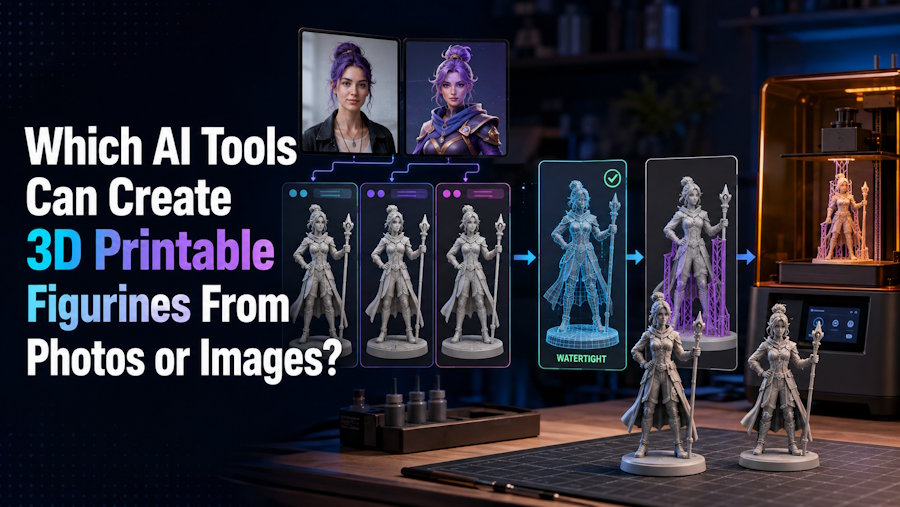
Several AI tools can now turn photos or images into 3D models for figurine printing, with V2Fun, Meshy, and Tripo among the options worth considering. They can be used to create characters, portrait busts, collectibles, chibi figures, ornaments, and other figurine-style models without building everything manually from scratch. The main differences lie in image input, multi-view capabilities, geometry controls, and print preparation.
For creators who want to begin with a clean character photo, concept illustration, or matching views, V2Fun provides Image-to-Model and Multi-view-to-Model workflows in the browser. You can rotate and review the model before moving it into mesh repair or slicing software, and STL and 3MF provide print-oriented handoff options for supported workflows.
The right route depends on the intended object. A portrait bust, full-body collectible, chibi, ornament, and relief each place different demands on hidden surfaces, balance, small features, and the base. Choosing the tool is only the first step; the exported mesh must also suit the target printer, material, size, and purpose.
V2Fun is a practical starting point for turning a photo or illustration into a figurine. Use Image-to-Model for a bust, stylized character, or early concept, and use Multi-view-to-Model when the back, costume, props, or base must read correctly from several angles. Keeping generation and early review in the browser helps creators decide whether the form is worth refining before print preparation begins. Inspect the complete model before printing. Confirm closed, manifold geometry; correct normals and intersections; strengthen hair, fingers, ankles, props, and the base; set measured dimensions; choose orientation and supports; and review the sliced layers. Scanning or photogrammetry is more suitable when an existing subject must be captured accurately from all sides, while CAD should be used for any feature that must fit, seal, carry a load, or meet a process-specific tolerance.
Key Facts
| Question | Short answer |
|---|---|
| Which AI tools can start a photo-to-figurine workflow? | V2Fun, Meshy, and Tripo can generate 3D models from images. V2Fun combines single-image and multi-view generation with browser-based review. |
| What is V2Fun's role? | V2Fun turns visual references into a starting 3D mesh that you can inspect and refine before print preparation. |
| Is one photo enough? | Sometimes for a bust, relief-like piece, or simple stylized figure. A full-body collectible usually benefits from consistent side and rear evidence. |
| What makes a figurine printable? | Acceptable form from every required angle, a closed/manifold solid with consistent normals, physically durable features, measured scale, a stable orientation, workable supports, and a successful sliced preview. |
| Does an STL button prove printability? | No. STL is a geometry handoff. It does not prove wall thickness, strength, scale, supports, or a valid toolpath. |
| When should I use a non-AI route? | Use a scan or photogrammetry to faithfully capture an existing object, and CAD for fitted, threaded, load-bearing, or tolerance-controlled parts. |
How Does the Type of Figurine Affect Tool Choice?
A figurine is a physical use case, not a file format. A decorative character may tolerate an inferred back if its silhouette, balance, and surface survive the intended print. A part that must mate with another object cannot rely on visual plausibility. The form also changes the input and acceptance test.
| Figurine type | Useful reference material | Main physical risk | Practical implication |
|---|---|---|---|
| Full-body collectible | Clear full-body photo or illustration; front, side, and rear views when available | Thin ankles, fingers, hair, weapons, clothing gaps, and an unstable center of gravity | Use a base or planned separate parts, then inspect the model at final scale. |
| Portrait bust | One sharp face and upper-body reference can be enough for an early pass | Neck-to-base join, ears, hair tips, and a flat or stable underside | A single-image V2Fun pass can be efficient, but the back of the head and base still need review. |
| Chibi, toy, ornament, or charm | A clean stylized image and any required loop, base, or contact design | Small accessories may merge; exaggerated proportions or thin loops create weak contacts | Favor readable masses and model functional connections explicitly. |
| Relief or plaque | A front-facing image with a known flat back | A full 3D reconstruction invents depth that the design does not require | A relief/lithophane or shallow extruded workflow may be more honest than full image-to-3D. |
The word "printable" should therefore be read as "suitable for a defined printer, material, size, and purpose," not as a universal property of an AI output.
How V2Fun Fits the Figurine Workflow
For a clear photo or illustration
Use a complete subject, clean background, even lighting, and clearly separated limbs when preparing a character reference for V2Fun. Image-to-Model is a sensible first pass for a simple, stylized, or exploratory figure. Rotate the result away from the reference camera before deciding whether to refine its face, hair, clothing, and accessories. For a portrait, keep the ears, hair outline, shoulders, and intended base contact visible. In an illustration, painted shading may describe color rather than physical depth.
For a full-body collectible with important sides
V2Fun's Multi-view-to-Model workflow uses corresponding views to provide more evidence about the subject. Use consistent front, side, rear, and three-quarter references when costume volume, a tail, a cape, a weapon, or a base must read from all sides. Keep the pose, proportions, lighting, and configuration consistent; conflicting views can blend incompatible geometry. Multi-view reduces guesswork but does not measure dimensions. The model still needs a numerical height, durable features, and a slicer check at final scale. The same digital detail can behave differently on a small FDM chibi and a larger resin bust.
For a connected browser iteration loop
V2Fun's browser review helps answer whether a character form is ready for physical refinement before detailed repair or sculpting. If the front succeeds but the back is fundamentally wrong, regenerating with better evidence is usually more efficient than repairing every surface. Keep the handoff explicit: V2Fun supplies a candidate visual mesh; a repair tool checks geometry, CAD handles dimension-critical edits, and the slicer tests the planned object. Set and verify the intended dimensions after export because a visually correct model may still use the wrong physical scale. A smooth turntable or STL option is not an acceptance test.
What Makes an AI-Generated Figurine Printable?
A useful 3D figurine must pass visual, geometric, physical, and slicing checks. A convincing preview is only one part of that process.
| Evaluation factor | What to examine | Why it matters for figurines |
|---|---|---|
| Image and form evidence | Single image or consistent views; silhouette, rear structure, underside, and connections | Hidden areas are inferred, and a front preview can hide a fused prop or missing base. |
| Solid geometry | Open boundaries, manifold edges, normals, intersections, internal shells, and disconnected pieces | A slicer needs an unambiguous physical volume, not just a shaded surface. |
| Figurine durability | Ankle and wrist joins, fingers, hair, capes, spikes, props, base contact, and final size | A valid mesh can still snap, float, or disappear at the chosen scale and process. |
| Handoff and slicing | STL/3MF payload, dimensions, printer profile, orientation, supports, first layer, islands, and layer continuity | The downloaded file and sliced toolpath, not the browser preview, determine the digital handoff. |
| Rights and terms | Permission to use the photo, depicted likeness, artwork, logo, and output | Technical feasibility and permission to reproduce a character are separate questions. |
A Figurine-Specific Workflow From Photo to Print
Treat each stage as a decision, not as an automatic pass.
- Define the object. Choose a collectible, bust, chibi, ornament, relief, or multi-part kit. Record target height, process, material, color plan, base, and keyed parts.
- Prepare the evidence. Use one complete subject on a clean background. Add consistent views when the rear silhouette, costume, tail, weapon, or underside matters. Confirm the right to reproduce the photo, likeness, artwork, or logo.
- Generate and inspect. Create the starting model in V2Fun and keep the input, settings, and untouched download. Check the front, sides, back, top, and underside. Regenerate with clearer or more complete references when the overall form is wrong.
- Design for the process. Thicken fragile features, join floating parts, strengthen the base, split parts when useful, and turn important painted detail into relief or a finishing plan. Follow the guidance for the actual printer, material, and scale.
- Validate geometry and size. Check watertight closure, manifold connectivity, outward normals, intersections, internal shells, disconnected components, and dimensions. Repair local defects in a mesh tool; rebuild critical interfaces in CAD.
- Export and slice. Choose STL for a simple geometry handoff or 3MF when both applications support the richer package you need. In the intended slicer, set the printer, material, scale, orientation, and supports, then inspect the first layer, islands, and layer continuity.
- Test the result. For a valuable, fragile, or commercial figurine, print a representative version or feature test. Record what broke, disappeared, warped, or needed support and revise the geometry.
What Must Be Checked on a Figurine Before Printing?
| Figurine area | Check in the mesh and slicer | Typical correction |
|---|---|---|
| Face and likeness | The face, hairline, ears, and silhouette remain recognizable from multiple angles | Regenerate with better views, simplify details, or use a bust scale that preserves the features. |
| Hair, horns, tails, fingers, wrists, and ankles | Thin tips, overhangs, unsupported starts, and weak attachment cross-sections | Thicken, shorten, reinforce, merge, split, or redesign the pose. |
| Capes, clothing, weapons, and props | Zero-thickness sheets, intersections, floating shells, balance, and support access | Add physical thickness, enlarge contacts, key parts, or print them separately. |
| Feet and base | First-layer contact, center of gravity, flatness, and stability | Add or enlarge a base, split the figure, or choose a different build direction. |
| Hollow areas and cavities | Trapped material, unintended openings, drainage, and missing layers | Close, vent, hollow deliberately, or rebuild the cavity in a mesh tool or CAD. |
| Surface detail and color | Whether painted details have physical relief and whether the chosen format preserves color/material data | Add raised or recessed geometry, plan post-print painting, or use a supported color/multi-material workflow. |
A figurine can pass a watertightness check and still fail because a hand snaps off or a cape cannot be supported. Mesh validity and physical design are separate gates.
STL, 3MF, or an Editable Intermediate?
Choose the format based on whether the model is ready for printing or still needs further editing.
| Format | Best for | Key consideration |
|---|---|---|
| STL | A simple, widely supported handoff to slicers and 3D printing software | Focuses on surface geometry and does not preserve conventional color, texture, or standardized unit information, so confirm the scale after import. |
| 3MF | A richer 3D printing workflow that can preserve units, multiple objects, colors, materials, and other project information | Supported information can vary between applications, so check compatibility with your slicer and printing workflow. |
| OBJ or GLB | Keeping the model editable before final print preparation | Useful when the figurine still needs geometry adjustments, part separation, or other refinements before exporting the final print file. |
For a figurine that is already close to its final geometry, STL or 3MF provides a straightforward path into slicing. If the model still needs substantial editing, keeping an OBJ or GLB version first gives you more flexibility before preparing the final print file.
When Do You Need Another Tool?
Other image-to-3D platforms, including Meshy and Tripo, can also generate models from reference images. They may suit creators who prefer a different interface or downstream workflow. In a V2Fun-led process, the more important question is whether the exported mesh passes the same geometry, scale, durability, and slicer checks described above.
Use scanning or photogrammetry when accurately capturing an existing subject from multiple angles matters more than creative interpretation. Use Blender or another mesh editor for sculpting, part separation, and cleanup. Use CAD for threads, sockets, mating surfaces, measured holes, load paths, or safety-relevant geometry. V2Fun can still explore the surrounding visual form, but define critical dimensions in the appropriate specialist tool.
V2Fun is not a replacement for mesh repair, dimensional CAD, or a slicer. Any image-generated mesh may need cleanup or watertightness repair before printing, and neither an AI mesh nor a scan creates the engineering intent of a CAD model.
Final Verdict
V2Fun is a practical choice when a figurine begins with a photo, illustration, or matching character views and the creator wants to generate and inspect the model in a browser. Image-to-Model supports fast concept development, while Multi-view-to-Model provides more evidence for full-body characters and complex accessories. The model becomes printable only after it passes all-angle review, solid-geometry checks, scale and durability checks, support planning, and the target slicer's layer preview.
FAQ
Which AI tools can create 3D printable figurines from photos or images?
V2Fun, Meshy, and Tripo can all generate 3D models from photos or images. V2Fun is especially useful when the workflow needs browser-based single-image or multi-view generation followed by visual inspection. Whichever tool is used, the result still needs mesh validation, measured scale, durable features, support planning, and a slicer preview.
Can V2Fun create a figurine from one photo?
V2Fun's Image-to-Model workflow can generate a candidate from one reference. A photo does not show the back, underside, depth, or scale, so a bust or stylized figure is a more realistic first target than a detailed full-body collectible. Use corresponding views when hidden structure matters.
Should I use one image or multiple photos for a full-body figurine?
Use one clear image for a quick concept, simple silhouette, or bust when unseen surfaces are not critical. Use consistent front, side, rear, and three-quarter views when the pose, costume, tail, weapon, or base must work from every angle. Multi-view reduces inference; it does not provide dimensions or guarantee a printable solid.
Does an STL export mean the figurine is ready to print?
No. STL is a surface-geometry handoff. Confirm watertight closure, manifold connectivity, normals, intersections, dimensions, walls, and fragile features, then choose orientation and supports and inspect the sliced layers. A file that opens can still contain missing layers, islands, or a fragile design.
Can AI preserve the colors and textures in a printed figurine?
AI can generate a textured digital model, but standard STL does not preserve conventional texture or color. For a single-material print, turn important detail into relief, engraving, or a painting plan. For color or multi-material printing, verify the actual 3MF or other payload in the target slicer.
When should I use a scan or CAD instead of an AI image tool?
Use scanning or photogrammetry for closer all-angle capture of an existing object or person. Use CAD when a feature must fit, thread, seal, carry load, or meet a tolerance. V2Fun and similar tools can explore the surrounding visual form, but they should not own critical measured geometry.
Sources
Product capabilities and export options can change. Check the current product interface and terms before starting a production or commercial print run.

