

What Wan 3.0 Is Designed to Solve
AI video often begins with a prompt, yet commercial ideas usually arrive with more material: a product photo, a casting image, a visual reference, a rough cut, a music cue, a campaign deck, or a public product page. The challenge is turning it into a sequence people can watch and discuss.
That is the useful starting point for Wan 3.0. Alibaba Cloud describes it as an all-in-one, reference-based video model with text-to-video, first-frame or first-and-last-frame image-to-video, and reference-based generation. The current public documentation describes clips up to 30 seconds at 30fps. The Wan 3.0 model page gives creators a place to look at the model before they decide which kind of brief they want to test.
The headline feature is its length, though the larger idea lies in the inputs. A product team can bring in product imagery and a launch deck. A short-film team can work from character art, scene references, and a suggested rhythm. The aim is to see whether a collection of references can hold together as a short piece of screen time.
30 Seconds, 1080P, and More Complete Video Expression
Thirty seconds is enough room for a small dramatic shape. A person can enter a space, notice a product, interact with it, and leave the frame. A fashion idea can move from detail shots to a wider scene. A brand film can establish a mood, introduce the object, and land on a final image. Those are modest narrative units, yet they are much closer to how people describe a commercial or social video than a single five-second shot.
Current public documentation says Wan 3.0 can generate from two to 30 seconds when no source video is supplied. With a reference video, the combined input and output duration stays within 30 seconds. The available resolution tiers are 480P, 720P, and 1080P, with 1080P listed as the default. Those specifications give a team enough room to review pacing, composition, and where the visual emphasis falls before a campaign moves further along.
Length does call for a clearer brief. A 30-second sequence needs a beginning point, one or two visible developments, and an ending image that has a reason to be there. A useful prompt can name the subject, location, action, mood, and camera movement in plain terms. For a new coffee machine, that might mean opening on a kitchen counter, following the first pour, moving into a close product detail, then ending with the finished cup in morning light.
How Images, Video, Audio, Documents, and Web Pages Become References
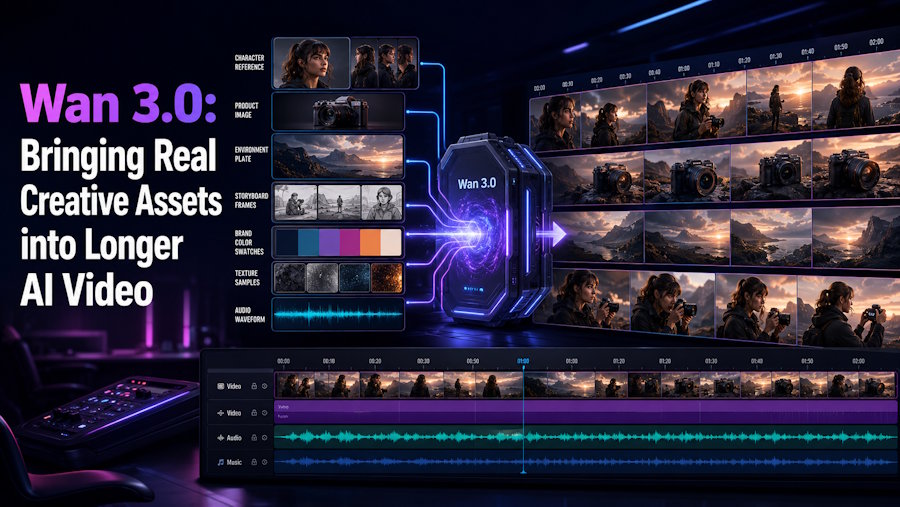
Reference-based generation is the part of Wan 3.0 that most closely resembles a creative brief. Wan 3.0 accepts reference images, video clips, audio clips, one file, or one public web link. The documentation allows up to 10 reference images, up to five reference videos, and up to five reference audio clips; each of the video and audio groups has a combined 15-second limit.
Consider a skincare launch: a packshot, a short motion clip for camera pace, a music reference, and a PDF with campaign language. Images establish objects and surfaces, video suggests movement, audio gives a rhythmic cue, and the file provides wider context. The prompt can then state the order of events.
Documents and public pages are useful for teams that already keep campaign information outside a prompt box. Wan 3.0 supports common presentation, document, spreadsheet, PDF, text, and Markdown formats, plus public web pages that do not require a login. A file or link can carry a product story or outline into the request. Reduce a long brief to the decisions that matter on screen: the central object, visual cues, action, and desired ending.
Creators who begin with a very large reference collection may also want to look at Seedance 2.5. ByteDance says its current model accepts up to 30 images, 10 video clips, and 10 audio clips in one generation. That is a nearby option for projects whose starting point is an extensive asset pack. Wan 3.0 keeps the focus here because its document and web-page inputs open a different route from a creative brief to a first video concept.
More Control Over First Frames, Final Frames, Characters, and Camera Direction
Some ideas begin with an image that must set the opening. Others depend on arriving at a particular final visual: a product on a clean background, a character at a destination, or a frame that leaves room for a brand message. Wan 3.0 exposes first-frame and first-and-last-frame modes for that purpose. The first-frame mode fixes the opening image. The first-and-last-frame mode gives the model a defined visual departure and arrival.
These modes ask creators to think in shots. If the opening frame is a close detail of a watch, the prompt can describe the hand movement, light change, and pull back to a wider setting. A chosen final frame makes the route toward it explicit. This can help with a product reveal, a location change, or the arc of a simple action.
Reference-based generation serves a different kind of control. Character images, product images, or style references can establish the cast and world of the piece. Strong briefs give each asset a clear role: a character reference for appearance, a product photo for the object, and a video reference for movement. The prompt supplies the relationship among them.
Camera direction benefits from the same clarity. Terms such as close-up, tracking shot, slow push-in, overhead view, or a move from medium shot to wide shot are useful when paired with the event the camera should observe. A first run can reveal whether the timing, visual emphasis, and motion language fit the concept. A second run with a tighter instruction helps a team compare choices without losing the core brief.
Native Audio, Video Editing, and Extension
Video begins to feel more like a scene when sound is considered from the start. Wan 3.0 includes audio in the generated output by default, and it can also accept reference audio. That gives creators a way to evaluate the relationship among ambience, speech direction, music cues, and movement in the same early version. Any dialogue, lyrics, brand claim, or detailed sound cue still needs close human review before use.
The public documentation also describes two paths for material that already exists. A reference video plus an instruction can be used for video editing, such as changing the setting or visual treatment. A source video can also be extended with a prompt that describes what should happen next. An agency might take an approved product movement and try a new environment for a pitch. Each pass needs a clear instruction and a careful viewing of the cut.
Where Wan 3.0 Fits in Brand, Advertising, and Content Creation
Wan 3.0 fits naturally into the stage when a team needs to make an idea visible. A brand team can turn a campaign deck, product imagery, and a few visual references into a short direction piece for internal discussion. An advertising team can test a product reveal, a mood, or a camera concept before committing resources to a larger shoot. A social creator can use a character image, a reference clip, and a concise scene description to explore a series format.
It also has a role in previsualisation. A director or producer can check the order of a short scene, then decide which details deserve a more controlled production step. A product marketer can see how copy, objects, gestures, and sound cues occupy the same piece of time. These are practical questions, and a 30-second test gives them somewhere to land.
The strongest way to approach the model is with a small, concrete brief. Choose the few assets that establish the idea, write the actions in their intended order, and review the output for the details that matter to the audience. Creators can bring that brief to this AI video generator website to experience how the idea reads as a short sequence.
Wan 3.0 matters because it invites more of the material around an idea into the first video pass. Longer duration, varied references, frame control, audio, editing, and extension give creators several ways to shape that pass. The most useful next step is simple: start with a real brief and see what it makes visible.

