

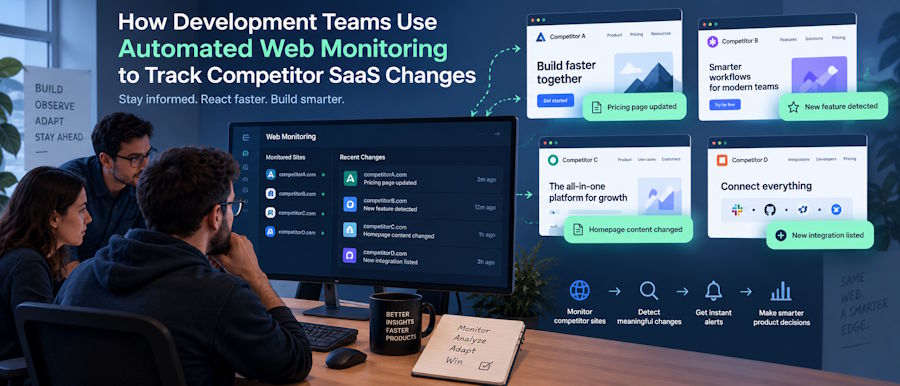
Software engineering teams, indie hackers, and SaaS founders do not just build in a vacuum anymore. They monitor the ecosystem. Competitor API endpoints change, pricing tiers shift, and new feature releases are often hinted at in public documentation or job postings long before the official changelog.
This article breaks down how development teams automate this tracking behind the scenes, why manual checking stops working once you monitor more than a handful of endpoints, and what "ethical" data collection really means when you are pulling information from web applications at scale. You will also see where a scraping browser fits into that pipeline and what to look for if your team is building this kind of system in-house.
Why Dev Teams Bother Tracking Competitor Infrastructure
Public data is a goldmine for technical strategy. A competitor updating their API rate limits or deprecating an endpoint is a direct signal about their scaling challenges.
Pricing page updates matter just as much. If a rival SaaS suddenly introduces a new enterprise tier or removes a free tier, that signals market demand and where their revenue model is heading.
Job postings are another technical signal. When a competing startup starts hiring heavily for Rust developers or specific AI infrastructure roles, it reveals their roadmap direction months before a product launch.
What Development Teams Are Actually Tracking
The monitoring usually falls into three technical buckets:
- Public API and Documentation Changes: Tracking diffs in Swagger/OpenAPI specs or documentation pages to spot deprecations or new capabilities.
- Pricing and Feature Pages: Monitoring DOM changes on pricing tables to detect new tiers, hidden usage limits, or removed features.
- GitHub and Tech Stack Signals: Watching public repositories for new dependency updates or infrastructure shifts that hint at architectural changes.
Why Manual Competitor Tracking Fails at Scale
Checking five competitor pricing pages by hand once a week is a reasonable task for a founder. It takes maybe 15 minutes.
The problem starts when an engineering team wants to track 50+ endpoints, across multiple environments, with daily or hourly frequency. Web pages update unpredictably. If nobody is running the check between visits, that data point is gone.
There is also a consistency problem. Two developers checking the same endpoint might interpret a UI change differently. Automated collection removes that variance because the same headless browser or HTTP client runs the exact same query every time.
The math is blunt. At even a modest hourly rate, a developer spending 5 hours a week on manual checks costs the company more per month than a fully automated, script-based monitoring setup, while delivering less frequent and less reliable data.
What "Ethically Sourced" Data Collection Actually Means for Developers
This phrase gets used loosely in the scraping community, so it is worth being specific. In web data collection, ethical sourcing generally covers three things.
First, only public data is collected, meaning information any visitor could see without bypassing authentication or paywalls. Second, the collection respects a site's published access terms (like robots.txt) and does not attempt to overwhelm servers with excessive, DDoS-like request rates.
Third, and this is the part most developers miss, the infrastructure used to collect that data should not rely on devices or bandwidth taken without the owner's consent. Many cheap proxy networks get their IP addresses from apps that quietly enrolled a device owner's connection without clear consent.
The Ethical Web Data Collection Initiative (EWDCI) was formed to set shared standards around consent, transparency, and responsible scraping practices across the proxy industry. Membership signals that a provider's network was built on properly disclosed, opt-in bandwidth sharing rather than gray-market sourcing. Providers like Evomi hold EWDCI membership, making it a clear signal to check before trusting a network with production traffic. Beyond compliance and reliability, cost predictability is also critical for scaling operations. Evomi prices by bandwidth, so a team can estimate a month's spend from its request volume before committing to a plan.
How to Build a Competitor Monitoring Pipeline
Here is a simplified, practical version of how an engineering team might build this, step by step.
Step 1: Define the target list. Pick the 10 to 20 competitor URLs or API endpoints that matter most. Trying to scrape everything from day one produces noise instead of actionable insights.
Step 2: Choose an extraction method. Some teams write custom scripts using Python's requests library paired with BeautifulSoup or lxml. For JavaScript-heavy single-page applications (SPAs), tools like Playwright or Puppeteer are necessary. Alternatively, ready-built data extraction tools can shorten setup from weeks to days. A useful comparison of current options sits in this roundup of data extraction tools, which breaks down strengths across scraping frameworks, browser automation, and no-code platforms.
Step 3: Route requests through a proxy layer. Modern web applications protected by Cloudflare or Akamai will rate-limit or block repeated requests coming from a single datacenter IP address. Rotating your requests through a residential or specialized scraping network keeps your collection running without tripping WAF (Web Application Firewall) rules.
Step 4: Schedule the pulls. Use GitHub Actions, cron jobs, or a task queue like Celery. Daily pulls for pricing data and weekly pulls for documentation diffs usually strike the right balance between freshness and server load.
Step 5: Store and compare. Pipe the structured output into a lightweight database (like PostgreSQL or SQLite) or a version-controlled JSON file. The value is in the git diff or database trend line, not any single day's snapshot.
Where Does a Proxy Provider Fit Into This Picture?
The proxy layer is the part many tutorials skip, yet it is often the difference between a tracking system that runs reliably and one that gets HTTP 403 Forbidden within a week.
A good provider needs three things for this use case: a genuinely large and diverse IP pool, strong uptime so scheduled cron jobs do not silently fail, and responsive support for when a target site updates its anti-bot challenge and your setup needs adjusting fast.
For teams building headless browser automation, partnering with a reliable Swiss proxy provider that offers a dedicated scraping browser gives your Playwright or Puppeteer scripts a stable, ethically sourced network to run on, backed by strict data governance and ISO 27001 certification. That combination gives engineering and legal teams a solid paper trail to point to if anyone ever asks how the data was collected.
What Should You Watch Out For?
A few mistakes come up repeatedly when teams build this in-house.
Pulling too aggressively is the most common one. Hitting an endpoint every few seconds instead of every few hours invites immediate IP bans. Slower, steady collection with randomized delays almost always outperforms an aggressive burst approach.
Ignoring data hygiene is the second. Without clear naming conventions, consistent timestamps, and structured JSON output, a growing dataset turns into a mess that nobody trusts within a few months.
Skipping the proxy layer entirely is the third. Some teams start with direct requests from their office or CI/CD pipeline IP address, which works for a week and then gets permanently blacklisted, sometimes taking down the whole team's access to that developer portal.
Frequently Asked Questions
Is it legal to monitor a competitor's public pricing or documentation?
Generally yes, since this is public information visible to anyone browsing the web. The legal risk usually comes from how data is collected, such as bypassing authentication or ignoring robots.txt, not from the fact that it is being collected.
How often should web data actually be refreshed?
Daily is standard for pricing or inventory pages. Weekly refreshes work well for slower-moving metrics like documentation updates or job postings.
What is the difference between residential proxies and a scraping browser for this work?
Residential proxies route requests through real home internet connections to avoid IP reputation blocks. A scraping browser goes a step further, providing a pre-configured, fingerprint-matched browser environment that handles TLS fingerprinting and JavaScript challenges automatically, making it ideal for heavily protected sites.
Do small indie projects need this, or is it only for large teams?
Even a solo developer building a micro-SaaS benefits from tracking two or three direct competitors closely. The setup does not need to be complex at that scale; a simple weekly GitHub Action script can capture most of the value without heavy infrastructure.
What does EWDCI membership actually verify?
It signals that a proxy provider's network follows agreed standards around consent, transparency, and responsible data collection practices. It is a meaningful signal when comparing infrastructure providers.
How much does a basic monitoring setup cost to run each month?
Costs vary by scale, but a small competitor-tracking project covering 10 to 20 endpoints typically runs proxy and tooling costs in the range of a modest monthly subscription, well below the cost of the developer hours it replaces.

