

Introduction
For creators exploring Seedance 2.5, choosing the right platform is almost as important as choosing the model itself. Seedance 2.5 is available through different websites, and each one adds its own pricing system, editing tools, model selection, output options, and production workflow.
The model generally supports longer single-pass video generation, multimodal references, localized editing, and synchronized audio. However, the actual experience depends on how each platform packages those capabilities. Some services focus on simple browser-based generation, while others are designed for APIs, team production, stock assets, character development, or social media content.
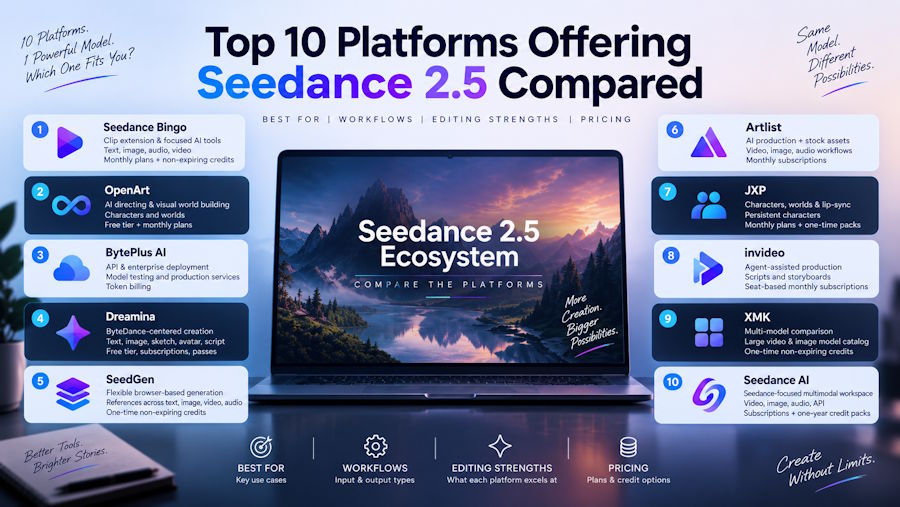
This article compares ten platforms that provide access to Seedance 2.5. The comparison is based on the supplied platform information and focuses on workflow, creative control, editing, pricing structure, and practical use cases.
How We Test
We compare the platforms using five criteria:
- Access and workflow: How Seedance 2.5 is provided and whether the service supports text, image, video, or audio references.
- Creative control: Reference capacity, camera direction, character consistency, prompting, and scene planning.
- Editing features: Extension, local editing, inpainting, storyboarding, timeline editing, and related controls.
- Output options: Resolution, duration, aspect ratios, audio, and export formats.
- Pricing and suitability: Credit structure, subscriptions, licensing, and the type of user each platform is designed for.
TL;DR
| Platform | Main Strength | Creative Workflow | Editing & Control | Pricing Structure |
|---|---|---|---|---|
| Seedance Bingo | Clip extension and focused AI tools | Text, image, audio, and video workflows | Prompt-guided extension and chained passes | Monthly plans and non-expiring credit packs |
| OpenArt | AI directing and visual world building | Text-to-video, image-to-video, characters, and worlds | Inpainting, relighting, restyling, and Smart Shot | Free tier and monthly plans |
| BytePlus AI | API and enterprise deployment | Model testing, APIs, and production services | Deployment and localized editing workflows | Token billing and three-month resource plans |
| Dreamina | ByteDance-centered creation | Text, image, sketch, avatar, and script workflows | R2V motion control and region editing | Free tier, subscriptions, and passes |
| SeedGen | Flexible browser-based generation | Text, image, video, and audio references | Clip extension and region editing | One-time, non-expiring credit packs |
| Artlist | AI production plus stock assets | Video, image, audio, and reusable workflows | Draft mode, extensions, and timeline-related tools | Monthly subscriptions |
| JXP | Characters, worlds, and lip-sync | Video, image, reference, avatar, and social workflows | Persistent characters and local editing | Monthly plans and one-time packs |
| invideo | Agent-assisted production | Natural-language creation, scripts, and storyboards | Multitrack timeline and region editing | Seat-based monthly subscriptions |
| XMK | Multi-model comparison | Large video and image model catalog | Local redraw and upscaling | One-time, non-expiring credits |
| Seedance AI | Seedance-focused multimodal workspace | Video, image, audio, and API workflows | Reference, Extend, and Edit modes | Subscriptions and one-year credit packs |
Website List
1. Seedance Bingo
What Is
Seedance Bingo is a browser-based AI creative workspace offering video, image, and audio tools. It provides access to Seedance 2.5 alongside specialized utilities for extending, enhancing, and transforming video content.
Seedance 2.5 is presented as a multimodal model for continuous clips, large reference stacks, synchronized audio, and improved prompt adherence. The platform also highlights a dedicated extension workflow for creators working with existing footage.
Features
The most distinctive tool is the AI video extender. It accepts MP4 or MOV clips up to 15 seconds and 50MB, then extends them by 4–10 seconds per pass. Users can guide the continuation with text or allow the system to continue the scene automatically.
- Prompt-guided and prompt-free extension modes
- Motion and visual continuity controls
- Synchronized ambient-audio extension
- Live credit-cost preview
- Chained extension passes for longer shots
The platform also provides tools such as Music Visualizer and Unblur Video. Seedance 2.5 is described as supporting up to 30-second single-shot generation, up to 50 references, native synchronized audio, and output options reaching 4K according to the supplied information.
Pricing
Seedance Bingo offers monthly subscriptions and non-expiring top-up packs. Monthly plans include Starter at $29.90 for 800 credits, Pro at $49.90 for 1,600 credits, Max at $99.90 for 4,000 credits, and Ultra at $199.90 for 10,000 credits.
Annual-equivalent pricing ranges from $19.90 to $149.90 per month. Subscription plans include watermark-free exports and private generation. Commercial licensing is included with Pro, Max, and Ultra, but not Starter.
One-time packs range from $39.90 for 1,000 credits to $4,999.90 for 300,000 credits. Top-up credits do not expire.
Pros & Cons
Pros
- Dedicated video-extension workflow
- Prompt-guided and automatic continuation
- Audio extension and live credit previews
- Multiple creative tools in one workspace
- Non-expiring top-up credits
Cons
- Source clips for the extender are limited to 15 seconds and 50MB
- Commercial licensing is not included with Starter
- Seedance 2.5 pricing is listed as pending
- Subscription plans may be more than occasional users need
Best for
Seedance Bingo is a practical option for creators who already have footage and want to extend or refine it. It may also suit users who prefer a focused creative platform with separate video, image, audio, and enhancement tools.
2. OpenArt
What Is
OpenArt is a browser-based AI creation platform that combines video, image, character, 3D world, and audio generation. Seedance 2.5 is available as one of several video models in its unified workspace.
Features
OpenArt Director provides conversational storyboarding and multi-scene planning. Users can describe a project naturally while shaping scenes, camera angles, and narrative structure.
- Text-to-video and image-to-video generation
- Consistent Character Builder
- Persistent 3D world generation
- Video inpainting, relighting, and restyling
- Smart Shot and Motion Sync tools
Seedance 2.5 is described as supporting 30-second single-pass clips, up to 50 multimodal references, synchronized audio, region-level editing, and 480p–1080p outputs. OpenArt’s broader video system supports resolutions up to 4K, but the supplied Seedance 2.5 information lists up to 1080p.
Pricing
OpenArt has a free plan with daily credits. Paid plans include Starter at $14 per month, Plus at $34, Pro at $56, and Wonder at $240. Annual-equivalent prices range from $13 to $175 per seat per month.
Monthly credits range from 4,000 on Starter to 106,000 on Wonder. Plus and higher plans include commercial usage rights, while higher tiers add more parallel generations, characters, and priority support.
Pros & Cons
Pros
- Conversational AI video director
- Character and 3D world tools
- Broad image, video, and audio model access
- Integrated visual effects and editing
- Commercial rights on Plus and higher plans
Cons
- Seedance 2.5 output is listed up to 1080p
- OpenArt Director generations are excluded from some video allowances
- Commercial rights are not listed for Starter
- The feature range may be excessive for simple video generation
Best for
OpenArt is suited to creators developing multi-scene stories, recurring characters, fantasy environments, or projects requiring inpainting and visual effects.
3. BytePlus AI
What Is
BytePlus AI is an enterprise AI ecosystem that includes APIs, model deployment tools, testing environments, and specialized platforms. Its Seedance 2.5 offering is connected with Dreamina and the broader ByteDance AI model ecosystem.
Features
BytePlus AI is centered on technical access rather than a simple consumer video interface. ModelArk provides tools for model deployment, API management, and testing.
- API-based Seedance 2.5 integration
- Model deployment and testing
- Enterprise production workflows
- Localized in-video editing
- Access to related ByteDance models such as Seedream and Seed Speech
Dreamina Seedance 2.5 is described as supporting 30-second clips, up to 50 multimodal references, 4–30 second durations, 480P–1080P resolutions, and MP4 or MOV exports at 24 FPS.
Pricing
Dreamina Seedance 2.5 API usage is listed at $6.4 per million tokens with video input and $10.7 per million tokens without video input.
Resource plans are valid for three months:
- Light: $32 for 5 million tokens
- Production: $64 for 10 million tokens
- Premium: $640 for 100 million tokens
When the resource plan is exhausted, usage returns to pay-as-you-go billing. The resource packages are non-refundable.
Pros & Cons
Pros
- Designed for APIs and enterprise integration
- Includes model deployment and testing tools
- Token-based pricing can support scalable usage
- Access to several ByteDance AI services
- Suitable for industrial and commercial applications
Cons
- Token pricing requires more planning
- Resource plans expire after three months
- Packages are non-refundable
- Less suitable for users seeking a simple consumer interface
Best for
BytePlus AI is intended for developers, production teams, and companies that need programmatic access, deployment controls, and integration with other AI services.
4. Dreamina
What Is
Dreamina is a ByteDance and CapCut-related AI creation platform for video, image, and digital-avatar production. Seedance 2.5 is hosted natively within the platform.
Features
Dreamina supports several creation workflows, including text-to-video, image-to-video, sketch-to-video, script-to-video, and specialized formats such as promotional videos, dance clips, and short dramas.
- Reference-to-video motion control
- Green-screen, white-model, and reference-video guidance
- Targeted region editing
- Digital avatars and lip-sync
- Long-video extension in beta
Seedance 2.5 is described as generating native 30-second clips, supporting up to 50 multimodal inputs, producing clean 4K output, and extending sequences up to 180 seconds in beta long-video mode.
Pricing
Dreamina offers a free tier with daily bonus credits. Paid plans include Basic at $15 monthly, Standard at $36, and Advanced at $79.
Annual-equivalent prices are listed as $14, $34.17, and $75 per month. The plans provide 1,575, 3,885, and 8,645 monthly credits respectively. A one-month pass is also available for each paid tier.
Paid subscriptions remove watermarks, increase resolution, support up to 60 FPS, enable lip-sync audio, and provide faster queues.
Pros & Cons
Pros
- Native ByteDance creation environment
- Strong reference-to-video and motion workflows
- Integrated avatar and script tools
- Region-level editing
- 4K and beta long-video capabilities
Cons
- Some extended-duration functions are still marked beta
- Paid plans are needed for watermark removal
- Credit use varies across the platform’s tools
- The many creation modules may require a learning period
Best for
Dreamina is a good fit for creators who want Seedance 2.5 together with ByteDance-oriented image, avatar, script, and specialized video tools.
5. SeedGen
What Is
SeedGen is a browser-based video creation service powered by several generative engines, including Seedance 2.5, Seedance 2.0, and Wan 3.0.
Features
The platform supports text-to-video, image-to-video, and multimodal workflows. Users can combine text prompts with images, video clips, and audio tracks.
- Cinematic camera-path controls
- Physics-oriented generation
- Clip extension
- Targeted editing
- Native synchronized audio and voiceovers
Seedance 2.5 is described as offering continuous 30-second shots, up to 50 references, region-level editing, and 480p, 720p, and 1080p outputs. Supported exports include 16:9, 9:16, and 1:1 formats.
Pricing
SeedGen uses one-time credit packs rather than subscriptions:
- Starter: $10 for 300 credits
- Creator: $30 for 1,000 credits
- Pro: $99.90 for 3,500 credits
Credits do not expire and can be used across supported Seedance and Wan models. New accounts receive trial credits, and commercial use is included subject to platform terms.
The platform lists a seven-day refund policy for purchases where less than 20% of the credits have been consumed.
Pros & Cons
Pros
- No monthly commitment
- Credits do not expire
- Supports several Seedance and Wan models
- Includes extension and targeted editing
- Commercial usage is included in listed packs
Cons
- The highest listed Seedance 2.5 output is 1080p
- Credit costs vary by model and workflow
- Generated works remain in the account library for six months
- Fewer subscription options are available for heavy users
Best for
SeedGen may appeal to users who prefer one-time credits and want a straightforward browser workflow with access to several video models.
6. Artlist
What Is
Artlist is a creative platform and stock-media library that combines AI video, image, voiceover, and music generation. Seedance 2.5 is available within its AI Toolkit.
Features
Artlist provides access to more than 100 AI models and includes production tools beyond basic generation.
- AI Agent and Auto-Prompt
- Storyboarding, casting, and location planning
- Text-to-video, image-to-video, and audio-to-video
- Reusable Artlist Flows
- A library of more than 900,000 royalty-free assets
Seedance 2.5 is described as supporting 30-second clips, up to 50 multimodal references, synchronized audio, region-based editing, clip extension, and draft mode. The supplied information lists 480p, 720p, and 1080p output for Seedance 2.5.
Pricing
Artlist uses monthly credit subscriptions with annual discounts. Plans include:
- AI Starter: $11.99 annually billed monthly or $19.99 monthly
- AI Core: $23.99 annually billed monthly or $39.99 monthly
- AI Creator: $41.67 annually billed monthly or $69.99 monthly
Monthly credit allocations range from 16,500 to 80,000. Custom business and enterprise pricing is available.
Commercial rights are included, and higher plans offer unlimited generations on selected models with additional fast-generation allowances.
Pros & Cons
Pros
- Combines AI generation with stock media
- Includes production and workflow tools
- Commercial rights are included
- Offers AI Agent and Auto-Prompt features
- Uploaded inputs are not used to train AI models
Cons
- Credits are shared across multiple asset types
- Seedance 2.5 is listed up to 1080p
- The subscription may be unnecessary for video-only users
- Usage varies depending on the selected model
Best for
Artlist is suited to agencies, marketers, and video professionals who need AI generation together with music, sound effects, footage, templates, and licensing support.
7. JXP AI
What Is
JXP is an all-in-one AI creation suite built around video, image, character, world, and avatar lip-sync workflows. Seedance 2.5 is included in its multi-model video catalog.
Features
JXP’s main tools cover:
- Text-to-video, image-to-video, and reference-to-video
- Persistent AI characters
- AI-generated visual worlds
- Avatar lip-sync
- Motion and dance templates
Seedance 2.5 is described as supporting 30-second clips, up to 50 references, local editing, 480p–1080p output, and 16:9, 9:16, and 1:1 formats. The platform also provides second-level control over action beats, lighting, and camera movement.
Pricing
One-time packs include Starter at $10 for 100 credits, Premium at $30 for 330 credits, and Ultimate at $99 for 1,211 credits.
Monthly plans provide 20% more credits: Starter offers 120 credits for $10 per month, Premium offers 396 credits for $30, and Ultimate offers 1,453 credits for $99.
Credits do not expire, monthly credits stack, and commercial licensing is included from the listed Starter tier.
Pros & Cons
Pros
- Strong character and world-building tools
- Includes avatar lip-sync and social templates
- Credits do not expire
- Monthly credits stack
- Commercial license is available on listed plans
Cons
- Seedance 2.5 output is listed up to 1080p
- Advanced features require higher tiers
- Credit use changes with duration and resolution
- Users seeking only video generation may not need every module
Best for
JXP is suitable for social creators, storytellers, and character-based projects that require video, environments, avatars, and recurring visual identities.
8. invideo
What Is
invideo combines AI video generation with Agent Two, scriptwriting, storyboarding, collaboration, and multitrack timeline editing. Seedance 2.5 is available on selected paid plans.
Features
Users can direct Agent Two using natural language instead of writing detailed technical prompts. The platform also supports custom agents for creative roles such as cinematography, sound, and color.
- AI scriptwriting and storyboard creation
- Full multitrack timeline editing
- Real-time collaboration
- 3D white-model composition
- Localized region editing
Seedance 2.5 is described as generating continuous 30-second scenes, accepting up to 50 references, producing native audio, and supporting direct editing of selected regions.
Pricing
invideo uses seat-based monthly or annual subscriptions. The entry plan starts at around $20 per seat monthly, while higher plans include Plus or Pro at approximately $50–$60 and Max or Ultra at approximately $100–$150, depending on billing.
Seedance 2.5 is available on Plus/Pro and Max/Ultra plans. A five-second 1080p Seedance 2.5 clip is listed at approximately 50 credits. Manual and agent-assisted timeline editing costs zero credits.
Pros & Cons
Pros
- Natural-language agent workflow
- Script-to-storyboard support
- Full multitrack editor
- Real-time team collaboration
- Seedance 2.5 support on higher tiers
Cons
- Entry plans do not include Seedance 2.5
- Credits reset monthly
- Seat-based pricing may not suit occasional solo users
- Some advanced features are plan-dependent
Best for
invideo is designed for teams and creators who want to manage scripting, generation, collaboration, and post-production within one environment.
9. XMK
What Is
XMK is a multi-model AI media workspace for generating images and videos. It includes Seedance 2.5 alongside models from ByteDance, Google, Wan, Kling, MiniMax, and other providers.
Features
XMK’s main advantage is model variety. Users can compare multiple video and image models through one interface.
- Large video and image model catalog
- Seedance 2.5 reference workflows
- Local redraw editing
- Video extension
- 2K and 4K upscaling on higher tiers
Seedance 2.5 is described as supporting 30-second single-pass clips, up to 50 references, native 1080p, 10-bit color, improved prompt adherence, and local editing. XMK lists upscaling rather than native 2K or 4K Seedance 2.5 generation on higher plans.
Pricing
XMK uses one-time credit purchases:
- Base: $9.90 for 990 credits
- Pro: $29.90 for 3,300 credits
- Ultimate: $49.90 for 5,700 credits
- Creator: $99.90 for 13,000 credits
Credits do not expire. The platform estimates that 100 credits can cover a five-second 480p Seedance 2.5 clip without video input, while reference inputs and higher resolutions increase the cost.
Pros & Cons
Pros
- Extensive model selection
- One-time non-expiring credits
- Local redraw and extension tools
- Higher-tier upscaling
- Commercial rights for paid users
Cons
- Native Seedance 2.5 output is listed up to 1080p
- Higher resolutions depend on upscaling
- Free files are retained for only 15 days
- Upstream content restrictions may affect generation
Best for
XMK is appropriate for creators who want to compare many AI models and use a flexible one-time credit system with optional upscaling.
10. Seedance AI
What Is
Seedance AI, operated through seedance2ai.io, is an independent web platform and API workspace offering third-party video, image, and audio models.
Features
The platform supports Seedance 2.5 together with Seedance 2.0, Kling, Veo, Wan, MinMax, GPT Image, Seedream, Nano Banana, and AI Music.
- Multimodal prompts using text, images, video, and audio
- Standard, Real, and Wild generation modes
- Clip extension and scene bridging
- Targeted segment editing
- Smart aspect-ratio detection
Seedance 2.5 is described as supporting 30-second generation, up to 50 references, native 4K, co-processed audio, and Reference, Extend, and Edit modes.
Pricing
Seedance AI has a free tier, annual subscriptions, and one-time credit packs. Annual plans include Basic at $14.90 monthly, Standard at $24.90, Pro at $49.90, and Max at $99.90.
Seedance 2.5 is available on Standard, Pro, and Max. One-time packs range from $3.99 for 200 credits to $2,499 for 180,000 credits. These credits remain valid for one year.
Paid plans include commercial licensing, private generations, priority rendering, and expanded storage.
Pros & Cons
Pros
- Native 4K option
- Reference, Extend, and Edit modes
- Broad aspect-ratio support
- Multiple generation modes
- API access and commercial licensing on paid plans
Cons
- One-time credits expire after one year
- Seedance 2.5 is unavailable on the Basic plan
- Free usage is limited
- The service is operated independently from ByteDance
Best for
Seedance AI may suit users who want a Seedance-oriented workspace with multimodal creation, extension, editing, and API-related capabilities.
Key Takeaways
- Platforms differ mainly in the workflow surrounding Seedance 2.5, not just in model access.
- Seedance Bingo focuses on clip extension and specialized creative tools.
- Dreamina and BytePlus AI are more closely connected to ByteDance-oriented workflows.
- OpenArt, JXP, Artlist, and invideo add broader production features such as characters, stock assets, agents, or collaboration.
- SeedGen and XMK use non-expiring one-time credits, while other services rely more heavily on subscriptions or token billing.
Conclusion
The ten platforms provide different ways to work with Seedance 2.5. Seedance Bingo is centered on video extension and focused AI creation tools. SeedGen and XMK emphasize flexible credit access, while Seedance AI adds multiple generation modes and API-related features.
Dreamina offers a ByteDance-centered creative environment, and BytePlus AI is designed for developers and enterprise users. OpenArt and JXP expand the workflow into characters, worlds, and visual effects. Artlist adds stock media and licensing, while invideo connects Seedance 2.5 with agents, scripts, collaboration, and timeline editing.
The right platform depends on the complete workflow. Before choosing, users should compare resolution, reference limits, editing tools, credit expiration, commercial licensing, and whether they need browser creation, team production, stock assets, or API integration.

