

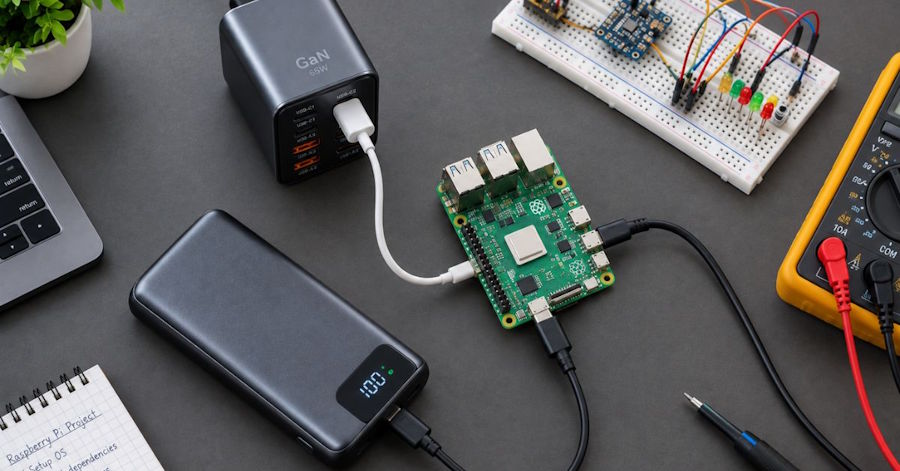
Anyone who's spent time building with Raspberry Pi, ESP32, or Arduino-based projects has run into it eventually: a board that reboots randomly under load, a peripheral that drops out the moment a second USB device gets plugged in, or the small lightning-bolt icon in the corner of a Pi's display quietly warning about undervoltage. Debugging usually starts at the code. It should start at the power supply.
Power delivery is the part nobody debugs first
Software bugs get attention because they're visible in a stack trace. Power issues don't announce themselves the same way — a board under-powered by even half a volt can behave inconsistently rather than failing outright, which makes it look like a software or wiring problem long before anyone checks the power source itself. This is especially common with the Raspberry Pi 4 and later, where power draw under load is high enough that a phone charger rated "5V" on the label frequently can't sustain the current a full load actually pulls once a display, USB peripherals, and Wi-Fi are all active at once.
The fix isn't complicated once identified: check the current rating, not just voltage, and don't assume any USB-A or USB-C charger is equivalent to any other.
USB-C PD isn't automatically compatible with every board
USB-C Power Delivery (PD) is a negotiated protocol — the charger and the device communicate to agree on a voltage and current profile, rather than the device simply drawing whatever the port supplies. This matters for hardware projects because a board expecting a fixed 5V/3A profile can behave unpredictably when connected to a PD charger that defaults to a different voltage before negotiation completes, or that doesn't support the specific profile the board requests. Some single-board computers handle this negotiation cleanly; others, particularly older revisions or lower-cost dev boards, don't implement the negotiation logic at all and expect a simpler, fixed-voltage supply.
Checking a charger's supported PD profiles against a board's documented requirements takes a few minutes and avoids an entire category of "it works sometimes" bugs that are genuinely painful to trace back to power.
Field-deployed projects need a power bank that behaves like a power supply, not a phone charger
Projects that leave the desk — remote sensors, mobile robotics platforms, weather stations, anything running away from a wall outlet — need battery power that maintains stable output under variable, sometimes spiky current draw. This is a different requirement than phone charging, where load is comparatively steady and predictable.
A few things matter more here than raw capacity: consistent output voltage as the battery depletes (not all power banks maintain this equally well near the low end of their charge), no automatic shutoff triggered by "low current draw" detection (a known issue with power banks designed for phones, where a Pi drawing a small idle current can trigger the bank into thinking nothing is connected), and physical durability if the deployment involves any vibration or outdoor exposure. Zesan Enterprise's power bank lineup includes models across this range, with wattage and output specs listed per model for anyone matching a power source against a specific board's current draw rather than guessing.
A dev workstation has its own power problem: too many devices, not enough ports
The other common scenario isn't a field deployment — it's a desk running a laptop, a Pi for testing, a couple of dev boards being flashed simultaneously, and a phone, all competing for a limited number of outlets and USB ports. This is where GaN (gallium nitride) charging technology has become genuinely useful for hardware development specifically, rather than just a marketing term: a single compact multi-port GaN charger can now deliver enough combined wattage to charge a laptop and simultaneously power two or three dev boards, replacing what used to require several separate wall adapters competing for space.
The detail worth checking before buying one for this use case: total wattage output when all ports are active at once, not just the maximum wattage on a single port. Many multi-port chargers advertise an impressive peak wattage that only applies when a single port is in use, and drop significantly once multiple ports draw power simultaneously — exactly the scenario a dev workstation creates constantly. Zesan Enterprise's adapters and cables selection lists current GaN chargers with their per-port and combined wattage specs, which is the figure that matters most for this use case.
The failure modes that show up in practice
A few patterns come up repeatedly in hobbyist and prototype builds specifically because of power, rather than code:
Random reboots under load that don't reproduce consistently almost always trace back to a supply that can't sustain peak current draw, even if it handles idle draw fine. Peripherals that work individually but fail when combined (a display plus a USB drive plus Wi-Fi, for example) point to the same root cause — the supply meets steady-state requirements but not the combined peak. And boards that behave differently across chargers labeled with the same voltage and amperage rating usually come down to PD negotiation differences that the label doesn't capture at all.
None of these are exotic problems. They're common enough that checking the power supply early, before spending hours debugging code or wiring, is usually the faster path to a working project.
A quick checklist before blaming the code
Before assuming a bug is in software: confirm the charger's sustained current rating matches or exceeds the board's peak draw under full load, not just its idle draw. Check whether the board expects a fixed-voltage supply or negotiates via PD, and match the charger accordingly. For battery-powered deployments, verify the power bank doesn't auto-shutoff under low, steady current draw. And when running multiple devices from one multi-port charger, check the combined-port wattage rating rather than the single-port maximum advertised on the box.
Power delivery isn't the interesting part of a hardware project, and it rarely gets mentioned in build logs or tutorials. But it's the layer everything else depends on, and it's worth ruling out first — before software, before wiring, before anything more time-consuming to debug.

