

You have just moved a website to a new server. You changed the A/AAAA record, and everything looks fine. But how do you know that DNS servers around the world are seeing the new address?
This is where a DNS propagation checker can help. Instead of checking one DNS server from your computer, it checks many servers in different places.
We tested WhatsMyDNS.me to see how well it does this job and what else it has to offer. Let’s begin.
What Is WhatsMyDNS.me?
WhatsMyDNS.me is an online DNS checking utility. It offers two main tools: a DNS propagation checker and a DNS lookup tool.
Using The Propagation Checker
You can use the propagation checker simply by following these steps:
- Enter a domain,
- Choose a record type,
And it checks the domain through DNS servers in different locations.
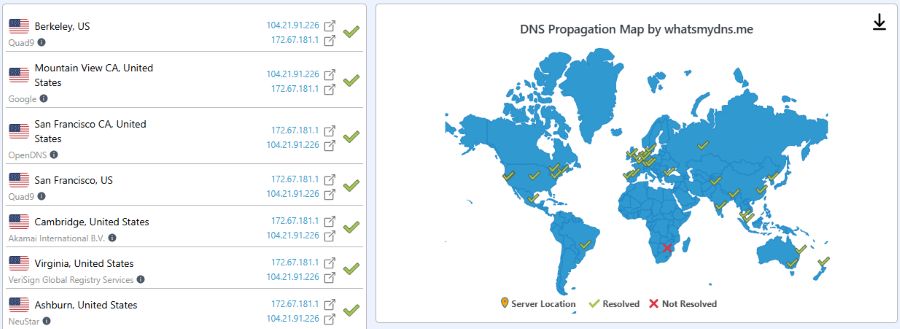
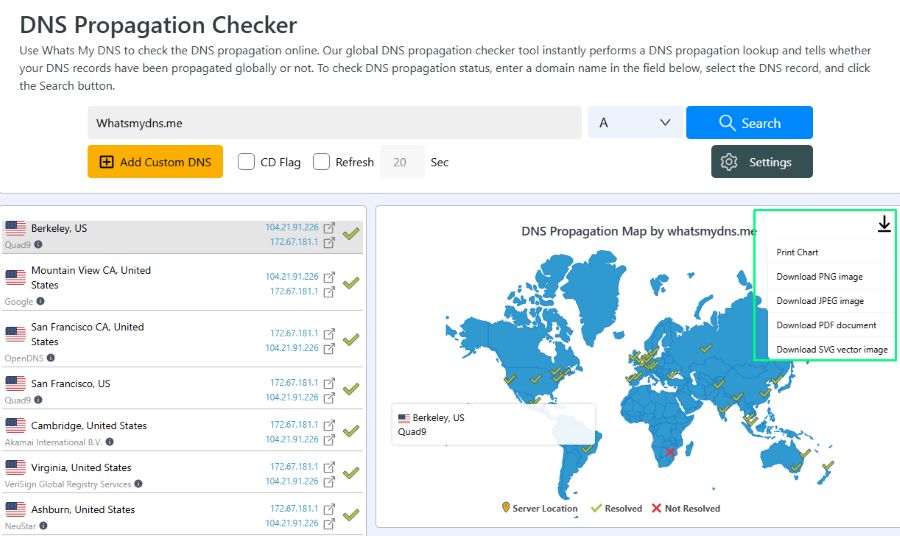
The results show:
- location,
- DNS provider,
- server IP,
- returned value,
- status.
A green check means the lookup worked. A red cross means the server did not return a result.
This is different from a normal DNS lookup.
For example, you can run this dig command in a Linux terminal:
dig example.com A
It shows the answer from the DNS resolver being used by your computer/device.
A propagation checker takes a much wider view. It checks many DNS servers and lets you see if they are all getting the same result.
That makes it useful after changing DNS records, moving a website, changing nameservers, or adding a TXT record, etc.
Using the DNS Lookup Tool
The basic process is simple. First, you go to the DNS Lookup tool, then you enter your domain, choose the record type, and start the search.
The results appear in a list and on a map. Each result shows where the DNS server is located and what it returned.
WhatsMyDNS.me supports a wide range of DNS records:
- A
- AAAA
- CNAME
- MX
- NS
- PTR
- SRV
- SOA
- TXT
- CAA
- DS
- DNSKEY
This is a useful list for developers because they are not limited to checking the main A record.
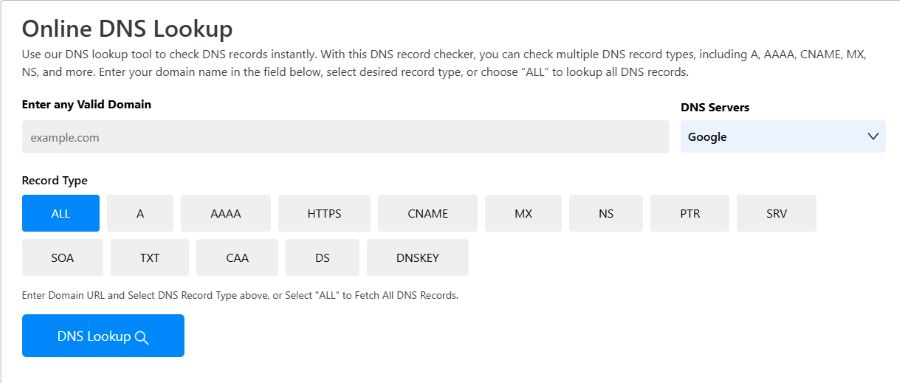
So, you can check MX records for email, TXT records for verification, CAA records for certificate settings, and DS and DNSKEY records when working with DNSSEC.
The checker is free and does not require an account. That makes it handy when you just need a quick DNS lookup.
Propagation Checker Unique Features
The propagation checker has some unique features of its own that warrant discussion. Here’s their breakdown.
Checking an Expected Value
One of the most useful features is the Expected Value option.
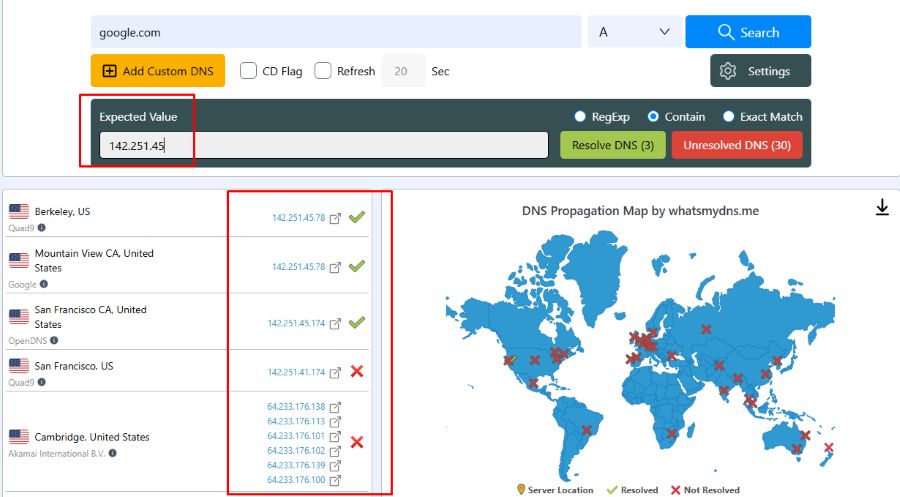
Let's say you moved a website to a new server. Suppose its A record should now point to:
198.51.100.25
Normally, you would need to look through the results and check which servers show that address.
With the expected-value option, you can enter the new IP address. The tool then helps you see which DNS servers are returning the value you expect.
This can save time during a website migration.
It also gives you a better answer than simply asking whether the domain resolves. A domain may resolve correctly but still point to the old server.
For simple websites (without CDNs and Load Balancers) where every DNS server should return the same IP, this feature is especially useful.
Adding a Custom DNS Server
WhatsMyDNS.me also lets you add a custom DNS server for testing.
You can enter its name and IP address. There are also fields for the provider and location.
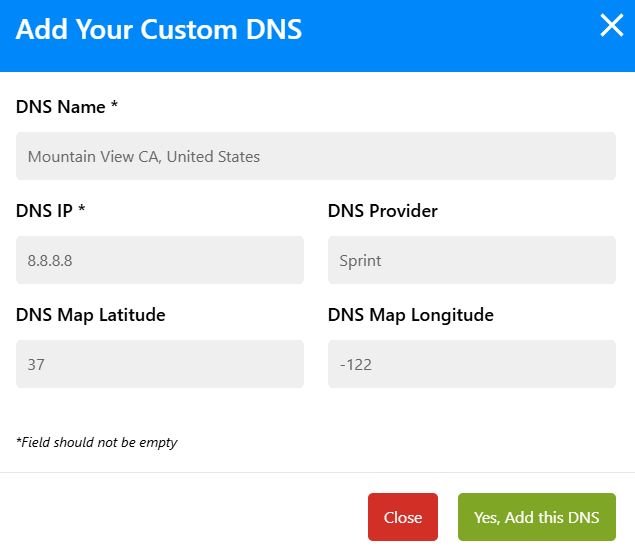
This is useful if you want to test a DNS server that is not already in the site's list. Or if you want to test a specific server only.
The location fields are a little awkward. If you only want to test a server, having to enter map details feels like extra work. Thankfully, they are not necessary, and the feature works without them as well.
So, the feature can be useful for developers who need to check a regional, ISP, or DNS server.
Map and Export Options
The map gives you a quick way to see where the DNS results are coming from. The list below it gives you the details.
You can also export the results as PNG, JPEG, PDF, or SVG. There is also a print option.
These features are not needed for a basic DNS check, but they can help when you need to share results with a client or another developer.
For example, you could export the results after a server move and keep them as part of your migration notes.
Are the Results Accurate?
A useful DNS review should not stop at the green and red icons. You can also check the results yourself with dig.
For example:
dig @8.8.8.8 example.com A
This asks Google's DNS resolver (8.8.8.8) for the A record.
You can then compare its answer with the result shown by WhatsMyDNS.me.
You can test another resolver too:
dig @1.1.1.1 example.com A
If you are investigating a DNS change, you can also ask the authoritative nameserver:
dig @ns1.example.com example.com A
For a fair test, use the same domain, record type, and DNS server. Otherwise, you may end up comparing different things.
Different Results Can Be Normal
There is also an important point about different IP addresses.
Suppose WhatsMyDNS.me shows one IP in one country and another IP somewhere else. That does not always mean something is wrong.
CDNs and other large hosting systems can return different IP addresses based on the user's location. Load balancing can do the same thing.
So, different results can sometimes be expected.
The same applies when you compare WhatsMyDNS.me with a local dig command. The website is using its own DNS servers. Your computer may be using your ISP's resolver, which could have a different cached answer.
That does not mean either result is wrong.
The Downsides
WhatsMyDNS.me has some limits.
First, it is a manual checker, not a monitoring service. You run a check when you need one. It does not provide continuous monitoring or alerts when a DNS record changes.
Its list of DNS servers also contains smaller third-party and regional servers. This gives you more variety, but it also means that a server can sometimes fail to respond. A red result does not always mean that your DNS settings are broken. The DNS server itself could simply be unavailable.
It is also somewhat finicky. You often need to clear the cache and site data before it works properly.
Finally, there are ads on the site. They are not unusual for a free tool, but they do make the page feel a little busier. Thankfully, they are not intrusive either.
Verdict
WhatsMyDNS.me is a useful free tool for checking DNS changes from different locations.
One of its best features is the Expected Value check. This is especially helpful when moving a website because you can quickly see which servers are returning the new IP address.
The wide range of DNS records is another strong point. Custom DNS servers, the map, and export options also make the tool useful for developers and sysadmins.
Just remember that a propagation checker is not the final word on a DNS problem. A red result does not always mean your DNS is broken, and different IP addresses do not always mean propagation has failed.
So, for quick DNS checks, migration monitoring, and troubleshooting, WhatsMyDNS.me is a handy tool to have in your browser.

