

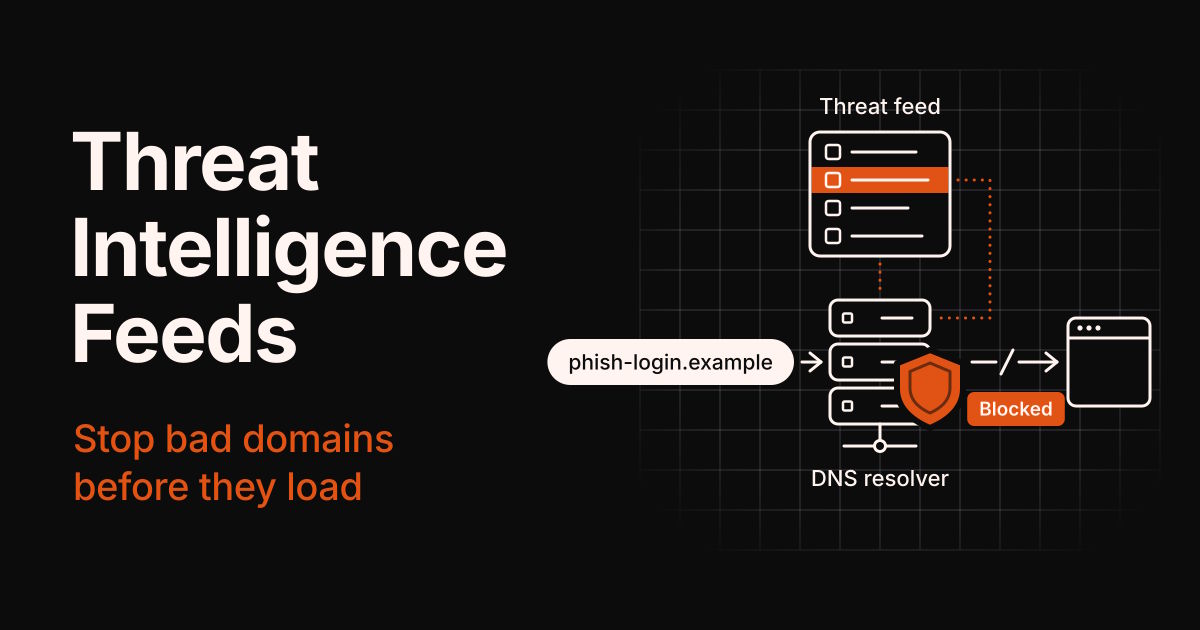
Most phishing pages and malware downloads sit behind a domain name. If your DNS resolver already knows that name is bad, the connection fails before anything loads.
There's no shortage of bad names, either. The Anti-Phishing Working Group (APWG) counted 1,069,681 phishing attacks in Q2 2026, and June alone hit 425,808, its highest monthly total since April 2023.
Threat intelligence feeds are how security teams keep up. They're regularly updated lists of domains, IPs, URLs, and file hashes already tied to attacks, ready for your resolver, firewall, or code to act on.
This guide explains what's inside a feed, which types matter, and how free and paid feeds differ. Then it walks through pulling a real feed with WhoisFreaks' documented SDK code and loading it into a DNS resolver, SIEM, or mail filter.
Disclosure: I work at JFreaks, the company behind WhoisFreaks. Its feed is the example in the walkthrough, and it's a paid product.
TL;DR
- A threat intelligence feed is a machine-readable list of indicators (domains, IPs, URLs, file hashes) linked to attacks and refreshed on a schedule.
- Match each feed to where you enforce it: domains go to DNS, IPs to your firewall, URLs to a proxy or mail filter.
- Free feeds are great for learning and home labs. Read their terms before you ship them inside a product.
- Scored feeds give every record a confidence value, so you set the blocking threshold instead of the publisher.
- Pulling a commercial feed takes one documented SDK call. After that, you unzip it, filter it, load it, and repeat daily.
- Start in monitor mode. No feed catches brand-new domains, and DNS blocking can't protect devices that skip your resolver.
What is a threat intelligence feed?
A threat intelligence feed is a regularly updated, machine-readable list of indicators of compromise (IOCs), such as domains, IP addresses, URLs, or file hashes, that have been linked to phishing, malware, spam, or other attacks. Security tools load the list and block or flag anything that matches.
The key word is machine-readable. A feed isn't a report you read over coffee. It's data your resolver, firewall, mail filter, or code acts on, usually once a day or more often.
What a feed record looks like
A bare list of domains works, but good feeds tell you more. Here's a made-up example of one record from a scored domain feed:
| domain | threat_type | confidence | first_seen | last_seen | No_of_threat_matched_pivots |
|---|---|---|---|---|---|
| login-verify-account.example | phishing | 0.93 | 2026-09-28 07:14:02+00 | 2026-09-29 18:40:11+00 | last_seen |
CSV:
Domain,threat_type,confidence,first_seen,last_seen
login-verify-account.example,phishing,0.93,2026-09-28 07:14:02+00,2026-09-29 18:40:11+00
Each field answers a question you'll care about later:
- domain: what to block.
- threat_type: why it's listed (phishing, malware, spam), which decides where the block belongs.
- confidence: how sure the publisher is, from 0 to 1. This is what lets you pick your own threshold.
- first_seen and last_seen: when the domain was active, so you can spot stale entries.
Feeds vs lookup APIs vs threat intelligence platforms
These three get mixed up a lot:
- Feeds are bulk lists you download on a schedule and check locally. Every check is instant and costs nothing extra.
- Lookup APIs answer one question at a time, like "is this domain bad right now?" They're fresher and richer, but every check adds a network call.
- Threat intelligence platforms like MISP and OpenCTI collect many feeds, dedupe them, and help analysts investigate. They're built for teams, not for a single script.
For most developers, a feed is the right place to start. Lookups are local and fast, and they keep working if the provider has a bad day.
Types of threat intelligence feeds
Feeds are grouped by the kind of indicator they carry, and each kind belongs at a different enforcement point. Put a URL feed in a DNS resolver and most of it goes to waste, because DNS never sees the path.
| Feed type | What it lists | Where you enforce it | Free examples | Watch out for |
|---|---|---|---|---|
| Domain | Domains used for phishing, malware, spam, or C2 | DNS resolver, mail gateway, web proxy | HaGeZi TIF, URLhaus host file | Shared hosts: block the exact subdomain, never the whole platform |
| IP | Botnet servers, scanners, hijacked ranges, VPN, proxy, and Tor exits | Firewall, WAF, signup and login checks | Spamhaus DROP, Tor exit list | Shared IPs, CGNAT, and cloud IPs that get reassigned |
| URL | Exact links to phishing pages and malware downloads | Web proxy, email link scanning | URLhaus, OpenPhish | DNS never sees the path, and URLs die fast |
| File hash | SHA-256 and MD5 hashes of known malware | EDR, antivirus, attachment scanning | MalwareBazaar | Change one byte and the hash no longer matches |
| Vulnerability | CVEs being exploited in the wild | Patch priority, vulnerability scanners | CISA KEV catalog | Not a blocklist: it tells you what to patch first |
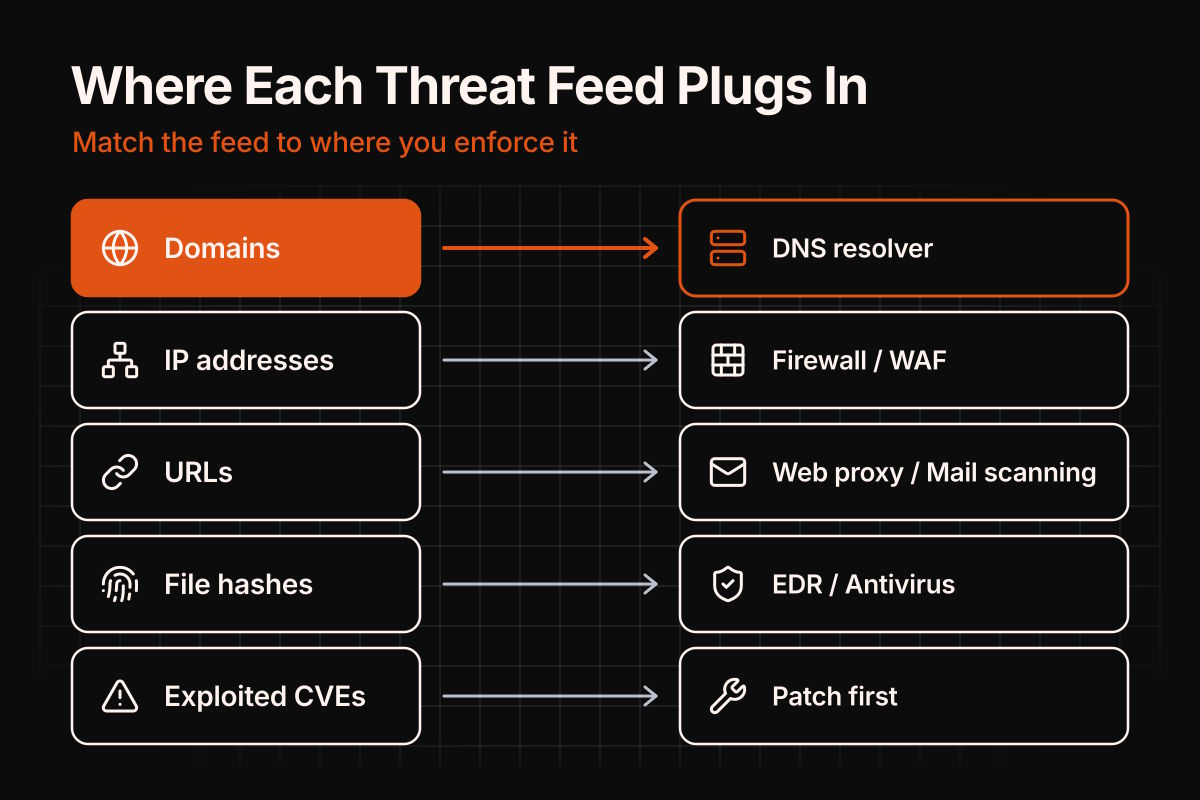
This guide focuses on domain feeds, because one DNS blocklist protects every device that uses your resolver.
Free vs commercial threat intelligence feeds
Both are useful. The real differences are what each record tells you and what the license lets you do with it.
Free feeds worth starting with
- URLhaus from abuse.ch shares URLs and hosts used to spread malware. Since June 30, 2025, downloads need a free Auth-Key.
- HaGeZi Threat Intelligence Feeds is a free DNS blocklist on GitHub, built from many threat sources and published in ready-made formats, including RPZ and plain domains. The full list has about 2.4 million entries, and the mini version, about 200,000, suits small resolvers. It's GPL-3.0, and its upstream sources keep their own terms.
- Spamhaus DROP lists IP ranges hijacked or leased by spam and cybercrime operations. It's free, even inside products, as long as you credit Spamhaus and keep its date and copyright text.
- The Tor Project's bulk exit list is a plain list of current exit node IPs. It's good for flagging traffic, and rarely a reason to block outright.
- awesome-threat-intelligence, a curated list on GitHub, indexes many more sources for when you need something niche.
The catch: most free lists are "listed or not listed", with no score, so you inherit the publisher's threshold. Some restrict commercial use or require credit, and each covers one slice of the threat picture, so you end up stitching several together.
When a scored commercial feed is worth paying for
A paid feed earns its cost when a wrong block or a missed domain costs real money, like on a company-wide resolver or a mail gateway.
WhoisFreaks, for example, publishes scored threat intelligence feeds for phishing, malware, and spam domains, plus five IP feeds (VPN, proxy, Tor, bot, and C2). Each feed is one CSV file rebuilt every day, and every domain record carries a confidence value from 0 to 1.
The domain feeds start from verified bad domains, then pull in related ones that share registrant details, name servers, MX records, or CNAMEs. That's how a domain can land in the feed before it shows up on public blocklists.
It's a paid product with a commercial license. Access and pricing go through their sales team, since there's no self-serve signup, but sample CSVs download from the feed page without an account.
If you're only protecting a home lab, the free lists above may be all you need.
How to use a threat intelligence feed, step by step
Here's the full path from feed to working protection, using the WhoisFreaks phishing feed as the example. The code comes straight from WhoisFreaks' official SDK documentation, so there's nothing to write from scratch.
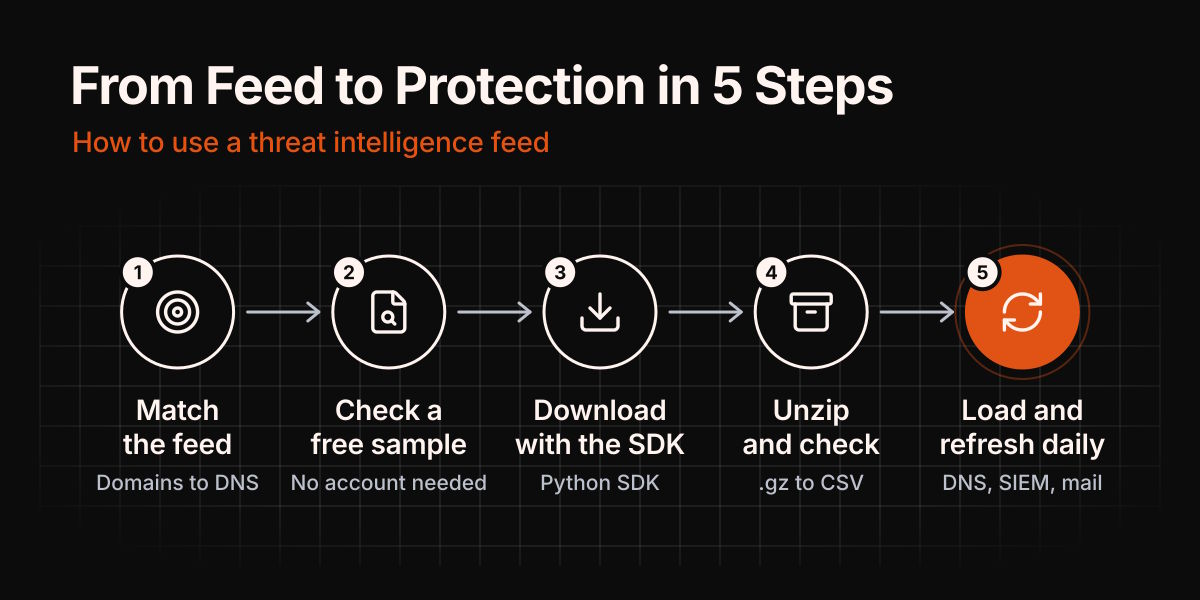
Step 1: Match the feed to where you'll enforce it
Decide this first, because it shapes every other step. Phishing and malware domains belong in your DNS resolver. Spam domains belong in your mail filter. VPN, proxy, Tor, bot, and C2 IPs belong in your firewall, WAF, or signup checks.
Step 2: Look at a free sample first
Download a sample CSV from the feed page. It needs no account, and it shows you the real columns before you plan anything around them.
Step 3: Download the full feed with the official Python SDK
Install the SDK:
pip install whoisfreaksThis is WhoisFreaks' documented example for the daily phishing feed, unchanged:
"""Runnable example: Download the daily phishing threat feed (CSV) (GET /v3.4/download/threat-feed/phishing).

Returns raw bytes (a compressed/binary file) -- write to disk, do not print."""

from datetime import date, timedelta
from whoisfreaks import Configuration, ApiClient
from whoisfreaks.api.databases_threat_feed_api import DatabasesThreatFeedApi

# Parameters for downloadThreatFeedPhishing (GET /v3.4/download/threat-feed/phishing):
#   - date (string, optional): Feed date (yyyy-MM-dd); defaults to latest available
config = Configuration()
config.api_key["ApiKeyAuth"] = "YOUR_API_KEY"   # set once
api = DatabasesThreatFeedApi(ApiClient(config))

data = api.download_threat_feed_phishing(var_date=str(date.today() - timedelta(days=1)))   # bytes
with open("downloadThreatFeedPhishing.gz", "wb") as f:
    f.write(data)
print(f"saved {len(data)} bytes to downloadThreatFeedPhishing.gz")
A few things to know before you run it:
- You need an API key. Live feed access is set up through the WhoisFreaks sales team, and your key then sits in the billing dashboard.
- Keep the key out of your code. The SDK docs recommend an environment variable, such as WHOISFREAKS_API_KEY.
- The file is compressed. The feed arrives as a gzip-compressed CSV, which is why the example writes raw bytes to disk instead of printing them.
- The date is optional. The example asks for yesterday's file. Per the documentation, leaving out the date returns a full dump of the feed, which is what you want when you rebuild a blocklist each day.
- The other feeds work the same way. Call download_threat_feed_malware() or download_threat_feed_spam() for the malware and spam feeds.
The endpoint, query parameters, and full field list are in the threat feed API documentation.
Step 4: Unzip the file and check the columns
On Linux or macOS, gunzip extracts the file:
gunzip downloadThreatFeedPhishing.gzThat leaves a CSV file named downloadThreatFeedPhishing, without an extension. On Windows, 7-Zip opens the .gz file.
Every row has the same six columns, per the docs: domain, threat_type, confidence (0 to 1), first_seen, last_seen, and No_of_threat_matched_pivots.
Step 5: Load it where it's enforced, and refresh it daily
WhoisFreaks says the CSV loads directly into Splunk, Microsoft Sentinel, MISP, and OpenCTI, and into BIND or Unbound as an RPZ zone. What you do next depends on the tool:
- SIEM: load the CSV as a lookup table and alert when a domain in your DNS or proxy logs matches.
- Mail filter: use the phishing and spam feeds to reject messages and links from listed domains.
- DNS resolver: keep the rows at or above your confidence threshold, then write each domain into an RPZ zone file.
In an RPZ zone, each domain takes two records. The first answers NXDOMAIN for the domain itself, and the wildcard covers everything under it. A minimal zone file looks like this:
$TTL 300
@ IN SOA localhost. hostmaster.localhost. (2026100101 3600 600 86400 300)
  IN NS localhost.
bad-domain.example CNAME .
*.bad-domain.example CNAME .
Then point BIND at it:
options {
    // keep your existing options and add:
    response-policy { zone "threat.rpz"; };
};

zone "threat.rpz" {
    type primary;    // older BIND versions call this "type master"
    file "/etc/bind/db.threat.rpz";
    allow-query { none; };
};
This setup was tested on BIND 9.18: listed domains and their subdomains returned NXDOMAIN, and other names resolved normally. After each rebuild, check the zone with named-checkzone threat.rpz /etc/bind/db.threat.rpz, then load it with rndc reload threat.rpz.
Run the download once a day and use the full dump. It holds everything currently in the feed, so you replace yesterday's list instead of merging into it.
How to pick a confidence threshold
Start at 0.8 on a shared resolver, then adjust using your own data and a week of logs. A lower threshold blocks more, including more false positives. A higher one blocks less, and lets more through.
| Where the list runs | Starting threshold | Why |
|---|---|---|
| Resolver for a whole office | 0.8 | A wrong block hits everyone at once |
| Your own home lab | 0.6 to 0.7 | You'll spot a wrong block and allowlist it in seconds |
| Log-only mode or SIEM alerts | 0.5 | Alerts don't break anything, so a wider net is fine |
Opinion, not rule: before you pick a number, count how many records in your own file pass each threshold. If most records score 1.0, moving between 0.7 and 0.9 barely changes the list.
Where threat intelligence feeds fall short
A feed only knows what someone has already seen, and a DNS blocklist only protects devices that ask your resolver. Plan around these gaps:
- Brand-new domains. A domain registered this morning may not be in any feed yet. For high-risk paths, like links in email, also check how old a domain is.
- Hacked legitimate sites. Domain feeds often don't list a real business whose site was compromised. URL feeds and your mail filter cover more of that.
- Shared platforms. Feeds often flag one subdomain on a free host. Block that exact name and everything under it, never the whole platform.
- Devices that skip your resolver. Browsers using DNS over HTTPS, or devices with a hard-coded public resolver, never ask your blocklist. Answering NXDOMAIN for Firefox's canary domain, use-application-dns.net, switches off the DoH that Firefox turned on by default, though not DoH a user enabled on purpose.
- False positives. Every feed gets some wrong. Keep an allowlist, log every block, and review the log weekly.
- Scale. Millions of names cost real memory in a resolver. Count what you're about to load, and raise the threshold if the list gets heavy.
- Licensing. Free doesn't always mean free for commercial use. Check each source's terms before you ship a list inside a product.
FAQ
What is a threat intelligence feed?
A threat intelligence feed is a regularly updated, machine-readable list of indicators, like domains, IPs, URLs, or file hashes, that have been linked to attacks. Tools such as DNS resolvers, firewalls, and mail filters load it and block or flag anything that matches.
Where can I find free threat intelligence feeds?
Good starting points are abuse.ch URLhaus for malware URLs, HaGeZi's Threat Intelligence Feeds for DNS-ready domain lists, Spamhaus DROP for hijacked IP ranges, and the Tor Project's exit list. Most free feeds aren't scored, and some restrict commercial use, so read the terms first.
What are the best threat intelligence feeds?
There's no single best feed. Pick by indicator type and enforcement point first: domain feeds for DNS, IP feeds for firewalls, URL feeds for proxies. Then favor feeds that score every record and update at least daily, so you control the blocking threshold.
How often should a threat intelligence feed be updated?
At least daily for domain and IP feeds, or on the provider's schedule if it's faster. Phishing domains are often used for a short time, so a week-old list misses much of what's active today.
What format do threat intelligence feeds use?
Most use CSV, JSON, or plain text lists. Larger platforms often exchange data as STIX 2.1 objects over TAXII 2.1, two open standards for sharing threat intelligence. For a DNS blocklist, a CSV or a plain domain list is the easiest to work with.
What's the difference between a threat feed and a threat intelligence platform?
A feed is the data. A threat intelligence platform, like MISP or OpenCTI, is the software that collects many feeds, removes duplicates, adds context, and helps analysts investigate. Small teams can skip the platform and load a feed straight into their resolver.
Can I use a threat intelligence feed with Pi-hole?
Yes. Pi-hole reads hosts-format blocklists, so add a hosts-format version of the feed as an adlist, then run pihole -g to update gravity. A CSV feed needs converting to that format first, and hosts lists match exact names, so subdomains need their own lines.
Will a DNS blocklist stop all phishing?
No. It stops lookups of known bad domains from devices that use your resolver. It won't catch brand-new domains, hacked legitimate sites, or devices that bypass your DNS, so treat it as one cheap layer, not the whole defense.
Where to start
Don't try to block everything on day one. This rollout keeps surprises small:
- Pick one enforcement point, like phishing and malware domains on your DNS resolver. Spam domains belong in your mail filter.
- Download a sample and count how many records pass the threshold you have in mind.
- Run in monitor mode for a week. Alert in your SIEM or log matches before you block anything.
- Allowlist anything legitimate that showed up, then switch to blocking.
- Schedule the daily download, and alert if a run fails, so you never block from a stale list.
Your next step: download a free sample from the feed page, or HaGeZi's mini list, and run it in monitor mode this week. You'll see exactly what it would block before it blocks anything.

