

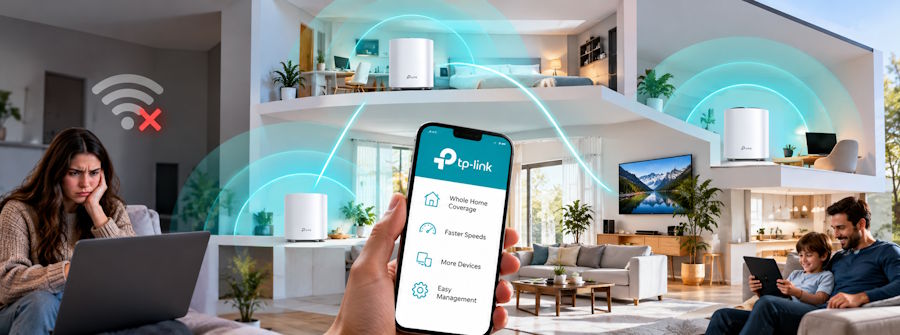
Few things trigger instant domestic frustration quite like stepping into a back bedroom only to watch your Wi-Fi signal drop to a single flickering bar. You settle down to stream a high-definition movie or join an urgent video conference, but your screen freezes into a spinning loading circle. Wireless dead zones affect millions of households, turning remote work and leisure time into an exercise in patience.
Thick concrete walls, metal appliances, microwave interference, and sprawling multi-storey layouts constantly block standard router signals. Fortunately, upgrading your home infrastructure with specialised TP-Link hardware banishes poor connectivity forever.
Identifying the Culprits: Why Your Wireless Signal Drops
Standard wireless routers broadcast radio frequencies in concentric circles from a single point. As these signals travel outward, dense building materials degrade their strength. Reinforced concrete, brick partitions, foil-insulated drywall, and large mirrors absorb or reflect radio waves, leaving distant rooms in total digital darkness.
- Thick Reinforced Concrete - Severe Signal Degradation (Home office setups and master bedrooms)
- Metal Appliances & Mirrors - High Signal Reflection (Kitchen smart hubs and hallway devices)
- Distance & Floor Levels - Moderate Attenuation (Attic conversions and basement playrooms)
- Competing Radio Frequencies - Channel Interference (Smart TVs and wireless sound systems)
Understanding these physical barriers helps you choose targeted hardware to bypass structural blockages effortlessly.
The Mesh Revolution: Blanketing Your Entire Home in Seamless Wi-Fi
Traditional range extenders repeat existing router signals, but they often create separate, clunky network names (SSIDs) that force your smartphone or laptop to disconnect and reconnect constantly as you walk through your home. Mesh networking solves this issue by creating a single, intelligent wireless blanket across your entire living space.
Deploying a multi-node TP-Link Deco mesh system eliminates dead zones. These sleek nodes communicate continuously with one another using dynamic backhaul channels, automatically routing your internet traffic along the fastest path. As you move from the kitchen to the garden patio, your device switches seamlessly between nodes without dropping a single video call frame or audio stream.
Hardwired Speed: Harnessing Existing Electrical Wiring
What should you do if thick concrete walls block wireless mesh signals entirely? Running long Ethernet cables across doorway frames and hallway floors creates unsightly clutter and tripping hazards, yet wireless signals simply cannot penetrate dense structural pillars.
Powerline adapters offer a brilliant, invisible solution by converting your home's existing electrical wiring into a superfast data network. You simply plug one adapter into a wall socket near your main router and connect a second unit in your distant home office. This setup delivers ultra-stable gigabit speeds straight to a stationary desktop computer, smart TV, or gaming console without drilling a single hole through your walls.
Supercharging Your Workstation: High-Speed Adapter Upgrades
Sometimes dead zones occur not because your network lacks power, but because your receiving device relies on outdated internal antenna hardware. Many older workstations lack built-in Wi-Fi cards or possess weak internal receivers that struggle to pick up distant signals.
- USB Wi-Fi Adapters - High-gain external antennas plug directly into a spare USB port to boost signal reception instantly.
- PCIe Network Cards - Internal expansion cards install directly onto your motherboard to deliver maximum Wi-Fi 6 bandwidth.
- Powerline Passthrough Kits - Direct Ethernet wall adapters supply lag-free cable connections straight to your workstation tower.
- Dual-Band Range Boosters - Plug-in wall units capture weak signals and rebroadcast them across 2.4GHz and 5GHz bands.
Upgrading a stationary desktop computer with a high-gain PCIe Wi-Fi card or a dedicated USB adapter restores full download speeds, ensuring lag-free video rendering, quick cloud backups, and smooth online gaming sessions.
Unlocking Your Home’s Full Connectivity Potential
Living with Wi-Fi dead zones is entirely optional in today's connected world. By replacing outdated single-router setups with intelligent mesh systems, powerline technology, and high-gain receiver adapters, you create a fast, resilient network that covers every square metre of your property. Invest in reliable networking hardware today to enjoy uninterrupted streaming, effortless remote working, and seamless connectivity across your entire household.
Frequently Asked Questions
How many mesh nodes do I need for a standard three-bedroom home?
Most standard three-bedroom homes achieve complete coverage using a two-node or three-node mesh system, depending on wall thickness and property layout.
Can I connect my workstation directly to a mesh node using an Ethernet cable?
Yes. Most mesh nodes feature gigabit Ethernet ports on the back, allowing you to plug your computer directly into the unit for maximum stability and speed.
Will a mesh system work with my existing internet service provider?
Yes. Mesh routers connect directly to your provider's existing optical network terminal (ONT) or modem, replacing your old router's function seamlessly.
Ready to eliminate frustrating Wi-Fi dead zones and supercharge your home network with top-tier connectivity gear? Contact Harvey Norman Singapore for high-performance networking solutions!

