

A text-to-video or image-to-video API can accept your request, finish the task, hand back a valid MP4, and still not give you what you asked for. The status code tells you the job ran. It says nothing about whether the clip has the resolution, aspect ratio, length, or soundtrack you requested. The fix is cheap: open the file with ffprobe and compare it to the request before you trust the provider with real traffic.
In short: after a generation finishes, run ffprobe on the output and check four things against the request: short-side pixels, aspect ratio, duration, and whether an audio stream exists. For image-to-video, also pull the first frame and look at it. Don't send a request shape to a provider until that provider has delivered that shape at least once.
Three ways a "successful" clip can be wrong
These all came up while we were wiring several video providers behind one generator. In each case the request reported success.
- The resolution was fixed on the provider's side. One endpoint accepted a resolution parameter but only ever delivers 768p, whatever value you send. If you charge differently for 480p and 768p, or promise one of them, that difference is invisible until you measure the file.
- The photo wasn't used as the first frame. One image-to-video endpoint treated a single uploaded photo as a reference: the clip was "inspired by" the image instead of starting from it. Another provider pinned the same photo as frame one. Same parameter name, different behavior.
- Turning sound off did nothing. One gateway ignored the "no audio" flag, so every clip came back with an audio stream. That's harmless if you wanted sound and a real bug if your user asked for a silent clip to put under their own music.
None of these produce an error. You only find them by opening the output.
What to measure
ffprobe ships with FFmpeg and prints the container and stream metadata as JSON:
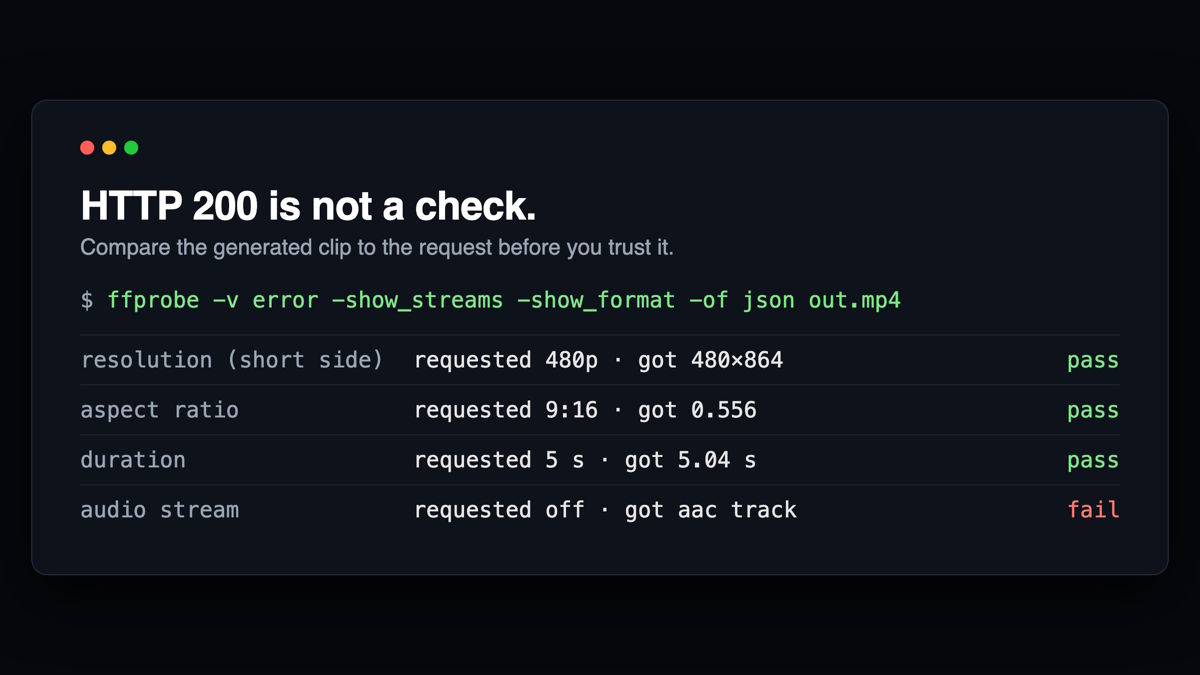
ffprobe -v error -show_streams -show_format -of json out.mp4From that output you need four values:
| Property | Where it comes from | Tolerance we use |
|---|---|---|
| Resolution tier | min(width, height) of the video stream | ±16 px of the tier (480, 720, 768, 1080) |
| Aspect ratio | width / height vs. the requested ratio | ±0.03 |
| Duration | format.duration | ±0.6 s |
| Sound | is there a stream with codec_type: "audio"? | must match the request exactly |
Why these tolerances? Providers round frame sizes to multiples of 8 or 16, so a "480p" portrait clip might be 480×864 and a landscape one 864×480. Comparing the short side lets one rule cover both orientations. Durations drift because a clip has to end on a whole frame; a 5-second request that comes back at 5.17 s is fine. A 5-second request that comes back at 10 s is not. If a file carries non-square pixels (sample_aspect_ratio other than 1:1), compare against its display_aspect_ratio instead of raw width and height.
A small checker in Node
This is trimmed from the probe script we run before a provider is allowed to serve users:
import { execFileSync } from 'node:child_process';
import { writeFileSync, mkdtempSync } from 'node:fs';
import { tmpdir } from 'node:os';
import { join } from 'node:path';

const PIXELS = { '480p': 480, '720p': 720, '768p': 768, '1080p': 1080 };

export async function checkClip(url, request) {
  const dir = mkdtempSync(join(tmpdir(), 'probe-'));
  const file = join(dir, 'out.mp4');
  writeFileSync(file, Buffer.from(await (await fetch(url)).arrayBuffer()));

  const probe = JSON.parse(
    execFileSync('ffprobe', [
      '-v', 'error', '-show_streams', '-show_format', '-of', 'json', file,
    ]).toString()
  );
  const video = probe.streams.find((s) => s.codec_type === 'video');
  const audio = probe.streams.find((s) => s.codec_type === 'audio');
  const w = Number(video?.width);
  const h = Number(video?.height);
  const duration = Number(probe.format?.duration);
  const [rw, rh] = String(request.aspect_ratio || '').split(':').map(Number);

  const checks = {
    tier: !request.resolution ||
      Math.abs(Math.min(w, h) - PIXELS[request.resolution]) <= 16,
    ratio: !rw || Math.abs(w / h - rw / rh) < 0.03,
    duration: !request.duration ||
      Math.abs(duration - Number(request.duration)) <= 0.6,
    audio: Boolean(audio) === Boolean(request.sound),
  };
  return {
    got: { w, h, duration, audio: Boolean(audio) },
    checks,
    pass: Object.values(checks).every(Boolean)
  };
}
Use execFileSync with an argument array, not a shell string. Prompts and URLs contain characters a shell will happily interpret. We once lost half a request to a wrapper that passed everything through a shell and split the command at a semicolon inside the prompt.
A passing run gives you something like this:
{
  "got": { "w": 480, "h": 864, "duration": 5.04, "audio": true },
  "checks": { "tier": true, "ratio": true, "duration": true, "audio": true },
  "pass": true
}
To gate a CI job or a deploy on it, wrap the call and set the exit code:
const result = await checkClip(url, request);
console.log(JSON.stringify(result, null, 2));
process.exit(result.pass ? 0 : 1);
Image-to-video needs one more check
Metadata can't tell you whether your photo is in the clip. For that, extract the first frame:
ffmpeg -v error -i out.mp4 -frames:v 1 first.pngPut first.png next to the input photo. If the provider pins the image as the opening frame, they will match closely, allowing for scaling, compression, and slight color shifts. If it treats the image as a reference, you'll see a different composition with the same general subject. Neither is wrong, but your product has to know which one it's getting. In our setup, a provider that hasn't passed this side-by-side check is skipped for any request that carries a photo.
Turn the results into routing rules
- Whitelist, don't blacklist. For each provider, record the resolutions, ratios, and durations it has actually delivered. A request with a shape outside that list goes to the next provider instead of being sent and silently downgraded.
- Record the options a provider ignores. If an endpoint always returns sound, mark it so. A request for a silent clip should skip it.
- "Reachable" is not "delivers." A gateway can accept every submit and fail every task. If your health check counts an accepted submit as a success, a provider like that never trips. Count only finished tasks as successes, and track content-moderation refusals separately from failures. A refusal usually says more about the prompt than about the provider, and counting it would switch off a healthy provider because of one user's request.
What we run before a provider takes traffic
At Movoa, a provider doesn't enter normal routing until a run through our own code has passed this check. The audio check matters most for us: an AI video with audio that arrives silent looks fine in a thumbnail and only breaks when someone presses play.
The check runs in seconds per clip. Compare that to finding out from a user that the "768p" option has been the same file as 480p for a month. Probe the file, compare it to the request, and let the router act on what you measured.

