

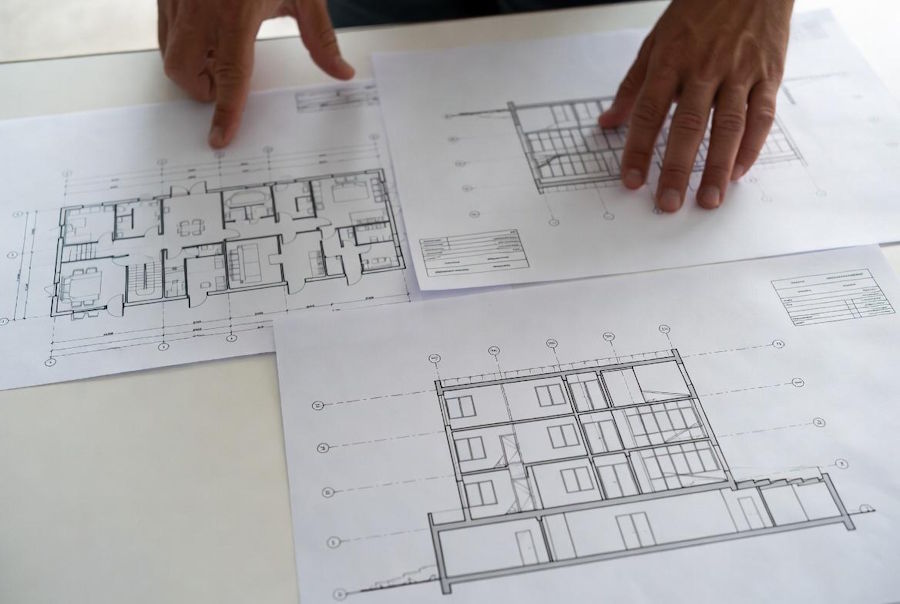
CAD is WAY MORE than lines, measurements, and symbols on the CAD level. These could be about rooms, structural elements, equipment configuration or arrangement, or material requirements and interrelations between building blocks. Nonetheless, much of this data is hidden in the details of drawing files, meaning project teams have to manually interpret plans before they can use the information for estimating, scheduling, and construction coordination.
That is where automation really provides the missing piece. Through structuring, indexing, and reusable data from drawing information, it allows decentralized construction teams to be better organized, reduce duplicated effort and replication of work across multiple teams, and enables design feedback to feed into project delivery. Not to remove the professional judgement from any workflow in construction. And in order not to waste human resources on doing an uninteresting job and wasting time that could be solved with the software, only focussing upon checks, problem-solving, and decisions that need our contextual experience.
Why Construction Drawings Need a Data-Driven Workflow
Typical output from a traditional project is architectural plans, structural drawings, mechanical schematics/layouts; electrical layouts/drawings/schedules/revisions. Such as various file formats, DWG, DXF, PDF, or IFC files received from other teams. In other documents, the same building is recognized, but organized differently.
For example, a door may be registered as: A symbol on a floor plan, an object in a door schedule, or a specification entry that describes its size, material properties, and fire rating. These records (symbols) are separate all of the time. Well, all somebody has to do this manually (and ensure they match).
This is where data-driven workflows kick in. Instead of considering each drawing as a document, CAD Drafting Services teams can identify important objects and transform them into attributes that associate those attributes with relevant project records.
For example, a formal door entry may include:
- A unique element identifier
- Width, height, and location
- Material or product classification
- Relevant drawing and revision number
- Cross-references to Specification and schedule items
- A verification status
Organized in this manner, software can search and compare, filter and transfer the information with much more security than it would be able to perform using a gathering of disjointed annotations on the drawings.
Automate CAD Data Extraction to Structured Data
Your source files and the available details govern your assembling mechanism. SERY Direct: Exposing lines, blocks, layers, dimensions, and text. While a scanned drawing is made up of pixels, before actually reading its content, you have to perform some image processing and recognition on it.
The most critical thing is that a working automated workflow has several steps.
Step 1: File Ingestion and Classification
The system collects drawings and documents from the projects, recognizes their file types in them, keeping all historical information of a project. The naming schemes, sheet numbers, disciplines, and revision identifiers are ways that those files are linked together.
Step 2: Extract Drawing Entities
File parsers (or application APIs) can be used to read supported CAD formats and let the software know how geometry, text, layers, blocks, and object properties should be interpreted. OCR: You might be able to read text in scanned plans, and computer vision might help spot some symbols and shapes.
Step 3: Normalize the Information
Note that different designers use different layer names, abbreviations, units, or naming conventions for similar objects. Then a normalization layer maps those variations to the same categories. There could be tons of labels for a door schedule item that map to one door generator type, without losing the first label.
Step 4: Validate the Extracted Records
GenerSystem checks for missing values, dimension duplicates, identifiers, and conflict information. It might be the case that it flags a door measured at 50mm, and the schedule says otherwise, but one may need to manually check which is right.
Step 5: Export Usable Data
Then, send verified records to the database, spreadsheet, estimating platform (like Excel or spreadsheets), document management system, or project dashboard. It should also include the link to each record extraction with the drawing and revision.
The key principle is traceability. Identifying how a structured value was created and where it came from often makes that structure much more useful to the reviewer.
Connecting Drawing Data With Estimating and Documentation
Data related to the drawing is extracted and fed into many downstream processes. Quantity measurement is one example. As long as the rules of geometry in a drawing are appropriate and dimensioning is given proper units, a system must calculate area or length measurement (i.e., counting, volume).
Then that data can be connected to cost databases or price assumptions. As an example, you could do a calculation for how much drywall, insulation, finishing, and related labor it would take to cover a section of wall. However, simple geometry cannot determine the final assembly: specs, types of walls, openings, as well as factors for construction waste and labor conditions are all really project-specific.

This is why organized drawing information can drive improvements in commercial estimating services. Estimates are easy to refer to; quantities are arranged well for an estimator to verify assumptions, evaluate alternatives, and identify ambiguities before bidding. While cutting preparation time is valuable, automation should not silently price a vague detail.
Similar is the case for Construction Documentation Services. Tying together revision histories, schedules, and quantities extracted for particular references with the drawings can help project teams keep a more consistent record of how things change by showing some reasons why (e.g., estimating changes).
Connecting Construction Systems Through APIs and Automated Data Pipelines
For published info, where did this info come from; which revision does it represent; who checked: your documentation had better answer those three questions.
One typical example of this situation can be interconnecting project systems through APIs and data models.
The utility of automation tends to increase considerably when data can be moved automatically between systems without requiring manual retyping or handling. APIs, database integrations, and data pipelines scheduled to run regularly can connect CAD extraction tools with estimating systems, document repositories, issue tracking solutions, and project management platforms.
Let us say a workflow where an updated drawing gets pushed to a project repo. The revision will be detected, relevant objects identified, and the previous dataset compared against it to generate a list of potential changes. You can then check the results before some approved quantities or documentation are updated.
Such a persistent data model is particularly important when information has to cross the boundaries of software. An example might be one application storing dimensions in millimeters and another expecting feet and inches. For example, one system might take the sheet number from a drawing as an identifier, and another might ask for some sort of key that is unique at the project level. Due to missing conversion and mapping rules, faults can propagate faster than a fault introduced by a human person through manual processes.
Interoperability standards/assets like IFC may also help in exchanging building information between applications complying with a certain standard. We find this best approach is task-dependent, tool-dependent, and source model-semantic-information-dependent.
Want to Discover the Areas AI Can Assist and When We Need Humans to Review?
Traditional automation works very well if the data is governed by known and predictable rules. AI techniques start becoming valuable when identifying something more variable in a drawing, like recognizing symbols across different drafting styles, reading scanned schedules, classifying notes, or hunting for discrepancies between documents.
Computer vision can potentially help in recognizing shapes and symbols; language models should help to classify categorical notes or short summaries of revisions. Think of these systems as machines that spit out candidates, not vendors or truthers.
Several limitations deserve attention:
- Badly scanned: A symbol or dimension is poorly understood automatically.
- Conflicting documents: Unquoted details in a plan, schedule, and specification can be conflicting in perception, but it very well can only be cured with an intelligent mind.
- Revision errors: If there is no revision metadata (or it was inaccurate), then a system could compare documents from different points in time on the same project.
- Degree of Overconfidence: AI can generate labels/numbers that seem realistic but are inaccurate in practice.
- Sensitive Information: The drawings may contain sensitive information about building layouts, infrastructure details, or client information that needs to be protected.
A good system would provide confidence scores when it can, flag borderline outputs to human experts, store source files, and pass exceptions through to humans. You should ensure they are part of the design rather than an afterthought on production systems. Access, audit logs, and versioning tracking as key type controls.
And these are not always good, Construction Documentation Services, but the better way with AI most of the time! The system should be left to handle repetitive, well-defined extraction tasks, but rare conditions, high-impact quantities, or compliance issues and cost- or safety-related decisions should be reserved for a human.
Information on Whether or Not Your Automation Is Occurring in the Workflow
The absence of objective measures means teams can never really know if a new workflow saves time when compared with an increase in fallibility.
Useful metrics include:
- Extraction accuracy: To check if the detected objects and their attributes are in sync or not with truth information of a verifiable source
- Manual correction rate: Rounds of data pulled (to be customized by a human)
- Processing time: The time to prep a dataset from a drawing package
- Revision detection rate: Observes whether no significant change is detected between versions
- Traceability coverage: If records reference their source drawings
- Exception resolution time: Performing those reviews promptly, and whether flagged discrepancies get resolved or not
The reason why it makes sense to start with a pilot project. Select a small set of drawings, prepare a manual gold standard, run the automation pipeline, and check the output. The evaluation is usually fooled by not tracking which extractions the system fumbled; here we need both success and failure cases recorded!
The other test cases you must also check your workflow with edge cases like repeated sheets, different layer names, missing coordinate systems, and scanned drawings. If it seems to work only well on clean files, that limitation should be understood before the process is scaled.
An end-to-end automated build process is not the most beneficial output for a lot of teams. A normal pipeline, which reduces duplicate entry, makes it simpler to change when exploring and arms practitioners with even more details at the time that they are needed.
Final Thoughts
It aligns better because you can plug in information from CAD drawings and transition to structured data with more connected construction workflows. Finally, with rule sets well-written and validated alongside careful AI assistance helps us achieve extraction of drawing info into records for any department that needs access to estimating, documentation accumulation, coordination, and revisioning.
Technology is only one side of answering that question. Only standardized approaches combined with disciplined version control, transparent sourcing, and individual review are reliable. It is this synergistic relationship of these three elements that creates so much utility from automation more than simple processing speeds across files; it enables a lifeblood function: making construction information far easier to reuse, verify, and trust.
Frequently Asked Questions
What is the conversion of CAD drawings to structured data?
It is parsing drawing files for useful information: dimensions, objects, labels, materials and locations, then cleaning the data into a structured record in a standardized format that can be queried against, compared to other datasets, or validated and interfaced with software.
Allows automation in recovering properties from each CAD drawing.
No, it depends on file quality and geometry and drawing conventions as well as scale, and the available information. Since clean vector drawings are probably easier to digest vs. scanned plans, a few quantities still need spec/order interpretation or construction assemblies.
How does AI enable the automation of construction drawings?
You get data up to October 202; AI can help you with recognizing symbols, OCR (optical character recognition), classification and indication of possible changes from documents. Most importantly, the output should be validated in cases where an approximation will directly influence pricing, compliance, or construction.
Structured data can illustrate how construction estimates work.
Structured data in buildings provides a major advantage as similar quantities can streamline and speed review, comparison, and transfer into the estimating workflows. This not only helps maintain links to source drawings and revisions, so that assumptions and changes can be more easily audited.
First, however: What should a business automate?
Selecting a task: Begin with something small and well-defined, such as extracting a few key attributes on known classes of objects or comparing two revisions of the same drawing. Try it on manually validated results.

