

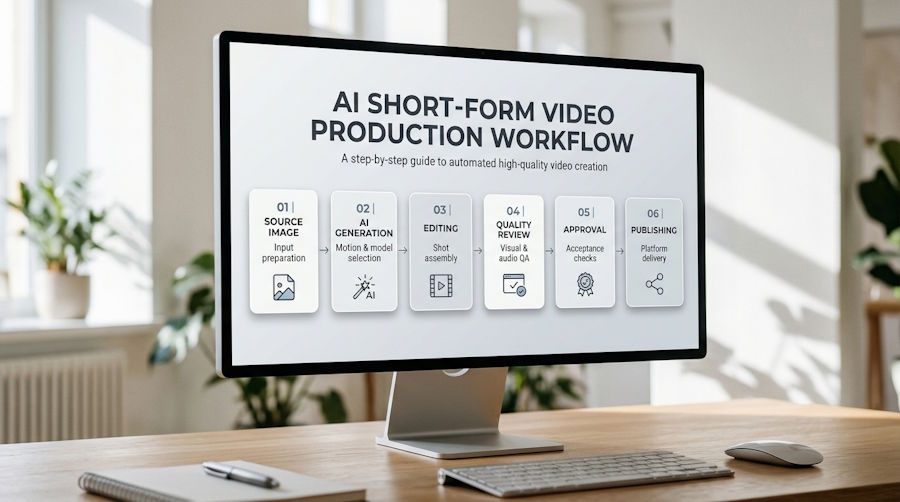
AI video generation has made it considerably easier to turn visual ideas into short clips. A single photograph can become an animated product shot, a written description can produce a cinematic scene, and existing footage can be transformed into something that looks entirely different.
But generating a video is only one step in producing content that is ready to publish.
A clip may look impressive in its first few frames but lose visual consistency as the subject moves. A product may change shape during a camera transition. Text may become distorted, facial details may shift, or the composition may no longer work when cropped for a vertical screen.
These problems become particularly important in short-form content, where every second has to communicate something useful.
A reliable AI video workflow therefore needs more than a good prompt or a capable generation model. It needs a process for preparing source material, controlling motion, reviewing outputs, assembling sequences, and checking the final export.
1. Define the Shot Before Generating It
One common mistake is starting with a long, descriptive prompt before deciding what the video is actually supposed to communicate.
A better approach is to define the intended shot first.
Every short video segment should have a clear subject, a visual objective, and a limited amount of movement. For example, a product demonstration might need to show the product clearly, introduce one camera movement, and finish with a close-up of a particular feature.
A useful shot brief can contain five elements:
- Subject: What must remain recognizable throughout the clip?
- Opening frame: What should viewers see immediately?
- Action: What single movement or event should take place?
- Camera direction: Should the camera push in, pan, orbit, or remain fixed?
- Visual payoff: What should the final moment communicate?
Consider a product reveal. Instead of asking an AI model to create a cinematic advertisement with multiple movements and effects, a more controlled instruction might describe a gradual camera push toward the product, followed by a brief pause on its most important detail.
This gives the model a more clearly defined task.
It also makes the resulting video easier to evaluate. When a generation fails, the creator can identify whether the problem came from the source image, the requested action, or the camera direction rather than changing everything simultaneously.
2. Treat the Source Image as Part of the Production Process
In image-to-video generation, the original photograph is not simply an optional visual reference. It can determine how much information the model has to reconstruct as the scene begins moving.
A clean source image generally provides a more reliable starting point than a crowded composition containing overlapping objects, partially hidden subjects, or inconsistent lighting.
For a product video, the product should be clearly separated from the background. Important labels, distinctive shapes, and surface details should be visible before animation begins.
For portraits, facial features should be reasonably clear, with enough space around the subject to accommodate the intended movement.
Aspect ratio also needs attention at this stage. A tightly cropped square photograph may not provide enough visual information for a wide video. The model may need to invent additional background content, potentially introducing inconsistencies.
A practical solution is to prepare the source image in approximately the same aspect ratio as the intended output.
Tools such as VioEvo's image-to-video AI workflow allow creators to animate a still image using a motion description. The workflow also supports start-frame and end-frame inputs on compatible generation models, providing another way to guide how a scene transitions from its opening composition to its intended final state.
The distinction between these two approaches is useful.
A single starting image is appropriate when the goal is to introduce natural movement while retaining the original visual composition. Start-and-end-frame generation is more suitable when a specific change between two visual states needs to be guided.
Neither approach guarantees perfect consistency, but defining the intended visual transition before generation can reduce unnecessary ambiguity.
3. Control Motion Through Small, Repeatable Iterations
A more complicated prompt does not automatically produce a better video.
In fact, combining too many independent actions can make the result harder to control. A subject walking, turning, speaking, changing expression, and interacting with several objects creates multiple opportunities for visual inconsistencies.
A more reliable workflow introduces movement gradually.
Start with one primary action. Once the basic movement works, additional visual elements can be introduced where necessary.
For example, a product shot might begin with a stationary product and a slow camera push. A second version could introduce a subtle reflection or a small environmental movement. Comparing the two makes it easier to determine whether the additional effect actually improves the result.
The same principle applies to camera instructions. Asking for a slow orbit is usually easier to evaluate than combining an orbit, zoom, rapid pan, and dramatic perspective change in one instruction.
An effective iteration process should keep most variables constant.
When reviewing alternative generations, preserve the source image, output ratio, and basic shot objective. Change one major prompt element at a time.
This makes comparisons more meaningful and prevents creators from repeatedly generating completely different scenes without understanding why one performs better than another.
It is also useful to maintain a simple generation record containing the source asset, selected model, prompt version, aspect ratio, duration, output resolution, and generation result.
For teams producing content repeatedly, this record becomes a practical reference for reproducing successful creative decisions.
4. Build for the Final Publishing Format, Not Just the Preview
A video that looks good on a desktop monitor may not work equally well on a mobile screen.
Short-form platforms place considerable emphasis on vertical composition. Subjects need to remain visible in a narrow frame, visual details must be recognizable at smaller sizes, and important information should not overlap platform interface elements.
The 9:16 aspect ratio is therefore a useful starting point for Instagram Reels, TikTok, and YouTube Shorts.
However, simply cropping a horizontal video into a vertical format is not always sufficient. A person's face may move outside the visible area, a product may become too small, or important background information may disappear.
The intended distribution format should influence the shot design from the beginning.
This is where an AI-assisted vertical video workflow becomes useful. VioEvo's AI Reels Generator supports creating vertical video shots from text descriptions, images, and compatible video inputs.
Creators can prepare a short source clip, choose a suitable generation model, describe the desired movement, and work with a 9:16 output format.
There is an important distinction between generating individual shots and producing a complete edited Reel.
For example, when starting with several product photographs, creators can generate separate animated shots and assemble them in a video editor. When working with longer footage, the relevant excerpt should be selected and prepared before uploading it to a compatible video-to-video workflow.
This approach provides more control over the final sequence than expecting one generation request to produce an entire finished campaign.
It also makes it easier to replace a weak segment without regenerating the other parts of the video.
5. Establish Quality Gates Before Approving a Clip
A generated video should not be considered ready for publication simply because it completed successfully.
A practical production workflow should include several independent quality checks.
Subject consistency
Does the main subject remain recognizable throughout the clip? For product content, check whether the object's proportions, color, packaging, and distinctive features remain stable. For portraits, inspect facial details and other identifying visual characteristics.
Temporal consistency
Watch the complete video rather than examining only selected screenshots. Look for flickering, sudden changes in texture, unstable edges, disappearing details, and backgrounds that shift unexpectedly between frames.
Motion quality
Check whether the requested action looks physically plausible. Movements should have a clear beginning and ending, without unnecessary acceleration, awkward transitions, or sudden changes in direction.
Composition and readability
Check whether the main subject remains within the intended frame. For vertical content, make sure the most important visual information remains visible on a phone-sized screen.
Text and audio integrity
Generated text can contain spelling errors or inconsistent lettering. Dialogue and sound effects may also have synchronization problems. Any information that needs to be accurate should be reviewed separately, and precise captions are often better added during editing.
Export quality
Finally, inspect the actual downloaded file rather than relying exclusively on the generation preview. Check the resolution, aspect ratio, playback, compression artifacts, and audio synchronization in a normal video player.
These checks are particularly important when videos will be used in paid advertising, product demonstrations, or other situations where visual mistakes can undermine the message.
6. Use a Simple Acceptance Scorecard
Quality control becomes more consistent when everyone involved in a project uses the same evaluation criteria.
A lightweight scorecard can help distinguish between a clip that needs minor revisions and one that should be rejected entirely.
| Quality dimension | What to evaluate |
|---|---|
| Subject fidelity | Identity, shape, color, and key details |
| Motion | Natural movement and camera behavior |
| Temporal stability | Flicker, deformation, and frame consistency |
| Composition | Subject visibility and platform-specific framing |
| Audio and text | Synchronization, readability, and accuracy |
| Export | Resolution, aspect ratio, and playback integrity |
Each category can receive one of three outcomes:
- Pass: The result meets the project's requirements.
- Revise: The clip is usable in principle but needs another generation or editing pass.
- Reject: A major visual or technical problem makes the clip unsuitable.
The advantage of this approach is that it creates a repeatable approval process.
Rather than relying entirely on whether someone likes the overall appearance of a video, the team can identify specific reasons for accepting or rejecting it.
It also creates useful feedback for future generations. If a particular type of source image repeatedly produces unstable motion, the problem can be addressed during image preparation rather than through endless prompt adjustments.
7. Measure the Cost of Usable Content
Generation speed alone is not a reliable measure of production efficiency.
A model might generate clips quickly, but if most of them require several retries or extensive manual correction, the overall workflow may be less efficient than expected.
For this reason, it is useful to measure production outcomes rather than just generation activity.
Three practical metrics are worth tracking:
- First-pass acceptance rate: The percentage of generated clips that pass quality review without another generation.
- Cost per approved clip: The total generation and production cost divided by the number of videos that are actually approved.
- Revision time: The amount of additional work needed to correct or replace unsuccessful generations.
These metrics help teams compare different models and workflows based on their usefulness in real production.
A model that produces slightly fewer visual effects but consistently delivers usable results may be a better choice for a repeatable marketing workflow than one that produces spectacular but unpredictable outputs.
The same principle applies to content volume. Producing twenty clips is not necessarily more valuable than producing five clips that meet the required visual and technical standards.
Conclusion
AI video generation is changing how creators and businesses approach short-form content, but the ability to generate a clip is only part of the process.
Reliable production depends on decisions made before, during, and after generation. Clear shot briefs, suitable source images, controlled iterations, platform-aware composition, and systematic quality checks all contribute to a better final result.
As AI tools become more accessible, the ability to evaluate and manage generated content will become just as important as the ability to create it.
The real goal is not to generate as many videos as possible. It is to build a repeatable workflow that turns creative ideas into consistent, technically sound, and publishable visual content.

