

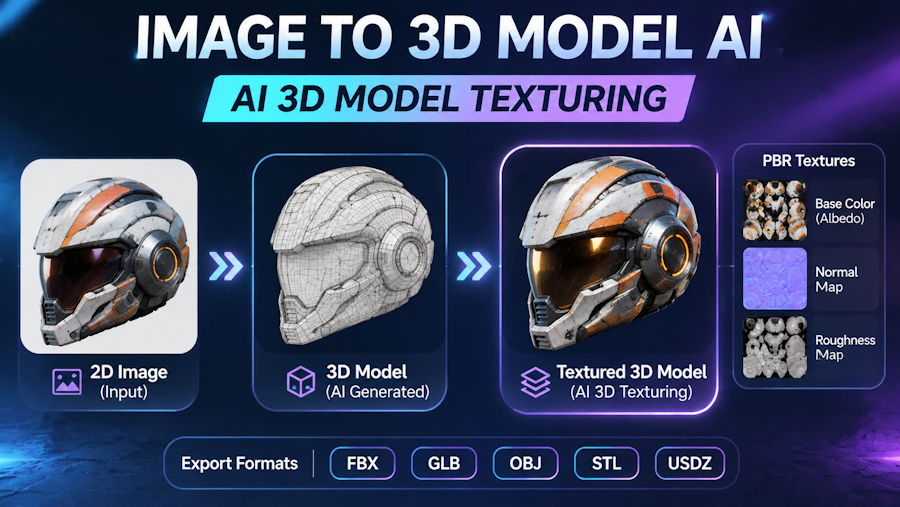
The world of 3D design is evolving rapidly, and artificial intelligence is making professional 3D creation more accessible than ever. Tasks that once required hours of manual modeling, sculpting, and texturing can now be completed in significantly less time with AI-powered tools. Whether you are a game developer, digital artist, product designer, or content creator, AI technology offers new ways to turn creative ideas into realistic three-dimensional assets.
One of the most exciting developments is image to 3d model ai technology, which transforms ordinary 2D images into detailed 3D models. Instead of building an object from scratch, creators can upload a reference image and let AI generate a three-dimensional representation. Combined with advanced texturing capabilities, this technology is changing how digital assets are designed, customized, and used across different industries.
What Is AI-Powered Image-to-3D Modeling?
Image-to-3D modeling is a technology that uses artificial intelligence to convert two-dimensional visual references into three-dimensional objects. Traditional 3D modeling usually requires knowledge of polygon modeling, sculpting, mesh editing, and geometry construction. AI simplifies this process by analyzing the visual information in an image and predicting the object's three-dimensional structure.
The system identifies important visual features, including shapes, contours, proportions, surface details, and object boundaries. Based on this information, it generates a 3D representation that can be used in digital environments.
For example, a product designer could upload a photograph of a chair and generate a 3D model for visualization. Similarly, a game developer could convert a character reference image into a starting 3D asset.
Although AI-generated geometry may require additional refinement, it provides a valuable starting point and reduces the time needed for initial modeling.
How Does AI Convert Images into 3D Models?
AI-powered image-to-3D generation typically involves several computational stages.
1. Image Analysis
The AI system first examines the uploaded image to understand its visual structure. It identifies the object's shape, edges, proportions, colors, and visible surface characteristics.
2. Shape and Depth Estimation
A two-dimensional image contains limited spatial information. AI models use learned visual patterns to estimate depth, volume, and three-dimensional geometry. This allows the system to predict how an object might look from different viewing angles.
3. 3D Geometry Generation
After analyzing the visual information, the system generates a three-dimensional representation. Depending on the technology, the result may use polygon meshes, neural representations, or other 3D data structures.
4. Surface and Detail Reconstruction
The generated model receives additional surface information to improve its visual appearance. This may include color, material characteristics, and texture details.
5. Export and Refinement
Once generated, the model can be exported into supported 3D formats for further editing, animation, rendering, or integration into other creative workflows.
The quality of the final output depends on the input image, the AI model, and the complexity of the object.
Why AI 3D Modeling Is Becoming Popular
The increasing popularity of AI-based 3D modeling comes from its ability to reduce technical barriers and accelerate creative workflows.
Here are some major advantages:
Faster 3D Asset Creation
Traditional modeling can take hours or even days, depending on the complexity of an object. AI-assisted generation can significantly shorten the initial creation process.
Lower Technical Barriers
Beginners do not necessarily need advanced knowledge of Blender, Maya, or other professional modeling applications to experiment with 3D asset creation.
Better Creative Exploration
Designers can generate multiple variations from different reference images. This makes it easier to explore alternative shapes, proportions, and visual concepts.
Improved Production Efficiency
Game studios, product visualization teams, and digital content creators can use AI-generated models as starting assets, allowing artists to spend more time refining and improving their projects.
The Importance of AI 3D Model Texturing
Generating the geometry of a 3D object is only one part of creating a convincing digital asset. Its surface appearance is equally important.
This is where ai 3d model texturing becomes valuable.
Texturing is the process of applying visual surface information to a 3D model. It determines how an object looks by defining details such as color, roughness, patterns, and material appearance.
For example, a simple 3D model of a wooden table may initially appear as a plain geometric structure. Applying a realistic wood texture introduces natural grain patterns, color variations, and surface characteristics that make the object look more believable.
AI-powered texturing can help automate parts of this process. Instead of manually creating every surface detail, users can leverage AI to generate or apply suitable textures.
Key Benefits of AI-Powered 3D Texturing
Realistic Material Appearance
AI-generated textures can help create convincing representations of materials such as wood, metal, stone, fabric, leather, and plastic.
Faster Workflow
Artists can reduce the time spent manually designing and adjusting surface textures.
Creative Customization
Different texture styles can transform the appearance of the same 3D model, making it suitable for different creative projects.
Consistent Visual Quality
AI-assisted texturing can help maintain a coherent visual style across multiple digital assets when used with appropriate references and settings.
Practical Applications Across Different Industries
AI-powered 3D modeling and texturing are useful in several professional and creative fields.
1. Game Development
Game developers require large collections of 3D assets, including characters, buildings, furniture, weapons, and environmental objects.
AI-generated models can accelerate early asset development, while AI texturing helps artists explore different surface appearances. However, production-ready assets may still require retopology, UV adjustments, optimization, and manual quality checks.
2. E-Commerce and Product Visualization
Online retailers increasingly use 3D product visualization to present products from different angles.
AI can help transform product photographs into 3D representations, making it easier to create interactive product previews and digital presentations.
3. Architecture and Interior Design
Architects and interior designers can use AI-generated 3D objects to explore furniture arrangements, decorative elements, and conceptual designs.
Texturing also helps communicate the appearance of materials such as marble, concrete, wood, and glass.
4. Animation and Digital Content Creation
Independent animators and content creators can use AI-generated models as initial assets for visual storytelling, promotional videos, and digital environments.
Additional editing is often necessary to ensure that models have suitable topology and deformation characteristics for animation.
5. Education and 3D Learning
Students learning digital design can experiment with image-based 3D generation without beginning with complicated modeling techniques.
This makes it easier to understand object geometry, materials, proportions, and digital visualization.
How to Build a Better AI 3D Creation Workflow
Getting good results from AI tools requires more than simply uploading an image. A structured workflow can improve the quality of the generated assets.
Step 1: Choose a Clear Reference Image
Use a high-resolution image with a clearly visible subject. Avoid excessive shadows, overlapping objects, and distracting backgrounds whenever possible.
Step 2: Generate the Initial 3D Model
Upload the reference image to an AI-powered image-to-3D platform. Review the generated geometry and check whether the model captures the important proportions and structural details.
Step 3: Evaluate the Model
Rotate the model and inspect it from multiple angles. Look for missing geometry, distorted surfaces, unusual proportions, and other reconstruction problems.
Step 4: Improve the Texture
Apply suitable materials and surface details. Consider the intended use of the model when selecting texture styles. A realistic product visualization may require different materials from a stylized game asset.
Step 5: Export and Optimize
Export the model in a compatible format and refine it using your preferred 3D software if necessary. Check polygon count, texture resolution, UV mapping, and compatibility with the target application.
Following these steps can help produce more useful and visually consistent 3D assets.
Choosing the Right AI Tools for 3D Creation
When evaluating an AI-powered 3D platform, consider several factors:
- Image compatibility: Does the platform support the image formats you normally use?
- Generation quality: Can it preserve the object's important visual characteristics?
- Texturing capabilities: Does it support realistic and customizable surface materials?
- Export options: Can you export models in formats compatible with your existing workflow?
- Ease of use: Is the interface suitable for beginners as well as experienced creators?
- Processing efficiency: How quickly can the platform generate usable results?
Hi3D offers dedicated AI-powered workflows for image-to-3D generation and 3D texturing. These capabilities provide creators with an accessible starting point for experimenting with digital asset production without relying entirely on traditional manual techniques.
The Future of AI in 3D Modeling and Texturing
AI is likely to play an increasingly important role in the future of digital content creation. Improvements in generative models, geometry reconstruction, material prediction, and rendering technology will continue to expand what creators can achieve.
Future developments may make it easier to generate more detailed models, maintain consistent textures, and integrate AI-generated assets directly into professional production pipelines.
However, AI is not necessarily a replacement for experienced 3D artists. Professional judgment remains essential for geometry optimization, animation readiness, material accuracy, and visual consistency.
The most effective approach is to combine AI automation with human creativity and technical expertise.
Conclusion
AI-powered image-to-3D modeling and texturing are making digital asset creation faster and more accessible. By transforming ordinary images into three-dimensional objects and improving their surface appearance, these technologies help creators explore new possibilities across gaming, e-commerce, architecture, animation, and education.
Whether you are experimenting with your first 3D project or improving an established production workflow, AI tools can reduce repetitive tasks and support faster creative development.
With platforms such as Hi3D, creators can explore image-based 3D generation and AI-assisted texturing as part of a more efficient digital design process. The combination of intelligent automation and professional artistic control represents an important step forward in the evolution of 3D creation.

