


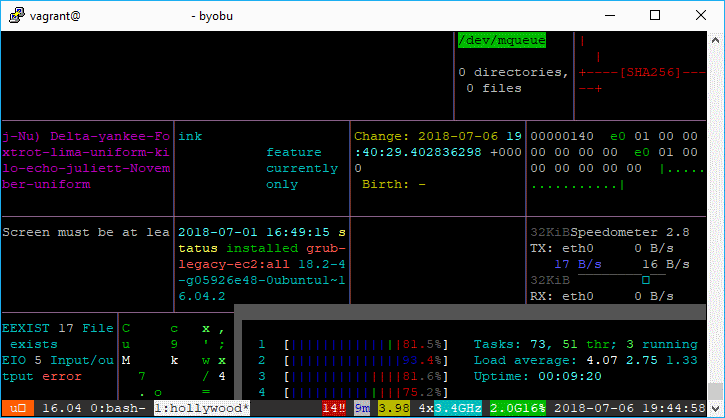
As a kid, we used to dream (at least the one that wanted to work with computer) how cool would be the life, if we could hack everything and do everything what we need with technology. Today I discovered a funny tool that you can let open in your terminal to "impress" the people that look on your screen letting a hacked atmosphere on it.
This tool, named Hollywood let you with a simple command to show up a terminal with multiple areas and random data about specifications of your computer. To install this tool on your ubuntu system, use the following command:
# Install Hollywood package
sudo apt install hollywood

# If the installation fails, update with
sudo apt-get update

# and try installing again
sudo apt install hollywood
The tool needs itself with all the dependencies aroun 300 MB (we'll explain after why), the hollywood package source is available at Github in this repository. After installing the package simply run the fake app with the following command (not necessary to run as root):
hollywoodBut do not be fooled by the output that this tool generates, indeed all the data that you see on the screen is real (that's why installing this package can ocuppy a considerable size in your system). In those tiny windows you will see the output of widely known CLI tools like:
- atop (run as Root)
- bmon
- cmatrix
- dnstop (run as Root)
- ethstatus
- glances
- htop
- ifstat
- iotop
- iptotal
- iptraf-ng
- itop
- jnettop
- kerneltop
- latencytop
- logtop
- netmrg
- nload
- nmon
- ntop
- powertop
- sagan
- slurm
- snetz
- top
- tiptop
- vnstat
So you won't have only an awesome output on your terminal to impress ladies, but a lot of tools that you can use by yourself for network monitoring, specs etc.
Happy "hacking" !

