


This issue happens when you doesn't have a Git windows distribution in your sistem, or you didn't installed correctly.
For example, if you are executing a bower install command, which uses git to clone a registered repository :
bower install --save jqueryyou'll get a clear error :
Running "bower:install" jquery

Fatal error : git is not installed or not in the PATH
Solution
Download a git distribution for windows (the latest version). You'll be able to download it in the official git homepage here, then continue with the installation.
Be careful with the following installation step :
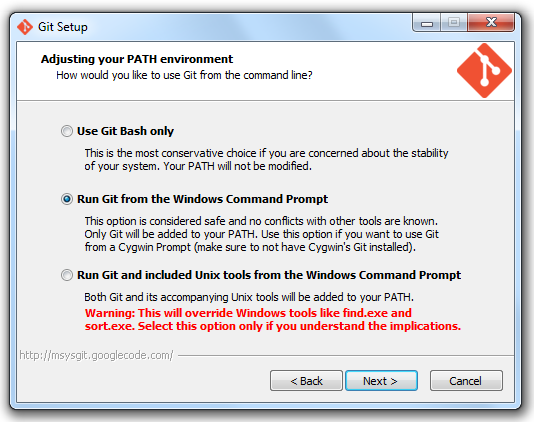
You need to select the 2nd option in the path environment part. Otherwise you'll be not able to use git from command prompts.
If everything went right through the installation, now you can use git as a environment variable on the windows command prompt (or Node.js command prompt).
Note: Remember to close any opened command prompt before the installation. Then open a cmd.exe and git will be available.

