

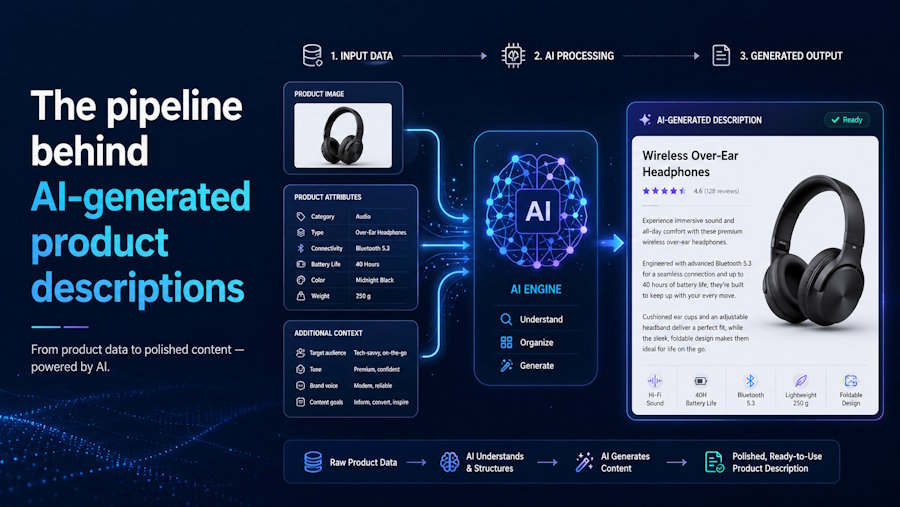
The first time you see the problem, it looks like a straightforward API call. You have a product name, maybe some attributes, and you want a description. You write a prompt, send it to a model, get something back that reads reasonably well, and think: solved. Then someone asks you to do it for ten thousand products, with the right keywords for each one, publishing directly into the correct fields in a WooCommerce or Shopify store, without creating cannibalization issues across similar products, and updating automatically as rankings change over time. That is when you discover there is a pipeline here, not a prompt.
What the system needs before it generates anything
The generation step gets all the attention, but input quality is what actually determines output quality. At minimum, the system needs a product name and a handful of attributes. In practice, it works better with structured category data, variant information such as size, color, and material, existing copy if any exists, and product images.
Images matter more than they might seem. A product photo contains information that attribute fields often do not: surface finish, relative scale, context of use. A well-implemented pipeline runs image analysis alongside the structured data, using what the model extracts from the photo to fill in what the product feed left out. If all you pass in is "Men's Running Shoe - Blue - Size 10," you get a generic description. If the model can also see the image and note the reinforced heel, the ventilation mesh, and the carbon fiber plate, the output tends to be considerably richer, though how much richer depends on the vision model's capability and the quality of the input images.
The other input problem is consistency. Real product catalogs are messy. Some products have ten attributes, some have two. Some have manufacturer descriptions that are technically accurate but written for a spec sheet, not a buyer. A production pipeline needs to handle all of these cases without producing wildly different output quality across a catalog.
Keyword analysis: the step that changes everything
This is the part many developers skip when first building something like this.
Generating fluent text is not the same as generating text that targets a keyword a buyer would actually search for. For that, you need per-product keyword research before generation, not as an afterthought. Providers like DataForSEO expose this via API cleanly enough that it is not hard to integrate, but the integration still needs to happen, and the data needs to feed the generation step rather than existing in a separate report nobody reads.
A common approach is to cluster keywords by topic and assign targets based on difficulty. New product pages with little existing authority get lower-difficulty terms. Pages that have been ranking for a while get assigned more competitive targets. This is one strategy among several, not a rule, and many teams target primary keywords from launch with equal success. What matters is that each product page has a distinct, intentional target rather than whatever keyword felt most obvious at the time.
The reason differentiation matters is cannibalization. In a catalog of several thousand products, it is easy to end up with dozens of pages targeting the same term. This can lead to competing pages and may reduce ranking efficiency for some queries. The pipeline should flag keyword assignment conflicts across the catalog before content is written, so overlaps can be resolved before they become a problem.
Generation: the straightforward part
With clean input and a keyword target assigned, the actual generation is the simplest step in the pipeline. You construct a prompt that specifies the product data, the target keyword, the intended field, and the constraints of the platform the content will publish to.
Those platform constraints matter more than you might expect. Shopify, WooCommerce, and Magento all handle product fields differently. Platforms impose different database field constraints; search engines determine separately how titles are displayed and truncated in results. These are two distinct things worth keeping separate in your implementation. HTML rendering support in description fields also varies across platforms. Some support a short description as a distinct field; others collapse it into the main body. A pipeline that ignores these differences produces output that looks wrong in the store even when it reads well in isolation.
Output validation is worth building explicitly rather than assuming the model will always return something usable. Models occasionally produce descriptions with broken HTML, hallucinated product specifications, or outputs that pass the prompt technically but fail some business rule, like mentioning a competitor by name or including a price that will go stale. Catching these before they reach a review queue or publish directly is much cheaper than catching them after. Structured output parsing libraries and lightweight schema validation can handle a large share of this automatically.
Publishing and the automation layer
How content moves from generated text to live product page is where the pipeline either saves time or creates new manual work.
The minimal version is a review queue: generated content gets staged, a human approves it, and it publishes. That works fine at low volume. At catalog scale, the queue becomes the bottleneck. A production pipeline needs the option to publish directly, at least for lower-risk fields like meta descriptions and alt text, while routing higher-impact fields like product descriptions through a human review step when that level of oversight is wanted.
New product handling is where automation pays off most clearly. When a product is added to the catalog, the pipeline should detect it, run it through keyword analysis, queue it for generation, and either stage it or publish it directly, without anyone manually triggering the process. Catalogs grow continuously. The pipeline should keep up without a human in the loop for each new SKU.
The update loop
A content pipeline that runs once and stops may leave ranking potential on the table. The content that gets a page from unranked to position 15 is not necessarily the content best suited to move it further. As a page builds authority, it may benefit from targeting more competitive terms, though this depends on the specific query, the domain's authority, and other factors outside content alone.
One way to approach this is to monitor ranking data, compare current positions against defined thresholds, and queue content updates for pages that have moved into the next tier. A scheduled job checks rankings, identifies pages that have crossed a trigger threshold, and adds them to the generation queue with a new keyword target assigned. For teams that want this level of iteration, it is a useful loop to build. It is an optimization on top of a working pipeline, not a baseline requirement.
Build vs. buy
If you are evaluating whether to build this pipeline or use something existing, the honest accounting looks like this. The generation step alone takes an afternoon. The keyword research integration, cannibalization flagging, per-platform formatting rules, bulk publishing logic, new product detection, and optional ranking-triggered update cycle take considerably longer. None of it is exotic engineering, but it is a lot of plumbing for something that is not your core product, and it needs ongoing maintenance as platform APIs change. Factor in the cost and latency of running large batches through vision models and external keyword APIs as well; at catalog scale, both add up in ways worth budgeting before you start building.
WriteText.ai is built specifically for this pipeline. It handles content generation across the standard ecommerce fields, runs keyword analysis per product before writing anything, flags keyword assignment conflicts across the catalog, and integrates natively inside WooCommerce, Magento, and Shopify rather than sitting alongside them as a separate tool. On the update side, it identifies pages that are ready to move to more competitive keyword targets and surfaces those as an optimization queue for the team to act on, rather than rewriting live content in the background without visibility. For teams working on ecommerce platforms who encounter this problem and do not want to build the full pipeline from scratch, it is worth evaluating before you start writing the keyword research layer yourself.
The generation is genuinely the easy part. What surrounds it is the product.

