

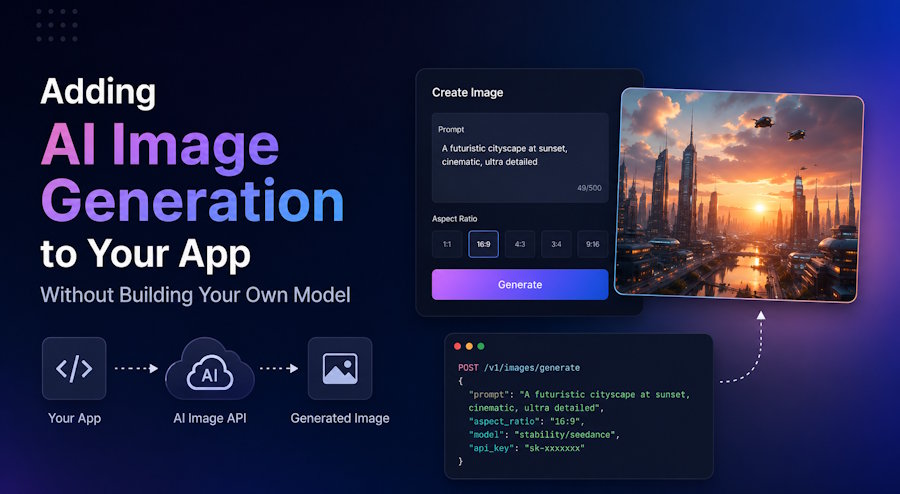
If you have ever wanted to add AI image generation to a product, you have probably run into the same wall most developers hit early on: training or hosting your own model is not realistic for most teams. It takes serious infrastructure, GPU costs add up fast, and keeping a model updated is a full time job on its own.
The good news is you do not need to do any of that. A growing number of products, from design tools to marketing platforms to internal admin panels, add AI image generation simply by calling an API. This post walks through how that works in practice and what to watch out for when you are picking a provider.
Why developers reach for an API instead of self-hosting
Running Stable Diffusion or a similar model yourself gives you control, but it also means managing GPU servers, handling queueing when traffic spikes, and dealing with model updates whenever a newer version comes out. For most apps, none of that is core to the product. The actual feature users want is "type a prompt, get an image back," and an API can deliver exactly that without the operational overhead.
This is the same reasoning that pushed most teams away from self-hosting email servers or payment processing years ago. Unless generating images is your entire business, it usually makes more sense to call a specialized API and focus your engineering time elsewhere.
The tricky part: not every model has an official API
Here is where things get more complicated than they first appear. Some of the most popular image and video generation tools, like Midjourney, were built as consumer products with no official public API. Developers who want to integrate Midjourney into their own app have historically had to either scrape it through unofficial bots or give up and use a different model entirely.
This is one of the reasons generative media API platforms like Apiframe exist. Instead of wiring your app directly to a dozen different providers with a dozen different quirks, you get one consistent API that gives you access to multiple models, including Midjourney via API, plus other image and video generation models, all through the same request and response format.
What the integration actually looks like
At a basic level, adding image generation to your app comes down to three steps:
1. Send a prompt to the API, along with any parameters like aspect ratio or style.
2. Poll for the result, or better, register a webhook so your server gets notified when the image is ready.
3. Store the returned image URL and display it in your app.
A simplified request might look something like this:
curl -X POST "https://api.apiframe.ai/v2/images/generate" \
  -H "X-API-Key: YOUR_API_KEY" \
  -H "Content-Type: application/json" \
  -d '{
    "prompt": "a minimalist logo for a coffee shop, vector style",
    "model": "midjourney",
    "midjourneyParams": {
      "aspect_ratio": "1:1"
    },
    "webhookUrl": "https://yourapp.com/webhooks/apiframe"
  }'
The request returns immediately with a job ID and a status of queued. Once generation finishes, your webhook receives the result, or you can poll the jobs endpoint with that ID until it comes back completed. Either way, you get back a set of CDN-hosted image URLs you can save or display directly.
A few things worth checking before you commit to a provider
If you are evaluating options for your own project, a few practical things matter more than they might seem at first:
- Webhook support. Polling works, but webhooks save you unnecessary API calls and make your backend simpler.
- Multiple models under one API key. Switching between an image model and a video model should not mean integrating a second SDK.
- Clear rate limits and pricing. Generative media jobs can vary a lot in cost depending on resolution and model, so know what you are paying for before you scale.
- Uptime and job status visibility. You want to know quickly if a generation job failed, not find out from a support ticket.
Wrapping up
Adding AI-generated images or video to a product used to require either deep ML expertise or a lot of patience with undocumented workarounds. Today, a single generative media API can cover most of what a typical app needs, whether that is one model or several. If you are building something that needs image generation, video generation, or both, it is worth spending an afternoon testing a provider like Apiframe before deciding to build anything from scratch.

