

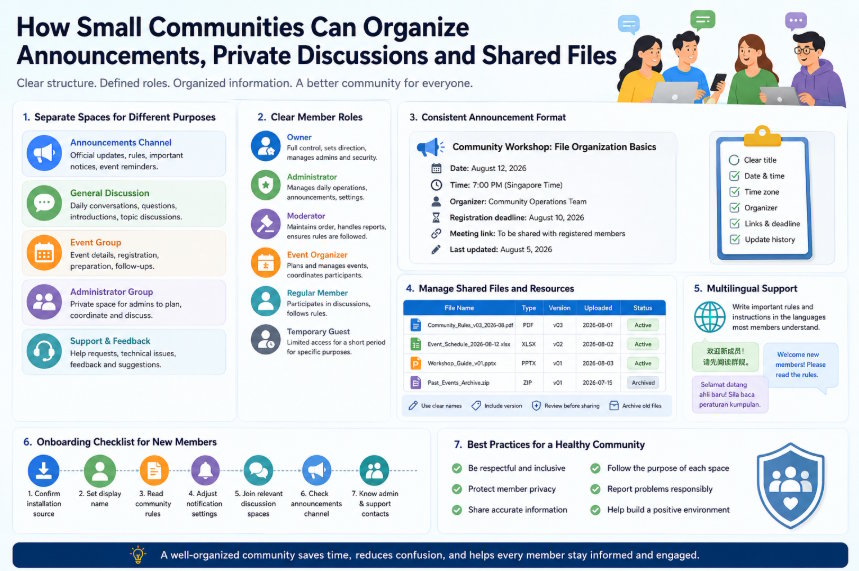
Small online communities often begin with a single group chat. At first, this feels convenient. Members can introduce themselves, ask questions, share files, discuss events, and contact administrators in one place. As the community grows, however, the same structure becomes difficult to manage.
Important announcements may disappear beneath casual conversation. Event registration messages can become mixed with unrelated replies. Support questions may be repeated because earlier answers are hard to find. Shared files may be uploaded several times under different names, while members may not know which version is current.
A more effective community structure separates different types of communication and gives each space a clear purpose. Administrators do not need a complicated system, but they do need consistent rules for announcements, discussions, files, permissions, and member onboarding.
The following practices can help small communities remain organized without making participation unnecessarily difficult.
Separate Announcements From General Conversation
Announcements should not compete with everyday discussion. When important notices are posted in a busy group, they may be visible for only a few minutes before new messages push them out of view.
A practical community structure may include several dedicated spaces.
Announcement channel
The announcement channel should contain only important updates, such as:
- Event dates
- Schedule changes
- New community rules
- Maintenance notices
- Registration deadlines
- Security warnings
- Major resource updates
Posting permissions should normally be limited to the owner and selected administrators. Members may be allowed to react to posts, but long discussions should be moved elsewhere.
General discussion group
The general discussion group can support normal conversation, questions, introductions, and topic-related exchanges. Members should understand that this area is not the official record for important announcements.
Event group
Temporary event groups are useful for workshops, online meetings, watch parties, study sessions, or community campaigns. They can contain registration information, preparation materials, event reminders, and follow-up discussion.
After the event is complete, the group can be archived or closed rather than remaining active indefinitely.
Administrator group
Owners, administrators, moderators, and event organizers need a private space for operational decisions. This area can be used to review member reports, prepare announcements, assign responsibilities, and discuss sensitive issues.
Support and feedback group
Support questions often interrupt normal discussion. A dedicated support area makes it easier to identify unanswered questions, publish recurring solutions, and collect suggestions.
Each communication space should have a short description explaining its purpose. New members should not need to guess where to post.
Verify the Platform Before Inviting Members
Community administrators are often responsible for helping new members join the correct platform. This creates an additional responsibility: installation instructions should not direct people to an unclear or unofficial source.
Community administrators should confirm the correct potato 官网入口 before sharing installation instructions with new members.
Before publishing a setup guide, administrators should review:
- The domain name
- The download source
- Available desktop and mobile versions
- Support documentation
- Language settings
- Privacy information
- Update instructions
The same installation instructions should not be copied indefinitely without review. Links may change, mobile store listings may be updated, and desktop versions may use different installation methods over time.
Administrators should also avoid uploading installation packages directly into community groups unless there is a clear operational reason. Sharing a verified source page is usually safer than redistributing an installer whose version may later become outdated.
When several platform versions are available, the onboarding guide should explain which one members need. For example, mobile users may install through an app store, while desktop users may need a Windows installer or browser version.
Create Clear Member Roles
A community becomes easier to manage when responsibilities are assigned clearly. Not every trusted member needs full administrative access.
A useful role structure may include the following.
Owner
The owner has final responsibility for the community. This role normally controls major settings, appoints administrators, reviews serious disputes, and manages long-term direction. Because the owner may have broad permissions, the account should use strong authentication and should not be shared casually.
Administrator
Administrators manage daily operations. They may publish announcements, approve members, organize discussion spaces, update rules, and coordinate moderators. The number of administrators should remain limited. Too many people with broad permissions can make accountability unclear.
Moderator
Moderators focus on discussion quality and member behavior. Their responsibilities may include removing spam, responding to reports, guiding conversations, and warning members who repeatedly ignore community rules. Moderators do not always need access to account settings or ownership controls.
Event organizer
An event organizer manages a specific activity. This role may prepare schedules, answer event questions, publish reminders, and collect attendance information. Temporary event permissions can be removed after the activity ends.
Regular member
Regular members participate in discussions, access shared resources, and join events. Their permissions should support normal participation without allowing them to change community structure.
Temporary guest
A temporary guest may be invited for a short event, presentation, consultation, or trial period. Access should be limited to relevant spaces and reviewed after the invitation expires.
Role descriptions should be written down. When members understand who is responsible for announcements, moderation, support, and events, they know where to direct questions.
Build a Consistent Announcement Format
Announcements are easier to understand when they follow the same structure.
A reliable announcement should include:
- A clear title
- Date and time
- Time zone
- Responsible organizer
- Event or resource link
- Registration deadline
- Required preparation
- Update history
For example:
|
Community Workshop: File Organization Basics |
Using a consistent format reduces follow-up questions. Members can quickly identify the information they need without reading several paragraphs.
When an announcement changes, administrators should update the original post when possible. A short update note should explain what changed. Publishing multiple conflicting versions can cause members to follow outdated instructions.
For recurring events, administrators can maintain a standard template and change only the relevant details.
Organize Private and Public Discussions
Not every conversation belongs in a public community space.
General questions, topic discussions, event ideas, and non-sensitive feedback can usually be discussed publicly. Public answers also help other members who may have the same question.
Private discussion is more appropriate for:
- Member complaints
- Account access problems
- Personal disputes
- Reports involving harassment
- Payment or billing information
- Private contact details
- Sensitive moderation decisions
Administrators should provide a clear reporting channel. Members should know how to contact a moderator without posting personal details in the main group.
Community rules should prohibit sharing private information without permission. This includes phone numbers, home addresses, identification documents, private messages, financial details, and confidential workplace information.
Moderators should also avoid discussing reported members publicly before reviewing the situation. A fair process protects both the reporting member and the person being reported.
Manage Shared Files and Resources
File sharing can become disorganized quickly. Members may upload several copies of the same document, use unclear file names, or continue sharing outdated versions.
A basic file-management policy should cover naming, formats, versions, approval, expiration, external links, and archiving.
Useful file names might include:
- community_rules_v03_2026-08.pdf
- event_schedule_2026-08-12.pdf
- member_guide_windows_v02.docx
- resource_list_2026-Q3.xlsx
Avoid names such as:
- final.pdf
- new_final.pdf
- latest2.docx
- document_updated_REAL.pdf
File names should explain what the file contains and which version is current.
Administrators should also define approved file types. Standard documents, spreadsheets, images, and PDFs are normally easier to review than executable files or unfamiliar archives.
Important files should be checked before publication. The reviewer should confirm:
- The content is accurate
- The file opens correctly
- The version number is current
- Personal information has been removed
- External links are still active
- The file does not contain unnecessary macros or scripts
Expired files should be removed from active channels and moved to an archive when historical access is useful.
A pinned resource index can help members locate the latest versions without searching through old messages.
Support Multilingual Members
Communities often include members who use different interface languages. This can make instructions difficult to follow because menu names and settings may appear differently on each device.
Communities using a potato 中文版聊天软件 should document menu names, notification settings, and group rules in the languages most members understand.
Administrators do not need to translate every casual message. Priority should be given to:
- Community rules
- Installation instructions
- Security notices
- Event announcements
- Reporting procedures
- Support instructions
- Privacy guidance
When possible, translated instructions should include both the localized menu name and the English equivalent. This helps members who use different app versions or operating system languages.
For example:
- Notifications / 通知
- Privacy / 隐私
- Storage / 存储
- Active Sessions / 活跃会话
Screenshots can also help, but they should be updated when the interface changes.
Multilingual communities should appoint trusted members who can clarify important instructions. However, unofficial translations of rules should be reviewed before publication to prevent misunderstandings.
Create an Onboarding Checklist
A structured onboarding process helps new members understand the community before they begin posting.
A practical checklist may include:
- Confirm the installation source.
- Set a recognizable display name.
- Read the community rules.
- Disable unnecessary notifications.
- Join the appropriate discussion spaces.
- Review recent announcements.
- Identify the administrators and support contacts.
- Learn how to report a problem.
- Review file-sharing rules.
- Check the event calendar.
The welcome message should be short enough to read but detailed enough to prevent common mistakes. It can link to a separate guide containing full instructions.
Administrators should review the onboarding process periodically. Questions repeatedly asked by new members often reveal that one part of the guide is unclear or missing.
Conclusion
Effective community management depends more on structure than on group size. Even a small community can become difficult to manage when announcements, casual discussion, support questions, private complaints, and shared files are mixed together.
A better system separates communication spaces, defines member roles, standardizes announcements, protects private discussions, controls shared files, supports multiple languages, and gives new members a clear onboarding path.
These practices do not require a large administrative team. They require consistent expectations and regular review. When members know where to find information, where to ask questions, and who is responsible for each task, the community becomes easier to operate and more useful to everyone involved.
Prepared for publication on OurCodeWorld.com |

