

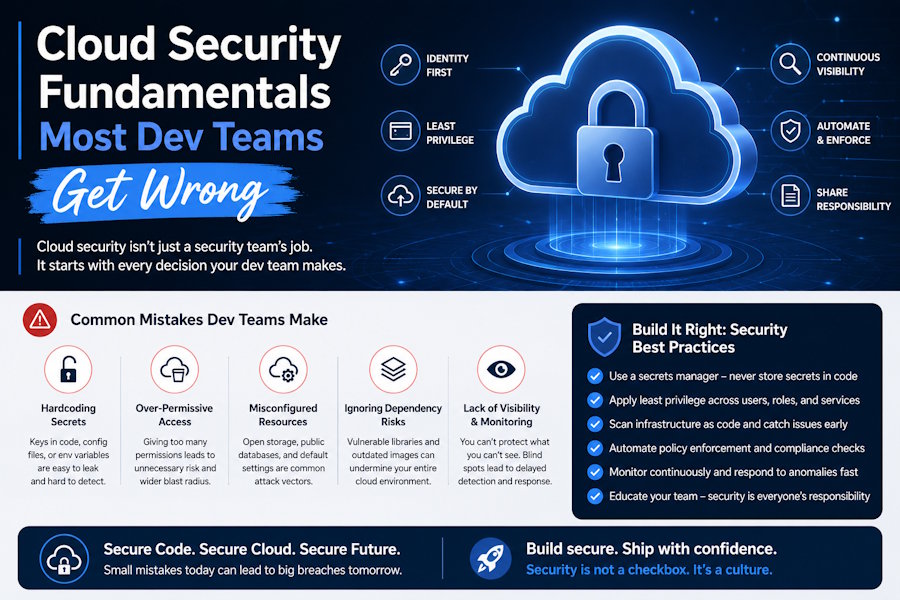
Let’s imagine that one of your developers spins up an S3 bucket to share a build artifact with a client when the weekend is approaching. The default gets left open…
Why? Because closing it properly means finding the right bucket policy syntax, and the client needs the link in five minutes.
Eight months later, nobody on the team remembers the bucket exists.
It is not only public but full of build logs that happen to contain an API key someone hardcoded in 2024, and a scanner bot found it long before anyone on the team did.
Blame is the wrong lens here.
This is just what happens when cloud security lives on as a checklist activity. The fundamentals underneath that bucket are not complicated, and none of them require a dedicated security hire to get right.
A junior engineer can implement every idea in this piece in an afternoon. Most teams simply never carve out that afternoon until a scanner, an auditor, or an attacker forces the issue.
The shared responsibility model is doing less than what you assume
AWS, GCP, and Azure all publish some version of the same diagram. The provider secures the hypervisor, the physical data center, the network backbone, and the managed service itself. Everything running on top of that from your IAM policies and your bucket permissions to your choice to reuse one root access key across three environments will stay entirely on you.
Almost every headline cloud breach traces back to this same scenario, and it is rarely the provider actually failing.
A misconfigured S3 bucket is a configuration failure. So is a root account running without MFA, or an overly broad IAM role attached out of convenience during a demo and never revisited.
The provider held up its end of the deal.
Nobody configured the other half, and the diagram buried in the onboarding docs never made that split obvious enough for a busy team to internalize.
What’s more, this gap gets worse the moment a stack stops being purely cloud.
A team running part of its infrastructure in the cloud and part self-hosted ends up owning security across two environments with two different responsibility lines and two different sets of defaults to double-check.
A lot of the real security risks of cloud computing fall into the same bucket, where a team assumes the provider covers something it explicitly does not, and finds out the hard way during an incident review.
Encryption must never be optional
Encryption at rest and encryption in transit are two separate settings, and treating them as one checkbox is where most teams go wrong.
Whether your data is sitting in a database or an S3 bucket, it needs encryption at rest, usually handled through a KMS key the provider manages or one your team controls directly. Data moving between a client and your server needs TLS, and TLS 1.2 is the practical floor at this point.
A basic self-managed setup can get most of the way there with tools that have existed for over a decade. GnuPG can encrypt a single sensitive file before it ever leaves a local machine, using a strong symmetric cipher that takes one command to run and no infrastructure to maintain.
Our guide to Linux security best practices goes deeper into GnuPG, TLS configuration, and the backup tooling that pairs with it. The point worth remembering here is that encryption that only covers half the data's lifecycle protects only against half the actual risk.
Key management is where most encryption setups quietly fall apart. A provider-managed KMS key rotates automatically and gets audited for you.
On the other hand, a key generated once and hardcoded into a deployment script years ago does neither. What’s worse, nobody notices until a security review asks who has access to it and the honest answer is everyone who has ever had shell access to that server.
Access control need not necessarily demand more locks by default
Most often, teams reach for more permissions when something breaks. This is due to the belief that granting broad access will fix the immediate problem faster than scoping the permissions down.
However, this habit may lead to circumstances where a junior developer ends up with the same IAM role as the infrastructure lead. This is precisely how a service account built for one Lambda function quietly gains access to an entire production database.
The principle of least privilege exists specifically to negate this drift. A stakeholder should get only the permissions their job demands without getting irrelevant permissions from a broader policy just because it was easier to map.
A policy scoped down to read access on a single bucket, and nothing else, takes maybe thirty extra seconds to set up compared to attaching a broad administrator-level policy out of convenience.
Those thirty seconds matter more than they sound like they should. They are usually the difference between a compromised token exposing one folder and a compromised token exposing everything your company has ever stored.
Multi-factor authentication belongs in this same category. Enforcing MFA on every root and admin account blocks a huge share of credential-based attacks for close to zero engineering effort. However, it remains one of the most commonly skipped settings in real production accounts.
Temporary credentials are the other half of least privilege that teams tend to skip.
A long-lived access key sitting in an environment variable is a liability the moment it leaks, and it can leak in a dozen boring ways such as a misconfigured CI log, a screenshot in a support ticket, a laptop left in a taxi. Short-lived credentials issued through something like AWS STS expire on their own, which means a leaked one only matters for the window it was still valid.
Backups don’t count if no one has tested the restore
A backup that has never been restored is not really a backup. Automated snapshots and cross-region replication solve the easy half of the problem of actually copying the data somewhere else.
They do nothing for confirming that a restore actually works under pressure while a stakeholder is waiting on an update.
Set objectives for recovery point and time, and anything that matters. Write both numbers down somewhere the whole team can see them, and run a restore drill on a schedule.
The old 3-2-1 rule still holds up well for hybrid teams: three copies of your data on two different types of storage, with at least one copy somewhere physically separate from the rest.
It predates cloud computing by decades and still describes what a cloud snapshot plus an offsite replica, along with a local copy. The rule never changed, except for the tools implementing it.
Audit trails exist to ensure it is not just a gut instinct
An audit trail is a record of who touched what and when. In a cloud environment, that usually means something like AWS CloudTrail, GCP's Cloud Audit Logs, or an equivalent centralized log your team actively reviews.
The value shows on the day something goes wrong and someone needs to reconstruct what happened. Teams that skipped logging find out how expensive that skip was right around the same time they are already dealing with a breach.
Logs come in handy if someone actually looks at them before that day arrives. A CloudTrail bucket collecting data nobody has ever queried is better than no logging at all.
A basic alert on unusual API activity, a new IAM user created outside business hours, or a spike in failed login attempts turns a passive log into something that actually catches a problem while it is still small.
What to do when the fundamentals fail anyway
Even a team that gets every one of the sections above right can still get breached. Attackers only need one gap, and fundamentals reduce the odds without ever reducing them to zero.
What actually separates a contained incident from a catastrophic one is usually the plan a team had ready before anything happened, not anything they figure out in the moment.
Our walkthrough on what to do immediately after a cybersecurity breach covers the first hours in more detail. The short version is that speed and a clear chain of command matter more than perfect information in the first hour, and most teams without a written plan waste that hour arguing about who should be making the call.
Compliance and data retention go hand in hand
GDPR, SOC 2, and most other security frameworks agree on the same basic requirements of knowing what personal data you hold, why you are holding it, and how long you plan to keep it before deleting it.
Engineering teams tend to treat this as a legal problem that lives in a different department, right up until an auditor asks for a data flow diagram nobody has ever drawn.
Data retention is the technical half of the same conversation. Old customer exports, stale database snapshots, and log files nobody set an expiry on all count as data you are still responsible for, whether or not anyone remembers they exist. Lifecycle policies exist specifically to remove the need to remember. An S3 lifecycle rule that automatically deletes objects in a given prefix after ninety days does more for compliance than a written policy nobody enforces.
GDPR specifically adds a wrinkle most engineering teams underestimate about the right to erasure. Deleting a user properly means clearing them from the primary database, every backup, every replica, every export sitting in a data warehouse, and every log line that contained their email address.
Building deletion into the data model from day one is dramatically cheaper than retrofitting it across six systems after a legal team asks for proof it happened within thirty days.
The uncomfortable part
Every fundamental in this piece is easy to understand on its own. Shared responsibility, encryption, least privilege, tested backups, real audit logs, an incident plan, and a retention policy are all concepts a junior engineer can grasp in an afternoon. Knowledge was never the actual gap. Calendar time is, the kind that gets scheduled before something forces the issue instead of after.
The S3 bucket from the first paragraph is still out there on more teams than would like to admit it. Fixing it takes less time than writing the postmortem will.

