

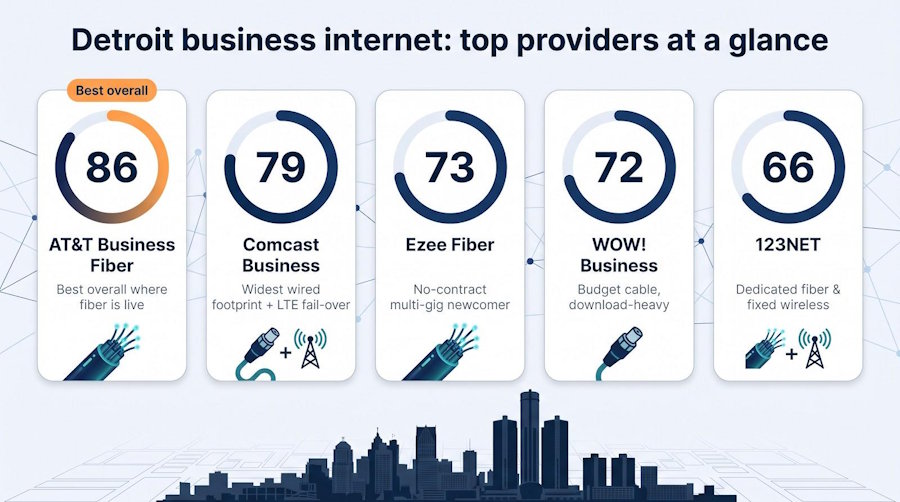
Finding the best business internet in Detroit starts with one question: what reaches your exact address? Our bottom line: pick AT&T Business Fiber when its symmetrical speeds hit your door, turn to Comcast Business for the city’s widest wired footprint, and choose WOW! Business when every dollar counts on cable. In the pages ahead, we cut through promo glitter to compare real-world upload rates, contract traps, and fail-over options - so you can sign once and stay productive. Data verified August 4, 2026.
Quick comparison: Detroit business internet at a glance
Every figure below was confirmed August 4, 2026, so you can weigh speed, price, and resilience in a single scan.
|
Provider |
Best for |
Connection |
Advertised speed (D/U) |
Starting price |
Contract |
Static IP |
Auto backup |
SLA / credits |
Detroit reach* |
Score |
|
WOW! Business |
Budget, download-heavy cable |
DOCSIS 3.1 coax |
600 / 51 Mbps<br>(1.2 Gbps / 60 Mbps max) |
$65.99 |
1–3 years (see fine print) |
$14.99/mo |
$44.99/mo |
99 percent reliability (no SLA) |
ZIP-listed pockets |
72 |
|
AT&T Business Fiber |
Best overall where fiber is live |
Shared GPON fiber |
300 Mbps–5 Gbps symmetrical |
$60 |
None |
Add-on |
5G on 1 Gbps and above |
99.9 percent credit |
Address-level fiber |
86 |
|
Comcast Business |
Widest wired footprint + LTE fail-over |
HFC cable |
300 Mbps–2 Gbps down<br>upload not published, ~35 Mbps ceiling on older plant |
$70 |
1 year (5-year price lock) |
Yes |
$35 LTE |
99.99 percent on DIA |
~89 percent of addresses |
79 |
|
Ezee Fiber |
No-contract multi-gig newcomer |
XGS-PON fiber |
1–8 Gbps symmetrical |
$99 |
None |
Add-on |
Not yet |
DIA optional |
Early-stage build |
73 |
|
123NET |
Regional dedicated & fixed wireless |
Fiber DIA / microwave |
Up to 400 Gbps DIA |
Quote |
Quote |
Yes |
Fixed-wireless alt |
Custom |
4,500 mi fiber + 55 towers |
66 |
Availability comes from the FCC’s Broadband Data Collection (data as of June 30, 2025, published January 2026) and each provider’s Detroit pages. Taxes, equipment fees, and construction costs may apply. Always run the exact street address before signing a contract.
Pause for a moment and spot the column that matters most: price, upload symmetry, or uptime guarantees. The next sections unpack each trade-off so you can choose once and keep your business moving.
How we compared Detroit business internet providers
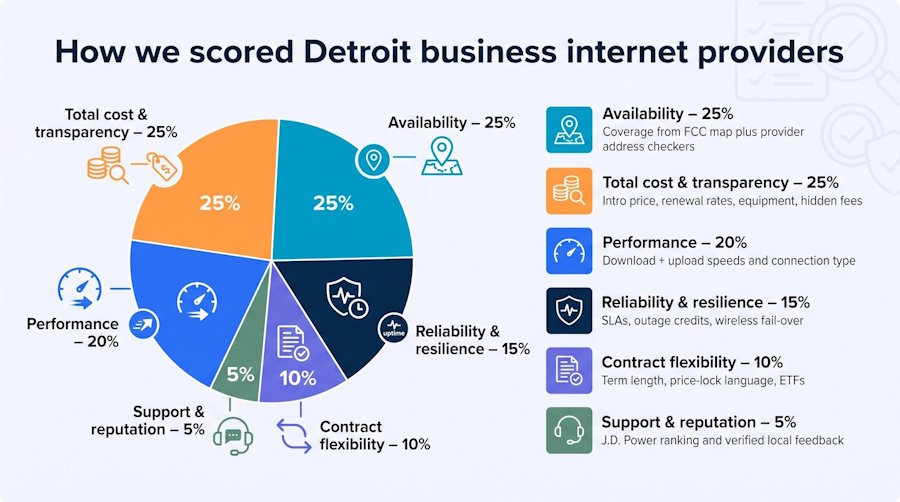
Our score weighs six factors, each chosen to answer the questions businesses ask most often:
|
Criterion |
Weight |
What we measured |
|
Availability |
25 percent |
FCC Broadband Map data verified by each provider’s address checker |
|
Total cost & transparency |
25 percent |
Intro price, renewals, equipment, install, hidden fees |
|
Performance |
20 percent |
Advertised download + upload speeds and connection type |
|
Reliability & resilience |
15 percent |
Written SLAs, outage credits, and automatic wireless fail-over |
|
Contract flexibility |
10 percent |
Term length, price-lock language, early-termination fees |
|
Support & reputation |
5 percent |
2026 J.D. Power small-business ranking and verified local feedback |
Why evidence matters: every data point comes from an official rate card, FCC filing, or a timestamped screenshot. Anecdotes such as Reddit threads or installer tips stay in the margins; they add context but never change the score. This ladder of proof keeps hype out and lets you trust the numbers that follow.
1. WOW! Business: the budget cable pick for download-first shops
Start at WOW!’s Detroit business internet provider portal; it lists every Detroit ZIP code the company serves along with a 99 percent network-reliability claim, 24/7 U.S.-based support and a 60-day satisfaction guarantee. Then plug in your exact address for a live quote.
WOW!’s pitch is clear: 600 Mbps down for $65.99 per month or 1.2 Gbps for $70.99, on DOCSIS 3.1 coax, with a 1-year or 3-year agreement. Uploads are 51 Mbps on the 600 Mbps tier and 60 Mbps on 1.2 Gbps, the typical figures WOW! files on its own FCC Broadband Facts labels. The Detroit page leaves two numbers off and the same labels supply both: the standing rate for the 600 Mbps business plan is $89.99 with no contract and no early-termination fee, and the modem runs $11 per month once the three free months end. The term is what buys the $24 discount, not a lock you cannot avoid. HighSpeedInternet reports the early-termination fee on the term product as 75 percent of the remaining monthly service charges, so get that confirmed in writing before you sign one.
Extras add up. Whole-Business Wi-Fi powered by eero costs $19.99 per month for two access points, static IPv4 addresses run $14.99 per month, and standard installation is free.
WOW! suits retail counters, cafés, and creative studios that stream, browse, and swipe cards all day but rarely push large files upstream. Cloud-backup teams should weigh the low entry price against that 51-to-60 Mbps upstream ceiling and possible evening congestion, though it sits above the roughly 35 Mbps ceiling Comcast documents on older coax.
Before you sign, confirm four numbers: 1) the exact upload speed at your address, 2) contract length, 3) the rate on invoice 13, and 4) static-IP cost. Nail those, and WOW! can be the least-cost way to move data downstream without straining your budget.
2. AT&T Business Fiber: best overall when fiber reaches your door
AT&T keeps the math simple: choose 300 Mbps, 500 Mbps, 1 Gbps, 2 Gbps, or 5 Gbps. Every tier is symmetrical and contract-free, and pricing starts at $60 per month with no equipment fee (online catalog, August 4, 2026). Professional installation is included.
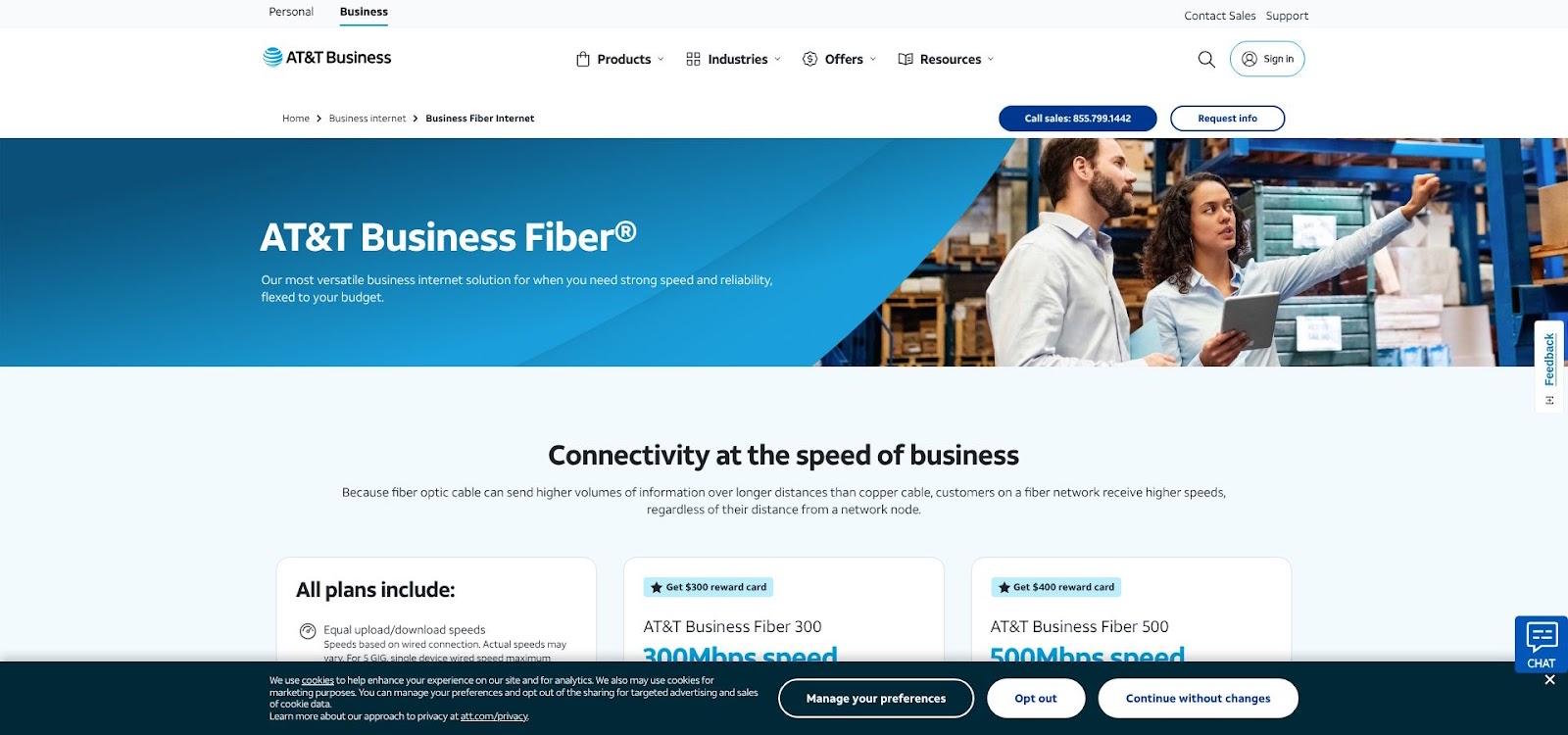
AT&T Business Fiber Internet Plans Page Screenshot
When you pick 1 Gbps or higher, the gateway’s built-in 5G radio takes over automatically if the fiber goes dark. You get 250 GB of wireless data before speeds may slow, enough to run card readers, email, and cloud docs through an afternoon outage. Lower tiers can add managed 5G backup for a small premium. Bring a UPS because the modem still needs power during an outage.
Reliability comes with paperwork, not hype. Shared Business Fiber issues credits after 20 minutes of continuous downtime, while Dedicated Internet carries a 100 percent uptime SLA. Support scores are strong as well: AT&T topped J.D. Power’s 2026 small-business internet study with 686 points, beating every other national ISP.
The catch is geography. Fiber stops block by block; one Midtown loft gets 2 Gbps, the café next door sees only legacy copper. Always enter your exact address before you budget.
If your address lights up green, we see AT&T Business Fiber as Detroit’s closest thing to a just-works line: transparent pricing, uploads that match downloads, and automatic backup included - ideal for cloud-heavy teams, video creators, and anyone who sweats every lost packet.
3. Comcast Business: widest wired footprint and built-in fail-over extras
If fiber skips your block, there is a good chance the hybrid-fiber-coax (HFC) drop outside belongs to Comcast. ISPReports, working from the FCC’s Broadband Data Collection as of June 30, 2025 and published January 2026, puts Comcast cable at about 89 percent of Detroit addresses, the widest wired reach in the city by a distance.
Plans and pricing (online catalog, August 4, 2026)
- 300 Mbps, 500 Mbps, 1.25 Gbps, 2 Gbps
- $70 per month for 300 Mbps, rising to $100 in year 2 and $140 in year 3
- A five-year price-lock option still starts with a one-year initial term
Resilience add-ons
Wireless Connect costs $35 per month and supplies an LTE modem with battery backup; if the cable line fails, traffic moves over automatically. SecurityEdge and static-IP blocks are sold à la carte.
Uploads are the catch, and Comcast publishes no figure per business tier: on older plant they can top out around 35 Mbps, and the number varies by node. That is below the 51 to 60 Mbps WOW! files on its own FCC labels for the same class of coax, so uploads are not a column Comcast wins here. Ask the rep for the exact provisioned upload on your quoted tier in writing before you sign.
Remember, Comcast’s standard Business Internet has no formal SLA; the 99.99 percent uptime guarantee applies only to its Dedicated Internet product.
Comcast is the pragmatic choice when availability outweighs symmetry. You can rely on one vendor for internet, phone, mobile, and TV, plus automatic LTE backup - just budget for the year-two price jump before you commit.
4. Ezee Fiber: no-contract multi-gig newcomer
Houston-based Ezee Fiber announced its Metro Detroit build on February 18, 2026, pledging symmetrical service up to 8 Gbps across Wayne, Oakland, Macomb, Washtenaw and four more counties, with installations starting in the second quarter. Current business pricing (captured August 4, 2026) stays flat:
|
Speed (sym.) |
Monthly rate |
Contract |
Equipment / install |
|
1 Gbps |
$99 |
None |
Free, Wi-Fi 7-ready eero |
|
2 Gbps |
$129 |
None |
“ |
|
5 Gbps |
$159 |
None |
“ |
|
8 Gbps |
$249 |
None |
“ |
A static IPv4 address is available as an add-on rather than bundled into a tier, and Ezee’s terms read “No Term Contracts. No Hidden Fees” with the price you sign up for being the price you keep. Ask the rep to put the no-increase commitment in writing if you plan to change tiers or move offices, and to quote the static IP separately.
Need tighter uptime? Ezee quotes dedicated enterprise service up to 100 Gbps with a formal SLA.
Rollout reality: Ezee announced Metro Detroit in February 2026 with installations starting in the second quarter, so anyone signing now is in the first cohort on new plant. Fresh overbuilds routinely produce splice-related outages in the opening weeks, which is rough if your POS or cameras rely on a single circuit. Keep your existing line active for the first month and test failover before you cancel it.
Use Ezee when your address sits inside the live build and you crave multi-gig uploads without a long contract. Keep a backup link for 30 days, test fail-over, and get the lifetime-price clause in writing before you celebrate symmetrical speed.
5. 123NET: regional heavyweight for dedicated fiber and fixed wireless
Southfield-based 123NET manages more than 4,500 route-miles of Michigan fiber and can serve more than 200,000 commercial buildings statewide (provider fact sheet, accessed August 4, 2026). Inside Detroit, this glass network teams with 55 licensed microwave towers, letting you choose a buried strand, a rooftop radio, or both.
Why “dedicated” matters: when you order 123NET’s Dedicated Internet Access (DIA), the last-mile fiber belongs only to you, so there are no neighbors and no prime-time slowdowns. Bandwidth scales from 100 Mbps to 400 Gbps, backed by customizable SLAs and options such as dual entrances, BGP, and four-hour truck rolls.
Pricing stays quote-only because every build is different. A single-story Corktown warehouse rarely costs the same as a thirty-story Downtown office. The engineer will ask for floor plans, conduit paths, and cross-connect details before naming a dollar figure; that extra step prevents promises that collapse during construction.
Resilience playbook: many Detroit IT teams pair 123NET fiber with its licensed microwave link from a separate tower. If a construction cut occurs, traffic swings to the radio path automatically, keeping card terminals, cameras, and cloud apps online until the splice crew finishes.
Choose 123NET when the cost of downtime is larger than the monthly line item. A small design studio may find the quote steep, but a plant that loses $10,000 a minute during an outage will view it as practical insurance.
Providers to check when the big five miss your address
If every major checker shows a red light, we suggest a closer look at these niche or low-footprint players:
|
Provider |
Connection |
Notable offer* |
Contract |
Detroit footprint |
|
Spectrum Business |
HFC cable |
500 Mbps for $65, 750 Mbps for $95, 1 Gbps for $115; uploads plateau around 35 Mbps at every tier |
None |
Not listed in current Detroit availability data; run the address checker before you plan around it |
|
Metro Wireless |
Licensed fixed-wireless |
Install in about two weeks; speeds and price quote-only (sales sheet, August 2026) |
Custom |
24/7 Detroit NOC, rooftops only |
|
Zentro |
Managed fiber / Wi-Fi |
Multi-tenant and event connectivity; pricing by property manager |
Varies |
Select downtown buildings and hotels |
|
T-Mobile Business Internet |
Mid-band 5G |
Desktop modem averages 200 Mbps or more down in light-tower load (company FAQ, August 2026) |
Month-to-month |
Tower signal and CGNAT vary block to block; test ports first |
|
Metronet |
FTTP fiber |
No published SMB rates; watch for build signs |
Varies |
FCC lists “low coverage” inside city limits |
All figures captured August 4, 2026; taxes, equipment, and fees may apply.
Add these names to your spreadsheet, run each availability tool, and you may uncover the last-mile gem that keeps projects on schedule when the majors say “not yet.”
What Detroit business internet really costs after the promo
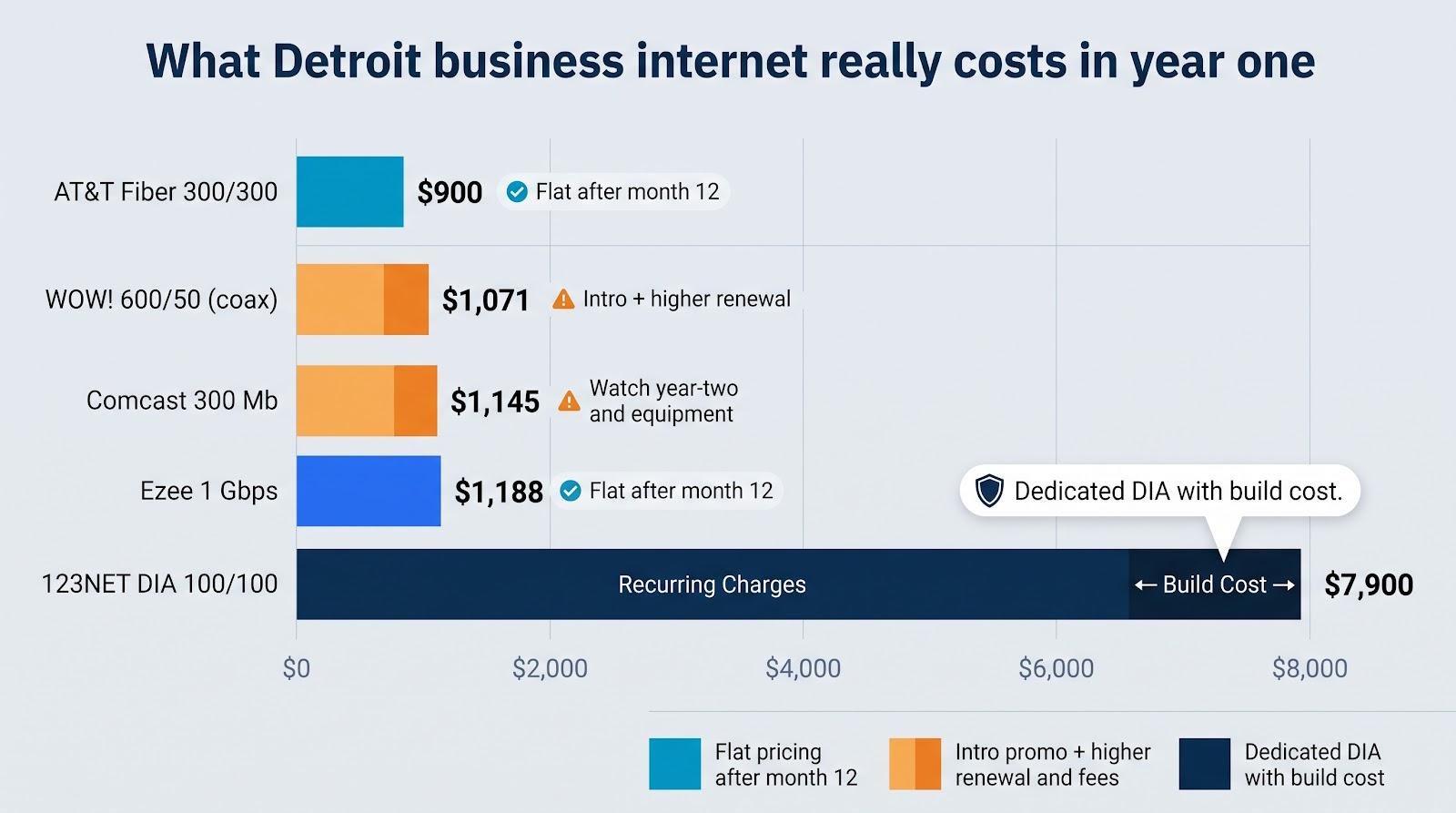
Intro rates grab headlines, but renewal rates hit bank accounts. The grid below shows published prices captured August 4, 2026, and what they look like after month 12. Taxes, paper-statement surcharges, and bundle offsets are excluded.
|
Provider & tier |
Term price |
Standing price (no term) |
Equip |
Install |
Static IP |
Backup fee |
Contract |
ETF |
Est. first-year total* |
|
WOW! 600/51 (coax) |
$65.99 |
$89.99 (FCC label, no contract, no ETF) |
Free 3 months, then $11/mo |
$0 |
$14.99/mo |
$44.99/mo |
1–3 years |
up to 75 percent of remaining balance (per HighSpeedInternet) |
$1,071 incl. static IP |
|
AT&T Fiber 300/300 |
$60 |
$60 |
$0 |
$0 |
Quote; blocks of 8 (5 usable) |
Included on 1 Gbps and above |
None |
None |
$720 + static IP |
|
Comcast 300 Mb |
$70 |
$100 in year 2, $140 in year 3 |
$0 |
$0 |
$24.95/mo |
$35 |
1 year |
Pro-rated |
$1,145 |
|
Ezee 1 Gbps |
$99 |
$99 “lifetime” |
$0 |
$0 |
Add-on, quote |
None built in |
None |
None |
$1,188 + static IP |
|
123NET DIA 100/100† |
$450 |
$450 |
Included |
about $1,500 build |
Included |
Fixed-wireless alt |
3 years (typ.) |
Quote |
$6,900 |
Totals assume paperless billing and waived install credits where noted.
†123NET figures are a representative quote; every dedicated build is custom.
Key lessons:
- Flat beats flashy: AT&T and Ezee keep the same sticker after month 12.
- Comcast discloses the hike, so budget for it.
- WOW!’s headline is a term rate. Add the $11 modem after month three, and note that WOW!’s standing no-contract rate for the same 600 Mbps plan is $89.99 on its FCC label. The commitment is what buys the $24 discount.
- Dedicated fiber is expensive up front but priceless when an hour offline costs four figures.
Run your own 12-month math that includes equipment, static IP, backup, and the worst-case renewal number, then negotiate or keep shopping. Detroit competition now rewards a little push-back.
Detroit availability by ZIP code and neighborhood
Detroit connectivity changes block to block, and no published map settles it. The grid below shows what each provider publishes for these ZIPs, which is a screening step, not an answer. Run your own suite number through all five checkers and screenshot each result before you shortlist anyone.
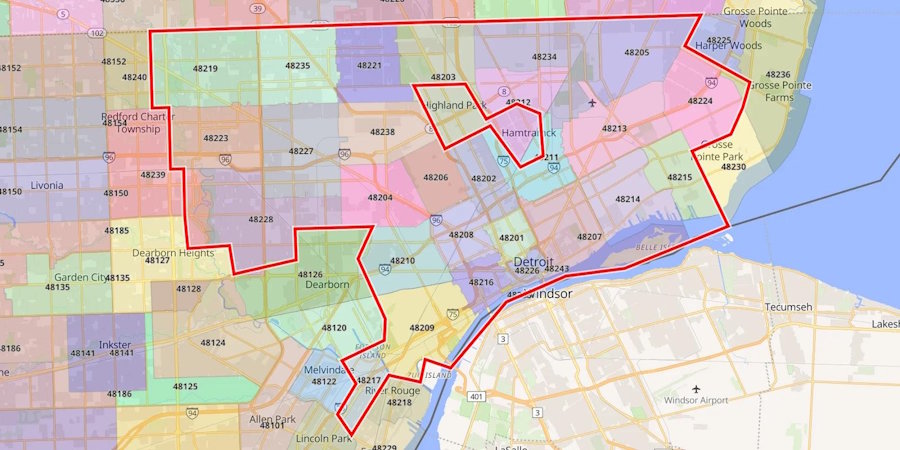
Detroit ZIP Code Map Showing Business Internet Availability
|
ZIP / neighborhood |
WOW! page list |
AT&T Fiber |
Comcast |
Ezee Fiber |
Regional alt (123NET / Metro) |
|
48226 Downtown |
N/A |
Not available |
300–2,000 Mb down |
Coming soon |
123NET DIA quote |
|
48201 Midtown |
Yes |
500–2,000 Mb sym. |
300–2,000 Mb down |
Planned |
123NET DIA + fixed wireless |
|
48202 New Center |
Yes |
No fiber |
300–2,000 Mb down |
N/A |
Metro Wireless 500/500 |
|
48207 Eastern Market |
Yes |
300–1,000 Mb sym. |
300–2,000 Mb down |
N/A |
123NET DIA |
|
48216 Corktown |
Yes |
1,000 Mb sym. |
300–2,000 Mb down |
Planned |
123NET DIA |
|
48209 Southwest |
Yes |
No fiber |
300–1,000 Mb down |
N/A |
Metro Wireless |
|
48214 East Side |
Yes |
300 Mb sym. |
300–1,000 Mb down |
N/A |
123NET DIA |
|
48219 Northwest |
Yes |
300–500 Mb sym. |
300–2,000 Mb down |
N/A |
123NET DIA |
Published availability as of August 4, 2026. “sym.” means symmetrical upload and download.
What jumps out:
- Comcast is the near-ubiquitous wire. Every sampled address qualified for at least the 300 Mb tier.
- AT&T fiber leaps street to street. Midtown and Corktown see multi-gig, while New Center still waits.
- WOW!’s ZIP list is published, which makes it checkable, and it has an edge. The twelve ZIPs are 48201, 48202, 48203, 48205, 48207, 48209, 48213, 48214, 48216, 48219, 48223 and 48227, spanning the far east side, southwest and far west as well as downtown. 48226, the central business district, is not on it. That is unusual and useful: most providers publish nothing you can check at all.
- Ezee remains “coming soon” inside the core. Keep an eye on its rollout map if you need multi-gig uploads.
- Regional providers fill the gaps. 123NET markets dedicated fiber city-wide and Metro Wireless serves rooftops where poles run thin, so both are worth a quote wherever the majors show red.
Always enter the exact street number; FCC data, ZIP lists, and checker databases are only screening steps. The final answer often arrives during the site walk-through.
Cable, shared fiber, dedicated fiber, or fixed wireless?
“Fiber-powered” ads can sound alike, yet the links behind them perform and cost quite differently. Here is how each lane behaves.
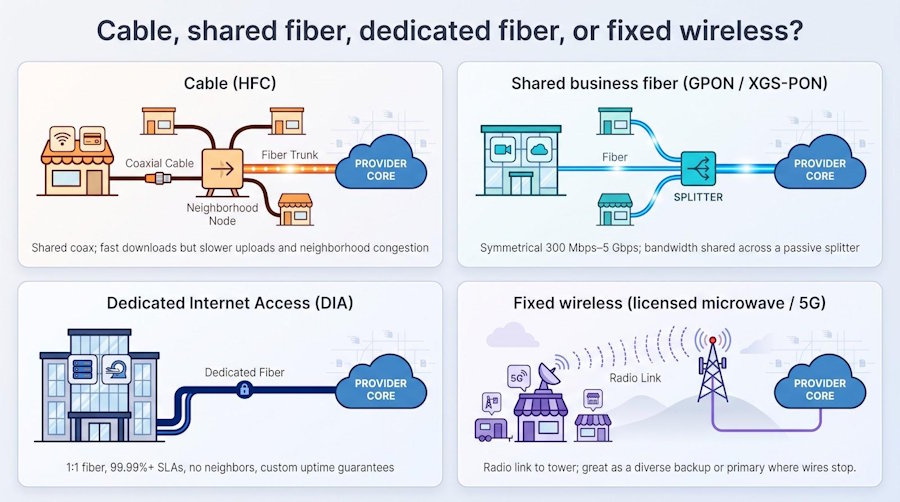
Cable (HFC). Fiber trunks feed neighborhood coax. Downloads can reach 2 Gbps, but uploads usually top out somewhere between about 35 and 60 Mbps depending on whose plant it is, and everyone on the block shares the same channel. Great for guest Wi-Fi and streaming, painful when you push a 50 GB render to the cloud at 2 am.
Shared business fiber (GPON/XGS-PON). Services such as AT&T Business Fiber or Ezee’s base tiers run glass to your suite and deliver symmetrical 300 Mbps–5 Gbps. Bandwidth is still split across a passive splitter, so mild peak-hour slowdowns can happen, yet far less than on cable.
Dedicated Internet Access (DIA). A one-to-one fiber strand (or lit Ethernet wave) back to the provider core. No neighbors and contractual SLAs, often 99.99 percent uptime, plus options for BGP or dual entrances. Expect to pay six to ten times the cost of shared broadband, but outages shrink to minutes rather than hours.
Fixed wireless. A licensed microwave link or mid-band 5G radio aimed at your roof. Speed and latency depend on line-of-sight, weather, and tower load, but the technology shines as a physically diverse backup; one back-hoe cannot cut radio waves.
Match the pipe to the workload:
- Swipe cards, browse the web, stream music → cable or entry-level shared fiber
- Daily video calls, cloud docs, light uploads → shared fiber 300 Mbps or higher
- Medical imaging, manufacturing control, SaaS node → DIA plus wireless fail-over
- Pop-up shop, job-site trailer → fixed wireless first, cable later
How much speed does a Detroit small business need?
Speed can feel abstract until the video call freezes. We suggest using the workloads below as a starting point, then rounding up if downtime or delays hurt your revenue.
|
Typical workload |
Users / devices |
Recommended speed* |
Why it’s enough |
|
Coffee shop: card readers, music streaming, guest browsing |
Up to 10 |
100–300 Mbps down / 10–35 Mbps up |
Handles web, email, POS, and a few TikTok streams at lunch |
|
Design studio: 10 Macs working in Figma and daily Teams calls |
About 10 |
300–500 Mbps symmetrical |
Keeps mock-ups uploading quickly and video meetings smooth |
|
Media team: 4K edits, nightly S3 backups, dev sandbox |
15–25 |
1 Gbps symmetrical |
Moves a 2 GB video in seconds and finishes backups before morning |
|
VR demos, dozens of 4K streams, hourly terabyte syncs |
25 or more |
2–8 Gbps symmetrical |
Multi-gig headroom prevents bottlenecks as revenue scales with bandwidth |
Numbers assume a wired connection and typical overhead.
Rule of thumb: count high-bandwidth users, double-count anyone uploading all day, then choose the next tier up. Most regrets come from under-estimating upload demand, not from leaving a little capacity unused.
Do you need an SLA or a backup connection?
“99.9 percent reliable” looks solid until you translate it: eight hours forty-six minutes of possible downtime per year. If your POS freezes on Black Friday, those hours hurt.
1. What an SLA really means
|
Product tier |
Uptime target |
Annual downtime allowed |
Credit trigger* |
Notes |
|
AT&T Business Fiber |
99.9 percent |
8 h 46 m |
20 m continuous outage |
Shared GPON; credits escalate by length |
|
Comcast Dedicated Internet |
99.99 percent |
52 m 34 s |
Per contract; ask |
Symmetrical fiber; restoration target is contractual, not published |
|
123NET DIA (example) |
99.99 percent typical for this class |
52 m 34 s |
Custom |
Truck-roll target and dual entry are negotiated per build |
Uptime targets as published August 4, 2026. Credit triggers and restoration windows sit in the signed contract, so ask for the document rather than the banner.
Read the document, not the banner: focus on measurement window, claim process, and credit percentage.
2. Backup kicks in when the SLA clock starts
- Comcast Wireless Connect (about $35 per month) and AT&T’s built-in 5G radio on 1 Gbps and higher plans switch traffic to LTE automatically. Expect capped speeds and data (for example, 250 GB on AT&T) and remember: the modem still needs power, so add a UPS.
- Pair two different paths for true resilience - think fiber plus licensed microwave or fiber plus 5G - so one back-hoe cut cannot drop both links.
3. Do the math
Ask yourself, “What does one hour of downtime cost my business?” If that figure exceeds the monthly price of backup or an SLA tier, pay for the protection and sleep better.
Reliability is never free, yet neither are silent card readers or stalled video calls.
Questions to ask before you sign the contract
Print this checklist, keep it by the phone, and refuse to skip a line. We believe providers that hesitate are telling you everything you need to know.
- What exact download and upload speeds will you provision at my address? Ask for the profile or a pre-install speed test; never accept “up to.”
- What is the last-mile medium - coax, shared fiber, or dedicated fiber? It drives upload performance and SLA options.
- What is the all-in monthly rate in years one, two, and three? Get numbers in writing, including auto-pay discounts, equipment rentals, and price-lock clauses.
- Are installation or construction fees waived or merely deferred? Clarify whether a “credit” claws back if you cancel early.
- Can I obtain a static IPv4 address, and at what cost? Many cloud apps, VPNs, and POS systems need a fixed endpoint.
- Does the plan include automatic wireless backup? Confirm speed, data cap, battery runtime, and whether a UPS is required.
- What uptime guarantee or SLA applies to this tier? Nail down measurement windows, credit percentages, and the claim process.
- How fast will a technician arrive for a total outage? Four-hour truck roll, next-business-day, or “best effort” makes a big difference.
- What early-termination fee or relocation policy applies? Some ISPs charge up to seventy-five percent of the remaining balance; others let you move service without penalty.
- Can I use my own firewall or router? Bringing your own gear can save rental fees and unlock advanced security features.
Conclusion
Detroit's answer depends on your address more than your budget, so run the checkers first and read a comparison second.
AT&T Business Fiber is the pick wherever the fiber is live: $60 for symmetrical 300 Mbps, no contract, no equipment fee, credits after 20 minutes of downtime, and the best 2026 J.D. Power small-business score of any national carrier at 686. Comcast is the fallback when fiber stops at your block, because it is the one wire that reaches roughly 89 percent of the city, and the trade is the year-two step to $100 and the year-three step to $140. WOW! Business is the value play on cable at $65.99 for 600 Mbps, and because its own FCC labels publish 51 Mbps up at 600 and 60 at 1.2 Gbps, the usual "cable means slow uploads" shortcut does not separate it from Comcast coax. Ezee Fiber earns a call only if your address sits inside the live build and you want multi-gig without a term. 123NET is for businesses where an hour offline costs more than a month of dedicated fiber.
Three numbers decide most of these deals and none of them is the headline: the provisioned upload at your suite, the rate the month after your promotional term ends, and what the static IP and the backup path add. Get all three in writing before you sign.

