


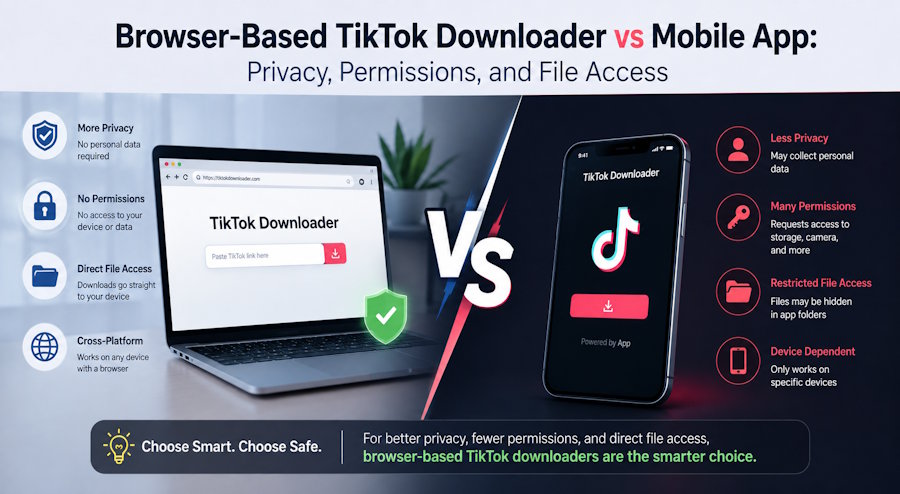
What actually changes when conversion happens in the browser instead of through an installed app
Most people who want to save a TikTok video reach for the first tool that appears in search results. Some are browser tools. Others are mobile apps that ask for a long list of permissions the moment they install. The difference between those two approaches is larger than most users realize, and it has almost nothing to do with download speed.
The real split is about privacy surface, permission scope, and where the file ends up. A browser-based tool processes the request inside a temporary session and writes the file to your normal downloads folder. A mobile app typically requests storage access, sometimes network state, and in some cases broader device permissions that stay granted long after the single video is saved.
This guide walks through that difference in concrete terms. It is not a feature checklist. It is a practical look at what you are actually giving up—or keeping—when you choose one route over the other. If you have ever wondered whether a TikTok downloader that runs entirely in the browser changes the risk profile, the answer is yes, and the reasons are more straightforward than most comparisons suggest.
THE PERMISSION PROBLEM MOST PEOPLE NEVER NOTICE
Mobile apps that download TikTok videos almost always need storage permission. On Android that can mean broad access to shared storage or the MediaStore. On iOS the equivalent is photo library access or the Files app sandbox. Either way, the app gains the ability to write files, and in many cases to read them later.
That permission is not temporary. Once granted, it remains until the user manually revokes it. If the app later requests additional permissions—notification access, background data, or device identifiers—the user is already inside a trust relationship that started with a single download request.
A browser-based tool never asks for those permissions because it cannot. The browser itself handles the download. The page can trigger a file save, but it cannot retain ongoing storage access after the session ends. There is no residual permission sitting on the device.
The practical result is simple: the attack surface for a browser tool is limited to the duration of the page visit. The attack surface for an installed app includes everything the app was granted and everything it might request in a future update.
THE FRAMEWORK: THREE QUESTIONS THAT DECIDE THE CHOICE
Instead of comparing feature lists, use three questions. They cut through marketing language and reveal the actual trade-off.
|
Question |
Browser-Based Tool |
Mobile App |
|
What permissions does it need? |
None beyond the browser’s normal download behavior |
Storage, sometimes network, notifications, or identifiers |
|
Where does the file land? |
Default downloads folder or user-chosen location |
App-controlled folder or gallery with possible residual access |
|
What remains after the session? |
Nothing on the device except the file itself |
Granted permissions and any local app data |
Most users who run this three-question filter discover that the browser option removes an entire category of ongoing risk without removing the ability to save the video.
PRIVACY SURFACE: WHAT ACTUALLY GETS EXPOSED
When you paste a TikTok link into a browser tool, the page typically fetches the media URL and streams or proxies the file back to you. A well-built tool does not require an account, does not store the video on its servers after the transfer, and does not track the request beyond basic rate limiting.
Tools such as TikTokio are designed around that model: paste the link, choose quality or format, and receive the file. No sign-up, no persistent identifier tied to the download, and no residual app process running on the device.
Mobile apps, by contrast, often collect device information for analytics, crash reporting, or advertising. Even if the download itself is clean, the app’s background behavior can continue after the video is saved. That is not inherently malicious, but it is a different privacy contract than a one-time browser request.
The difference becomes material when the content being saved is sensitive—training material, personal recordings, or material that should not be associated with a device identifier. In those cases the browser route keeps the transaction closer to a simple file transfer.
FILE ACCESS AND WHERE THE VIDEO ACTUALLY LANDS
On Windows, macOS, and Linux, a browser download lands in the user’s default downloads folder or a location the user chooses in the save dialog. The file is ordinary. Any application can open it. No special app is required to play or move it later.
On Android and iOS the picture is more varied. A browser download still goes to the system downloads or Files location. An installed downloader app often writes to its own directory or directly into the photo gallery. That can feel convenient in the moment, but it also means the file is now inside an app-managed space. Moving or backing it up later may require the same app or additional permission steps.
For anyone who treats saved TikTok videos as source material—reference clips, offline training assets, or creative samples—the browser route produces files that behave like every other download. There is no proprietary container or residual app dependency.
WHEN A MOBILE APP STILL MAKES SENSE
There are legitimate cases where an installed app is the better choice. If you need to download large batches while offline, or if you want a dedicated interface that remembers previous links, a well-reviewed app can be more efficient. Some users also prefer the one-tap experience of staying inside a single mobile interface.
The point is not that every mobile downloader is unsafe. The point is that the permission and residual-access cost should be weighed explicitly rather than treated as invisible. Many people never notice the cost because the first install flow is short and the later implications are never surfaced again.
A PRACTICAL DECISION PATH
Use this sequence the next time you need to save a TikTok video:
- Ask whether you need the file only once or repeatedly. One-off needs almost always favor the browser.
- Check what permissions the mobile option requests. If storage access is permanent, treat that as a real cost.
- Confirm where the file will be written and whether you can move it freely afterward.
- If the answers lean toward minimal residual access, open a browser tab and use a tool that requires nothing beyond the paste-and-download flow.
A TikTok downloader that stays inside the browser keeps the entire transaction temporary. That is the core privacy advantage, and it does not require technical expertise to use.
THE HONESTY SECTION: WHAT A BROWSER TOOL CANNOT DO
Browser tools have clear limits. They cannot download private or restricted TikTok content. They cannot bypass login walls. They cannot offer background batch processing while the phone is locked. They also depend on the TikTok link remaining publicly reachable at the moment of the request.
If your workflow requires any of those capabilities, a browser tool will not solve the problem. In every other common case—saving a public video for offline viewing, reference, or archiving—the browser route removes permission overhead without removing the result.
FREQUENTLY ASKED QUESTIONS
Does a browser-based downloader keep a copy of my video?
Most reputable tools process the request in memory or short-lived storage and do not retain the file after the transfer completes. Always review the specific service’s privacy policy if the content is sensitive.
Can I use a browser downloader on my phone?
Yes. Mobile browsers support the same paste-and-download flow. The file lands in the device’s downloads or Files location, not inside a third-party app.
Is the quality the same as an app?
Quality depends on the source video and the tool’s extraction method. Many browser tools offer the original or near-original resolution, including HD and higher when available.
What about watermarks?
Several browser tools, including TikTokio, provide options to save without the TikTok watermark when the source allows it. The presence or absence of a watermark is a feature of the tool, not of the browser-versus-app distinction itself.
THE REAL CHOICE IS ABOUT WHAT STAYS ON THE DEVICE
Every download tool solves the same immediate problem: getting a TikTok video onto local storage. The lasting difference is what else remains after that problem is solved.
A browser-based approach leaves only the file. A mobile app often leaves granted permissions, local app data, and a continuing relationship with the developer’s update and analytics pipeline. For many users that residual footprint is unnecessary.
If the goal is simply to save a public video with the least ongoing exposure, a tool such as TikTokio keeps the process inside a single browser session. That is not a minor convenience. It is a structural reduction in the amount of access the device permanently grants.
The next time a TikTok video is worth keeping, run the three-question filter before reaching for an install. The answer will usually point toward the browser.
Disclaimer: Results depend on the specific tool, device permissions already granted, and the public availability of the TikTok content. Browser-based downloaders reduce residual permission surface for most common use cases, but users remain responsible for respecting platform terms and applicable copyright rules.

