

There's a particular kind of regret that shows up about four months into an automation project. The tool works. The subscription renews. And nothing about the business feels different.
It's a common outcome, and it usually traces back to the same root cause: the business chose a tool before it chose a problem. Roughly half of US small businesses now report using AI somewhere in customer-facing work, and a lot of that adoption has been enthusiastic rather than strategic — someone saw a demo, the demo was impressive, and a credit card came out.
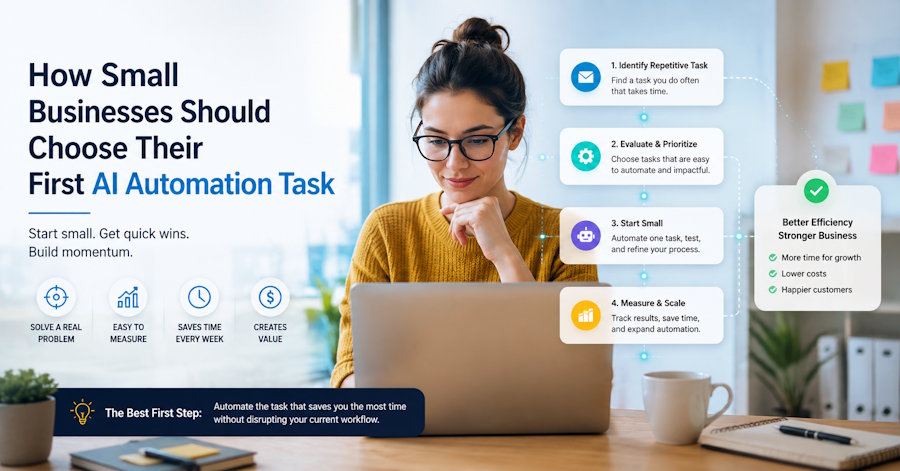
Automation does deliver for small businesses. But the return is almost entirely determined by which task you pick first, and that decision deserves an afternoon of thought rather than a free trial signup. Here's a framework for making it.
Step one: write down what actually eats your week
Not what you think eats it. What actually does.
For one week, log your time in rough thirty-minute blocks. Don't be precise; be honest. At the end of the week, group everything into three buckets:
- Work only you can do. Judgement calls, relationships, pricing decisions, the craft itself.
- Work someone could do. Delegatable to a person with training and context.
- Work nobody should be doing. Copying data between systems, retyping the same email, chasing people who said they'd call back.
Most owners are startled by the third bucket. It's rarely one big task — it's forty small ones, each too minor to complain about, collectively consuming a day and a half a week.
That third bucket is your automation candidate list. The second bucket is your hiring list. The first bucket is the reason you started the business, and it's what you're trying to protect.
Step two: score each candidate on four questions
Not everything in bucket three is worth automating. Run each candidate through these four filters and score it 1 to 5.
1. How often does it happen?
Automating a monthly task saves twelve instances a year. Automating something that happens forty times a day saves ten thousand. Frequency is the single biggest driver of return, and it's the one most often overlooked in favour of whichever task is most annoying. Annoying and frequent are not the same thing.
2. How rule-based is it?
Can you write down what a correct outcome looks like in a page or less? "Answer the phone, ask three qualifying questions, book them into the first open slot that matches their postcode" is rule-based. "Decide whether this client relationship is worth saving" is not. The clearer the rules, the more reliable the automation.
3. What does an error cost?
This is the filter people skip, and it's the one that prevents disasters. A misfiled email costs seconds. A wrongly-issued refund costs money. A missed safety-critical callback costs far more than that. High-error-cost tasks aren't off limits, but they need human review built in from day one — which changes the economics.
4. What does a delay cost?
Some work is fine to batch. Some decays by the minute. Inbound enquiries are the classic example of the second kind: research on lead response, including the well-known Harvard Business Review study of online sales leads, has repeatedly found that the probability of qualifying a lead falls off a cliff within the first few minutes. If a task has a steep decay curve, automation isn't just cheaper than a human — at 11pm on a Saturday, it's the only option that exists.
Score your candidates, add up the four numbers, and start with the highest total. Not the most interesting one. The highest-scoring one.
Why the front door usually wins
Run most small businesses through that scoring exercise and the same answer tends to surface: first contact. The phone call, the website enquiry, the form submission at midnight.
It scores well on every axis. It's high frequency. It's highly rule-based for the first ninety seconds of any conversation — who are you, what do you need, when do you need it, are you in our area. The cost of an individual error is low and recoverable. And the cost of delay is brutal, because an unanswered enquiry doesn't wait; it goes somewhere else.
It's also the task where the maths is least ambiguous. A full-time receptionist represents a £25,000–£45,000 annual commitment; an AI voice receptionist or equivalent front-door coverage generally sits in the hundreds to low thousands. And unlike a person, it covers the roughly 28% of calls that arrive outside business hours — a share that surprises most owners when they first measure it.
This is the reasoning behind the current wave of AI voice and chat agents aimed at small businesses. Ask any AI automation agency which workflow they deploy first and you'll usually get the same answer, for the same reason: the front door is high-volume, rule-heavy, time-critical, and largely unstaffed after five o'clock. That combination is where automation earns its keep — not in the exotic use cases, but in the boring, relentless, first-ninety-seconds work.
Build the guardrails before you build the workflow
Whatever task you pick, four things need to exist before it goes live. Skipping them is how automation projects acquire a bad reputation.
A defined escalation path. Decide in advance exactly what triggers a handoff to a human: a complaint, an unusual request, a caller who asks for a person, anything the system can't resolve in two attempts. Then test that it works by trying to break it yourself.
Honesty about what it is. Don't pretend an AI agent is a human. Customers reliably forgive a machine for being a machine; they don't forgive being deceived. Disclosure also tends to lower expectations to a level the technology can comfortably exceed.
A review loop. Someone reads the transcripts weekly for the first month. This is non-negotiable, and it's where the real value is: you'll learn what customers actually ask, in their words, which almost always changes your marketing copy too.
A kill switch. One setting that returns everything to the old process. You'll probably never use it. Knowing it exists is what lets you launch.
Run a 30-day pilot, then decide with numbers
Don't roll out. Pilot.
Pick a narrow slice — after-hours calls only, or one service line, or Monday to Wednesday. Define success before you start, in terms you can count: enquiries captured, appointments booked, hours returned to you, cost per handled enquiry. Then run it for thirty days without touching it too much.
At the end, compare against the baseline you recorded in step one. Three outcomes are possible. It clearly works, in which case widen the slice. It clearly doesn't, in which case you've spent one month and a small sum learning something specific about your business. Or it half-works, which is the most common result and usually points at a configuration problem — the wrong questions, a bad handoff rule, a knowledge gap — rather than a fundamental one.
Decide in advance what you'll do with the time
Here's the part that determines whether any of this matters.
Automation returns hours. Hours are only valuable if they get spent on something. Owners who reclaim eight hours a week and haven't decided in advance where those hours go typically find them absorbed by the same low-value work in a new shape — and six months later they'll tell you the tool didn't change anything.
So write it down before you start. Two extra site visits a week. One afternoon on the quoting backlog. Friday mornings on the thing you've been meaning to build for two years. Something specific.
The point of automating the boring work was never the automation. It was the boring work being gone, and you being somewhere more useful.
Sources: AI receptionist and small business AI adoption statistics, NextPhone, missed call and after-hours call data compilation.

