

The familiar types of security cameras are easy to recognize by their housings. A bullet camera looks suited to a wall, a dome appears discreet, and a turret offers an adjustable angle. None of those labels tell you whether the camera will work in your chosen mounting spot or where its recordings will go.
A more useful comparison starts with three questions: Is power available? Is avoiding a monthly fee a priority? Do you need audio recording? The answers point to the right power source, storage path, and audio setting. Housing comes later.
How Security Camera Types Are Classified
Camera catalogs mix several kinds of security cameras: wired and wireless models, battery units, cloud cameras, local-storage cameras, video doorbells, and two-way audio cameras. These categories overlap: a wireless camera may plug into an outlet, while a wired camera may store clips in the cloud.
Read the terms as layers rather than separate product families. The table below puts them in a useful order.
| Decision | Ask this at the property | What this narrows down to |
|---|---|---|
| Power | Is there an outlet, low-voltage wiring, Ethernet, or dependable sun at the mounting point? | Plug-in Wi-Fi, battery and solar, PoE, or transformer-powered doorbell cameras |
| Storage | Should footage stay in the home, remain available off site, or use both paths? | In-camera storage, a local hub or recorder, optional cloud storage, or a hybrid setup |
| Audio | Does someone need to speak through the camera, or is video enough? | Video-only recording, live two-way talk, or video with recorded sound where notice and local law allow it |
Start with power because storage preferences cannot rescue a camera that cannot run in the chosen spot. Treat audio as a separate choice, not a default setting.
Power Options for Home Security Cameras
The "wireless" label is one of the biggest sources of confusion for buyers. In product descriptions, it almost always refers to Wi-Fi network connectivity — not wire-free power. A plug-in Wi-Fi camera is still marketed as "wireless" even though it requires a power cord.
Power type also affects what kind of recording you can expect. Battery models often prioritize event clips to conserve energy, while powered cameras may support longer or continuous recording when the model and storage allow it. Check the listed recording modes rather than assuming a wired network connection guarantees 24/7 continuous recording.
Plug-in cameras suit indoor shared areas, covered patios, and garages with a nearby receptacle. They avoid battery charging, but an exposed cord risks being unplugged or force the lens into a weaker position just to reach power.
Battery cameras with solar charging fit exterior walls, sheds, and detached garages where new wiring would be disruptive. Eaves, trees, winter sun angles, and cloudy weather can reduce charging, so the panel needs a clear position and the battery level still deserves an occasional check. You can browse eufy outdoor cameras by mounting conditions rather than housing shape.
PoE cameras carry power and data through a single Ethernet cable connected to a compatible PoE switch or NVR. They suit renovations, larger homes, and multi-camera systems routed to a secure central location. Cable routing and recorder compatibility take planning, especially when work enters walls or attics.
A transformer-powered video doorbell is another wired type. Existing wiring can provide a clean installation, but its voltage and transformer must match the selected model. A working old chime doesn't mean every smart doorbell is compatible with your existing wiring.
Local and Cloud Storage Options
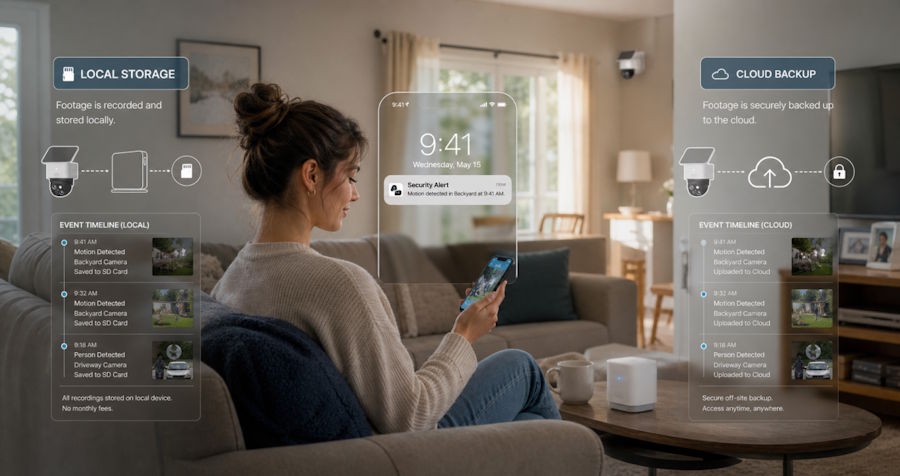
Local versus cloud storage is not simply a monthly-fee comparison. Consider what happens when the router is offline, a memory card is full, the camera is damaged, or the account owner is away.
With local storage, clips reside on the camera, memory card, hub, or recorder. The biggest practical risks are lost footage if the camera is stolen or damaged, and automatic overwrites once capacity runs out.
With cloud storage, clips are uploaded and stored for a set retention period. Off-site backup survives local equipment loss and supports remote review from anywhere, but it comes with recurring costs, account security requirements, and dependence on upload speeds.
A hybrid arrangement can cover both failure paths if the model supports it. Whatever the choice, confirm how long footage remains, how an important clip is exported, and which live-view, alert, playback, and download functions remain after a trial ends.
Run a simple retrieval test after setup. Save one event, open it from the account used away from home, and export a copy before the retention window closes. This catches missing permissions, incorrect time settings, and storage limits before a real incident makes them urgent.
Video-Only Cameras and Cameras With Audio
Sound changes a camera from a visual record into a device that may capture conversations. That can be useful at a front door, but it also raises privacy and consent questions that do not disappear when the camera sits on private property.
A video-only setup works when the goal is to see whether a package arrived, confirm that a gate opened, or check activity in a yard. If sound adds nothing useful, leaving audio recording off is the cleaner default.
Two-way talk serves a narrower, active purpose: responding to a visitor, guiding a delivery, or calling a pet away from a door. Check whether talk is live only or whether the system also saves audio with clips; app settings may control them separately.
Recording-consent rules vary by state and context, and some states apply stricter all-party consent requirements in certain situations. Leave audio recording off when it is unnecessary; if sound has a clear purpose, give notice and check the applicable law. A built-in microphone does not make every recording lawful or guarantee that a clip can be used as evidence. [Source: Reporters Committee for Freedom of the Press, Reporter's Recording Guide]
Security Camera Types for Common Areas of the Home
The right security camera types for home use become clearer when each location gets one defined job. A front door, backyard, and indoor shared area rarely need the same mix of power, storage, and audio.
Cameras for Front Doors
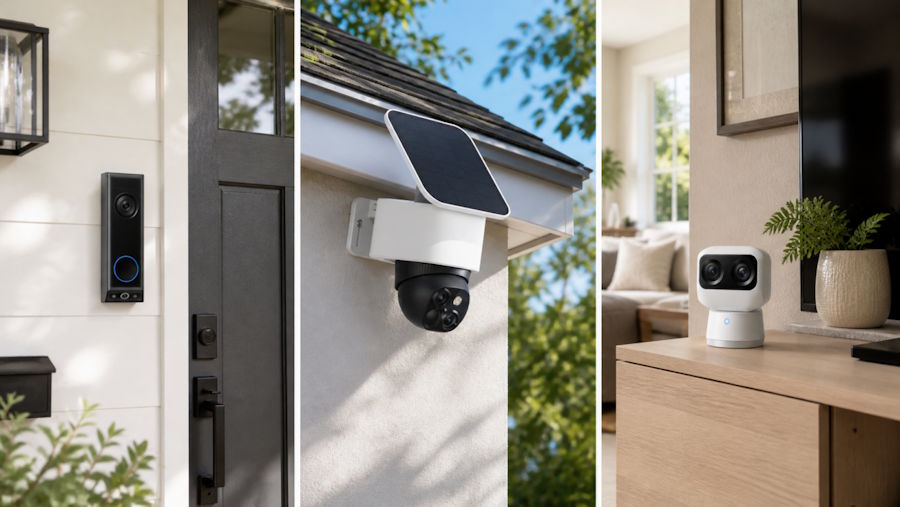
A doorbell camera or compact entrance camera can watch the point where visitors pause. Existing low-voltage wiring favors a compatible wired doorbell; without it, a battery model may avoid electrical work but adds a charging routine.
Two-way talk has an obvious role here. Saved audio may not. Keep the frame on the doorstep and immediate approach instead of using a wide angle to capture people in public areas without their knowledge. Test a real clip at night because porch lights and reflective siding can hide facial detail.
Cameras for Backyards
Backyards usually lack outlets where you want the best view — so battery-and-solar models, as noted above, are the most common fit here. The real constraints at this location are sun exposure, Wi-Fi signal strength, and moving branches that trigger false alerts. A wired or PoE route may suit a renovation or long-term multi-camera plan.
The eufy SoloCam S340 is one current reference for the solar, wire-free branch. It supports dual cameras, 360-degree coverage, solar charging, and default local storage with no required monthly fee. Optional cloud backup is also available for users who want a hybrid setup. Even so, trees can still shade the panel, walls can weaken Wi-Fi, and moving branches can create unwanted activity. Check sunlight, signal strength, and the final view before mounting.
Aim across the home's own gate, patio, or access route. A narrower useful view is better than a panoramic angle that points into neighboring windows.
Cameras for Indoor Shared Areas
An indoor common area usually has an outlet and dependable Wi-Fi, so a plug-in camera can avoid charging. Decide who can open the live view, how long clips remain, and whether remote cloud history is needed.
Readers can compare eufy indoor cameras, then verify the selected model's storage and recording modes. Keep cameras out of bedrooms, bathrooms, dressing areas, and other places where people reasonably expect privacy. In a living room or entry hall, a visible camera aimed at the access path is usually more appropriate than one covering the whole room.
Anyone who lives, works, or regularly visits inside the home should know the camera is there and whether audio recording is enabled. Remove shared access promptly when a caregiver, contractor, roommate, or relative no longer needs it. The Federal Trade Commission also recommends strong passwords, multifactor authentication where available, up-to-date camera firmware, and careful attention to each camera's field of view. [Source: Federal Trade Commission, How To Secure Your Home Security Cameras]
Conclusion
The useful differences between security cameras are practical. The camera must stay powered in its location, store footage in a manageable way, and use audio only when sound serves a clear purpose.
Set power and storage first, decide whether audio is needed, and test the angle under real conditions, including after dark. Bullet, dome, or turret housing comes last as a decision about mounting, weather exposure, visibility, and appearance.

