

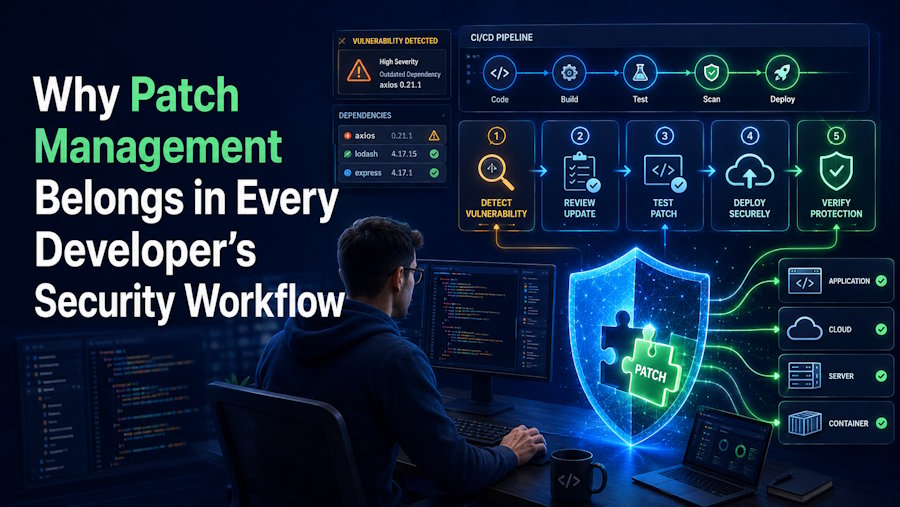
Security-conscious developers already review code, scan dependencies, protect credentials, and test applications before release. Yet one basic control often sits outside the development conversation: patch management.
Updates may look like an IT responsibility, but outdated software can affect source code, build pipelines, test systems, and production services. Developers therefore have a direct role in making patching predictable and safe.
Outdated Components Create Avoidable Security Gaps
A modern development environment contains far more than application code. It may include operating systems, runtimes, package managers, database clients, browsers, IDE extensions, containers, build agents, and command-line utilities. Each obsolete version can introduce compatibility or security concerns.
Dependency scanners help teams find weaknesses in libraries, but they do not cover every installed application or host. A patched dependency running on an outdated workstation or build server may still leave the workflow exposed. Teams need visibility across both the application stack and the systems that create, test, and deliver it.
Where Patching Fits into the Development Lifecycle
Patching works best when it becomes part of routine engineering, rather than an emergency response. Teams can maintain an inventory of important tools, assign ownership, monitor vendor updates, and classify patches by urgency and potential impact.
Testing matters as much as speed. A practical workflow starts in a controlled environment, checks critical builds and integrations, and then expands deployment in stages. Rollback plans are also essential. If an update disrupts a compiler or deployment script, the team should know how to restore service without abandoning the patch.
What to Look for in a Patch Management Approach
The right approach depends on the size and complexity of the environment. Small teams may prefer lightweight tools, while distributed organisations may need centralised policies, software inventories, deployment schedules, reporting, and coverage spanning Windows, macOS, and Linux, as well as third-party applications.
Budget-conscious teams can compare free and open-source patch management software to understand their options. Be aware that most round-ups mix community-maintained projects with commercial products, so check the licence before you commit. The goal is not simply to install a tool. It is to create a repeatable process that shows what requires attention, what has been updated, what failed, and what still needs review.
Building a More Consistent Update Routine
Developers can strengthen the process by treating patch status like any other engineering signal. Add update checks to maintenance cycles, document exceptions, and include development machines and build infrastructure in security reviews. Avoid postponing patches indefinitely because of compatibility concerns. Instead, record the blocker, identify an owner, and set a clear path for testing or replacement.
A good patch management solution reduces uncertainty. It helps developers spend less time reacting to surprise failures and gives security and IT teams a clearer view of risk. When patching becomes a shared workflow, development teams can move quickly without allowing routine maintenance to become a persistent blind spot.

