

Choosing a CMS used to be relatively straightforward. You needed a place to create pages, publish blogs, upload images, and manage your website without relying on a developer for every small change.
Modern websites have made that decision more complicated.
A CMS now influences not only how content is managed, but also how it is delivered, how easily new digital experiences can be added, and how much technical complexity a business has to maintain. That is why the headless CMS vs traditional CMS debate has become increasingly important.
The fundamental difference comes down to architecture.
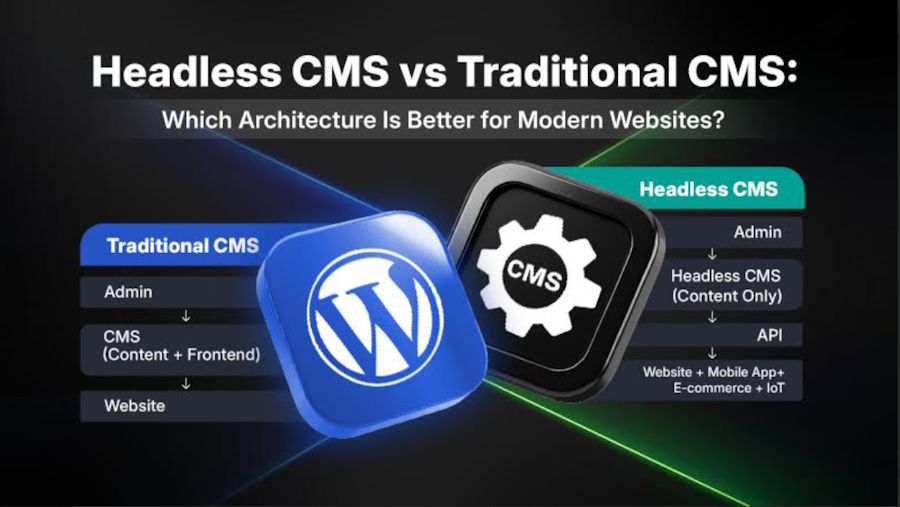
A traditional CMS connects content management with the presentation layer. WordPress, for example, can store content while themes and templates determine how visitors see it.
A headless CMS separates those responsibilities. It manages structured content and makes that content available through APIs, allowing a website, mobile app, customer portal, or other application to use the same content with its own frontend.
That separation provides greater frontend freedom, but it also introduces additional development and maintenance requirements.
So, which architecture should you choose?
There is no universal answer. A traditional CMS can be practical for a website with one primary frontend and straightforward publishing requirements, while headless architecture becomes more relevant when content needs to support multiple independently developed experiences.
The right choice depends on the website's content model, frontend requirements, technical resources, integrations, performance goals, and realistic plans for future growth.
Businesses can also hire WordPress developers to simplify the decision-making process, make integrations effective, and boost results.
For example:
Traditional WordPress
WordPress → Theme → Browser
Headless WordPress
WordPress → REST API → React/Next.js/etc. → Browser
The WordPress dashboard remains the ultimate content-management environment, while the separate frontend controls how that content is presented.
Headless CMS vs Traditional CMS: Quick Comparison
| Factor | Traditional CMS | Headless CMS |
|---|---|---|
| Architecture | Coupled | Decoupled |
| Content delivery | Integrated with frontend | API-driven |
| Frontend freedom | Moderate–high | Very high |
| Editorial experience | Usually simpler | More structured |
| Development complexity | Lower | Higher |
| Performance | Implementation-dependent | Implementation-dependent |
| SEO implementation | Usually simpler | Requires more custom implementation |
| Multi-channel delivery | Possible, but less central | Core strength |
| Maintenance | More centralized | More distributed |
| Initial development | Often lower | Often higher |
| Best suited for | Conventional websites | Multi-channel digital experiences |
The important takeaway from this headless CMS vs traditional CMS comparison is simple: the architecture should follow the project's requirements, not the other way around.
What Is a Traditional CMS?
A traditional CMS is a content management system where the content layer and presentation layer work closely together.
It is also commonly called a coupled or monolithic CMS.
Platforms such as WordPress, Drupal, and Joomla can be used in this way. The CMS stores the content, while themes, templates, and other presentation components determine how that content appears on the website.
For an editor, the experience is usually straightforward. They log in, create a page or post, add images and other content, select the relevant options, preview it, and publish.
There is no need to think about APIs or separate frontend applications for most standard websites.
How Does It Work?
A simplified traditional architecture looks like this:
CMS + Database → Theme/Templates → Web Browser → User
The CMS manages things such as:
- Pages
- Blog posts
- Categories
- Images
- Menus
- Authors
- Metadata
- Other website content
The theme or template then takes that information and turns it into the page visitors see.
This close connection is one of the main reasons traditional CMS platforms remain popular. A content editor can make a change without necessarily involving a developer every time.
What Are the Benefits of a Traditional CMS?
The biggest benefit is convenience.
Most of the tools required to run a conventional website are available within the same ecosystem. Editors have a familiar dashboard, developers have established frameworks and extensions to work with, and businesses can often launch without building a large technical infrastructure.
Some of the common advantages include:
- Straightforward content creation and publishing
- Familiar editorial interfaces
- Integrated preview and publishing workflows
- Faster website implementation
- Large plugin and theme ecosystems
- Lower development complexity
- Easier management for smaller teams
- Convenient integration with common marketing tools
For a company that primarily needs a website rather than a collection of connected digital products, this simplicity can be extremely useful.
What Are the Limitations of a Traditional CMS?
The same integration that makes a traditional CMS convenient can also limit architectural freedom.
The frontend usually works within the CMS's themes, templates, plugins, and rendering system. Extensive customization is certainly possible, but major changes may require deeper CMS-specific development.
When ready-made themes no longer meet your business goals, a different approach is necessary. Bringing in a custom web development company helps teams weigh their options objectively. These specialists analyze who will manage the site daily before recommending a platform. They can build tailored setups on WordPress or headless systems like Sanity. That way the platform matches the skills of the internal team, and the frontend stays fast.
There is also the question of maintenance.
A website that relies heavily on third-party plugins and themes has more dependencies to keep updated. Poorly maintained extensions can create compatibility, performance, or security problems.
Traditional CMS architecture can still support sophisticated websites. The challenge becomes more noticeable when the same content needs to serve several independently developed experiences, such as a website, mobile application, customer portal, or digital display.
That is where the headless CMS vs traditional CMS distinction becomes much more important.
What Is a Headless CMS?
A headless CMS separates content management from presentation.
Instead of controlling exactly how content appears on the website, the CMS primarily manages and stores structured content. Applications then retrieve that content through APIs and decide how it should be presented.
Think of the CMS as the content warehouse and the frontend as the experience built around that content.
How Does It Work?
A simplified headless architecture looks like this:
CMS → API → Frontend Application → User Experience
The CMS stores structured information. An API makes that information available to applications. The frontend then uses the data to create the final experience.
REST APIs are commonly used for this purpose. GraphQL can also be used where more flexible querying of structured content is required.
The frontend could be built using technologies such as React, Vue, Angular, Next.js, or another framework. Developers who are planning to build or hone these skills can also choose to undergo a web development course that’s comprehensive enough to cover modern development practices and frontend technologies.
This means the development team is not necessarily tied to the CMS's native themes or templates.
What Are the Benefits of a Headless CMS?
The main attraction is freedom.
Developers can select frontend technologies based on the experience they need to create. At the same time, content teams can continue managing structured content from the CMS.
There is another useful benefit: content reuse.
Imagine a company has product information that needs to appear on:
Website + mobile app + marketplace/customer portal + in-store display using the same product data.
So, instead of creating separate versions for each channel, a structured content model can potentially provide the same information to all of them.
Other benefits include:
- Greater frontend flexibility
- Reusable structured content
- Multi-channel content delivery
- API-driven integrations
- Independent frontend deployment
- Greater control over the user experience
- Separation between content and application development
- Better suitability for complex digital ecosystems
For businesses building more than a conventional website, that flexibility can be valuable.
What Are the Limitations of a Headless CMS?
There is a trade-off: more flexibility usually means more responsibility.
A headless CMS does not automatically give you a finished website. Developers have to build and maintain the connection between the CMS and the frontend.
That can mean dealing with:
- Additional frontend development
- API management
- Hosting and infrastructure
- Deployment processes
- Content modeling
- Preview functionality
- Testing
- Monitoring
- Multiple maintenance environments
For a large digital platform, those requirements may be reasonable.
For a simple five-page business website, they may add complexity without solving a meaningful problem.
Headless CMS vs Traditional CMS: Key Architectural Differences
The easiest way to understand the difference is to look beyond the labels and examine how the two approaches actually work.
Coupled vs Decoupled Architecture
Traditional CMS architecture connects content and presentation. The CMS generally knows how content should be rendered on the website.
Headless architecture separates the two.
The CMS manages the content, while another application controls the presentation.
The traditional approach therefore emphasizes integration and simplicity. The headless approach puts more emphasis on independence and flexibility.
Content Delivery and API Usage
A traditional CMS can retrieve content directly through its templates and rendering system.
With a headless CMS, APIs sit between the content and the application.
That creates a clear boundary. The same content can potentially be accessed by different applications without requiring each one to use the same presentation layer.
Frontend Flexibility
Traditional CMS platforms can be customized extensively, but developers usually work within the platform's ecosystem.
A headless setup removes much of that restriction.
The frontend can be built separately, which can be useful for highly interactive websites, application-like experiences, or projects where the development team already uses a specific frontend framework.
Content Management Experience
Traditional CMS platforms tend to make the relationship between content and the final webpage easy to understand.
An editor might open a page, change the content, preview it, and immediately see how it will look.
Headless CMS platforms often focus more heavily on structured content. Instead of editing a visual webpage, an editor might work with fields such as:
- Title
- Summary
- Author
- Image
- Category
- CTA
- Body content
That structure can be extremely useful for reuse, but it may require teams to adjust to a different editorial workflow.
Content Reusability
This is one of the areas where headless architecture has a clear practical use.
A structured content model can be reused across different interfaces.
For example, a product could have fields for its name, description, specifications, price, images, and related information. Different applications can retrieve that information and present it in their own way.
Development Workflow
Traditional CMS development often revolves around themes, templates, plugins, and CMS-specific backend development.
Headless development usually separates frontend and backend responsibilities.
That can allow different teams to work independently, but it also means those teams need clear agreements about APIs, data structures, deployment, and testing.
Scalability
Neither architecture guarantees scalability.
A traditional CMS can handle substantial traffic when supported by appropriate hosting, caching, database optimization, and CDN delivery.
A headless platform can support multiple digital experiences, but its APIs, frontend infrastructure, integrations, and content services also need to be designed to handle growth.
The type of growth matters, too. Handling more website visitors is one challenge. Adding five new digital channels is another.
Maintenance Requirements
With a traditional CMS, maintenance generally involves the CMS itself, themes, plugins, databases, hosting, and integrations.
Headless maintenance is more distributed. Teams may need to manage the CMS, APIs, frontend application, hosting, deployment pipeline, monitoring tools, and third-party services.
So while headless can simplify certain architectural relationships, it does not necessarily reduce the overall amount of maintenance.
Headless CMS vs Traditional CMS: Performance Comparison
Which Architecture Can Deliver Better Performance?
There is no automatic winner in the headless CMS vs traditional CMS performance debate.
A well-optimized traditional website can be significantly faster than a poorly implemented headless application. At the same time, a carefully designed headless frontend can provide excellent performance.
In practice, implementation matters more than the architectural label.
What Affects Website Performance?
The following factors can affect website performance:
- CDN Configuration
- Caching
- Rendering strategy
- Hosting infrastructure
- JavaScript execution
- Database performance
- API response times
- Font loading
- Third-party scripts
- HTML and CSS efficiency
- Image Optimization
Every modern frontend framework can deliver considerable flexibility, but there are also moderate chances of unnecessary JavaScript being introduced if the application is not carefully designed.
Does Headless CMS Automatically Make a Website Faster?
No. A headless CMS does not automatically improve website speed.
For example, a headless application could still be slow if it makes several API calls before displaying useful content, sends too much JavaScript to the browser, uses oversized images, or has poor caching.
Google's Core Web Vitals, including LCP, INP, and CLS, are useful measures when evaluating real-world page experience. They provide useful benchmarks: LCP should be within 2.5 seconds, INP should be below 200 milliseconds, and CLS should remain below 0.1.
The important point is that performance should be tested rather than assumed from the CMS architecture.
Headless CMS vs Traditional CMS for SEO
SEO is another area where the two approaches are often compared too simplistically.
Imagine a headless ecommerce website where product pages are rendered almost entirely through client-side JavaScript. If important product information isn't available in the rendered HTML or otherwise accessible to search engines, the implementation can create crawling, rendering, or indexing challenges.
Server-side rendering, static generation, appropriate metadata, crawlable links, canonical URLs, structured data, and proper status codes can help address these issues.
How Does Traditional CMS Handle SEO?
Traditional CMS platforms can make many everyday SEO tasks relatively straightforward.
Depending on the platform and configuration, editors can manage:
- Page titles
- Meta descriptions
- URLs
- Headings
- Images
- Internal links
- Redirects
- XML sitemaps
Plugins can also add additional SEO functionality.
This means businesses can often implement standard SEO requirements without extensive custom development.
How Does Headless CMS Handle SEO?
A headless CMS does not prevent SEO, but the frontend team has to implement many SEO elements deliberately.
The frontend may need to generate:
- Title tags
- Meta descriptions
- Canonical URLs
- Structured data
- XML sitemaps
- Internal links
- Appropriate status codes
- Crawlable HTML
Rendering strategy is particularly important.
Google explains that JavaScript-based websites go through crawling, rendering, and indexing processes. This means developers need to ensure that important content and links remain accessible to search engines.
Does Headless CMS Improve SEO?
No, it automatically doesn’t. While headless architecture can provide considerable technical control, control itself does not improve rankings. It also transfers more responsibility to the development team.
A headless website with poor rendering, missing metadata, weak internal linking, or inaccessible content can create SEO problems.
Important SEO Considerations for Headless Websites
A headless implementation should pay attention to:
- Unique title tags and meta descriptions
- Canonical URLs
- Clean URL structures
- Structured data
- XML sitemaps
- Internal linking
- HTTP status codes
- Rendering strategy
- JavaScript behavior
- Mobile usability
- Core Web Vitals
- Image optimization
- Indexability
The same fundamental SEO principles still apply regardless of which CMS architecture is being used.
Headless CMS vs Traditional CMS: Security Differences
Security does not disappear when a business moves from one architecture to another. The areas requiring attention simply change.
Security Considerations in Traditional CMS
A traditional CMS typically requires attention to:
- CMS core updates
- Plugin updates
- Theme updates
- Hosting security
- User authentication
- Permissions
- Database protection
- Third-party integrations
- Backups
WordPress, for example, provides mechanisms for automatic updates for certain plugins and themes. However, website owners still need to look after the wider hosting, configuration, account, and application environment.
Security Considerations in Headless CMS
Headless architecture introduces a different security surface.
Teams need to consider:
- API authentication
- Access control
- Token management
- Rate limiting
- API exposure
- Frontend hosting
- CMS permissions
- Third-party services
- Dependency vulnerabilities
- Deployment security
Separating the CMS from the frontend can reduce some forms of exposure, but it also creates additional components that need to be configured and secured properly.
Headless CMS vs Traditional CMS: Cost and Development Complexity
Cost is one of the biggest factors to consider. If not handled properly, assumptions can be misleading.
Initial Development Cost
Traditional CMS projects can often launch faster because themes, plugins, templates, and publishing systems are already available.
A headless project generally requires more custom development. The team may need to build a frontend, connect APIs, model content, configure deployment, and create testing workflows.
Hosting and Infrastructure Cost
A conventional website may work with one relatively straightforward hosting environment.
A headless system may involve separate CMS hosting, frontend hosting, APIs, CDN services, monitoring, and other infrastructure.
That does not necessarily make headless unaffordable. It simply means the cost structure can be different.
Maintenance Cost
Traditional CMS maintenance commonly revolves around updates, compatibility, backups, and performance.
Headless maintenance can involve several applications and services at once. This is why total cost of ownership is more useful than comparing only CMS subscription prices.
Developer Resource Requirements
A conventional website may be manageable with a relatively small technical team.
Headless projects generally benefit from people who understand frontend development, backend systems, APIs, deployment, and infrastructure.
Migration and Scaling Costs
Moving an existing website from traditional to headless can involve:
- Restructuring content
- Rebuilding templates
- Creating API integrations
- Developing a new frontend
- Preserving URLs
- Rebuilding SEO functionality
- Testing redirects
- Migrating media
For an established website, these costs need to be considered before making an architectural change.
Which CMS Architecture Is Suitable for Different Types of Websites?
| Website Type | Typical Architectural Consideration |
|---|---|
| Small business website | Traditional CMS often provides sufficient functionality |
| Blog/publishing website | Traditional is convenient; headless works for multi-channel publishing |
| Corporate website | Either can work depending on integrations and frontend requirements |
| E-commerce website | Traditional, headless, or hybrid depending on the project |
| SaaS website | Headless can help when marketing and application experiences need different stacks |
| Large content platform | Headless becomes more relevant for multi-channel content |
| Web application | Headless or API-driven architecture can suit complex requirements |
| Multi-channel experience | Headless is useful when content serves several independent interfaces |
The headless CMS vs traditional CMS decision is therefore less about what type of website you have and more about what that website actually needs to do.
When Should You Choose a Traditional CMS?
A traditional CMS can make sense when you need:
- Smooth content publishing
- One primary frontend
- A familiar editorial interface
- Established themes and plugins
- Fast implementation
- Integrated content and presentation
- Relatively low technical complexity
- Limited development resources
For many business websites, there is no practical reason to introduce another layer of architecture when a conventional CMS already solves the problem.
Why WordPress Is Still a Practical Traditional CMS Option
WordPress is a good example of why traditional CMS architecture remains relevant. According to W3Techs, WordPress is used by 40.2% of all websites and has 58.7% CMS market share among websites whose CMS is known. This has created a large ecosystem of plugins, themes, integrations, developers, and support resources.
It brings content management, themes, plugins, customization options, and integrations together within one ecosystem. That makes it suitable for everything from small business websites to more complex corporate platforms.
Performance still depends on implementation. Caching, image optimization, CDN delivery, database optimization, hosting quality, theme selection, and plugin management all matter.
The same is true for security. Plugins and themes need to be maintained, and unnecessary extensions should not be allowed to accumulate.
Businesses that need substantial WordPress customization can also consider hiring professionals when the project requires more specialized development.
When Should You Choose a Headless CMS?
A headless CMS becomes more relevant when you need:
- Mobile applications
- Multiple frontend experiences
- Omnichannel publishing
- Highly personalized interfaces
- Well-structured reusable content
- API-driven integrations
- Autonomous frontend deployment
- Separate development teams
- Complex digital ecosystems
The strongest case for headless usually appears when content needs to behave more like reusable data than content tied to one particular webpage.
When Is Headless CMS Unnecessary?
Headless is not automatically the right choice for a modern website.
If a project has one primary frontend, straightforward content requirements, limited integrations, and no need for independent frontend development, a traditional CMS may provide everything the business needs.
Choosing headless simply because it sounds more advanced can create unnecessary development and maintenance work.
A good architecture should solve a real problem.
Can WordPress Be Used as a Headless CMS?
Yes. WordPress can function as both a traditional CMS and a headless CMS.
Traditional WordPress Architecture
The conventional model looks like this: WordPress → WordPress Theme → Browser
WordPress manages both the content and presentation.
Headless WordPress Architecture
The headless model looks more like this: WordPress → REST API → Separate Frontend → Browser/App
Here, WordPress continues to manage content, while another application controls the frontend.
How WordPress APIs Support Headless Development
WordPress provides a REST API that allows external applications to access WordPress content in JSON format.
Developers can work with resources such as posts, pages, media, taxonomies, and other content. Custom endpoints can also be created when the standard API does not provide the required structure.
Benefits of Using WordPress as a Headless CMS
Headless WordPress can combine a familiar editorial environment with an independently developed frontend.
Potential benefits include API-based content delivery, familiar WordPress management, reusable content, custom application experiences, flexible frontend technologies, and integration with external applications.
Challenges of Headless WordPress
The trade-offs include:
- More frontend development
- API configuration
- Preview complexity
- Additional deployment requirements
- Greater developer involvement
- More deliberate SEO implementation
- Possible plugin compatibility issues
- Separate frontend and WordPress maintenance
When Does Headless WordPress Make Sense?
It can make sense when WordPress's content management experience is useful but its traditional presentation layer does not provide enough flexibility.
For a standard corporate website, conventional WordPress may be easier to manage.
For a content-driven application with a highly customized frontend, headless WordPress can be worth considering.
Headless WordPress vs Traditional WordPress
| Factor | Traditional WordPress | Headless WordPress |
|---|---|---|
| Architecture | Coupled | Decoupled |
| Content management | Integrated | WordPress-based |
| Frontend | WordPress themes/templates | Separate application |
| API usage | Optional | Central to architecture |
| Developer involvement | Lower to moderate | Higher |
| Customization | Themes, plugins, custom code | Very high frontend freedom |
| Performance control | Themes, plugins, caching, hosting | Rendering, APIs, frontend, CDN, hosting |
| SEO implementation | Usually simpler | Requires deliberate implementation |
| Scalability | Strong with proper optimization | Strong for multi-experience systems |
| Editorial workflow | Familiar | May require custom preview workflows |
| Maintenance | WordPress ecosystem | WordPress + frontend ecosystem |
| Initial cost | Often lower | Usually higher |
What Technical Skills Are Needed for Modern CMS Development?
The skills required depend on the architecture.
Traditional CMS development may involve themes, templates, plugins, databases, backend customization, and CMS-specific APIs.
Headless development expands that responsibility across frontend applications, APIs, deployment, infrastructure, and content modeling.
Frontend Development Skills
Important frontend skills include:
- HTML
- CSS
- JavaScript
- Responsive design
- Accessibility
- Component-based development
- Frontend frameworks
- Rendering strategies
- State management
Backend Development Skills
Backend work can involve:
- Server-side technologies
- Databases
- Authentication
- Authorization
- API development
- Application architecture
- Third-party integrations
- Data validation
API and Integration Skills
Developers working with headless systems should understand:
- REST APIs
- GraphQL
- JSON
- Authentication
- Authorization
- Webhooks
- API testing
- Third-party integrations
Deployment and Performance Skills
Modern development also benefits from knowledge of:
- Version control
- Hosting
- CI/CD
- CDN configuration
- Caching
- Monitoring
- Logging
- Performance testing
- Image optimization
- Security practices
For someone building these skills from the ground up, a structured course can help establish a foundation across frontend, backend, APIs, and deployment.
Traditional CMS vs Headless CMS vs Hybrid CMS
There is actually a third option worth considering.
A hybrid CMS combines aspects of traditional and headless approaches.
What Is a Hybrid CMS?
A hybrid CMS can support conventional website rendering while also making content available through APIs.
This means an organization does not necessarily have to choose between an integrated website and API-driven content.
How Does a Hybrid CMS Work?
Editors can continue managing content through the CMS while developers can deliver that content through:
- Traditional templates
- APIs
- Mobile applications
- Custom frontend applications
- Other digital channels
This can be useful for organizations that already have a conventional website but expect their digital ecosystem to expand.
When Is a Hybrid Approach Useful?
A hybrid approach can be useful when a company wants to retain an existing website while gradually introducing additional digital experiences.
It can also prevent the need for a complete frontend replacement simply because certain content needs to become available through APIs.
Headless vs Traditional vs Hybrid CMS Comparison
| Factor | Traditional | Headless | Hybrid |
|---|---|---|---|
| Architecture | Coupled | Decoupled | Combination |
| Content management | Integrated | Structured/API-focused | Integrated + API |
| Frontend flexibility | Moderate to high | Very high | High |
| API capabilities | Optional/varies | Core capability | Strong |
| Development complexity | Lower | Higher | Moderate to high |
| Scalability | Strong with optimization | Strong for multi-channel systems | Strong across mixed requirements |
| Typical use cases | Conventional websites | Omnichannel platforms and applications | Organizations needing both models |
How to Choose Between a Headless CMS and Traditional CMS
There is no universal answer to the headless CMS vs traditional CMS question. Start by looking at the actual requirements.
What Are the Website's Content Requirements?
If content is mainly page-based and intended for one website, a traditional architecture may be enough.
If content needs to be modeled as reusable entities, headless becomes more attractive.
How Many Channels Need the Same Content?
One website generally needs less architectural separation.
If the same content must reach a website, mobile app, kiosk, portal, or another application, API-driven delivery becomes considerably more useful.
How Much Frontend Customization Is Required?
If existing themes and templates can deliver the required experience, a traditional CMS may simplify the project.
Highly customized, application-like experiences may benefit from headless development.
What Development Resources Are Available?
Headless architecture requires stronger technical capabilities.
Before choosing it, consider whether the team can maintain both the content infrastructure and the separate frontend.
How Many Integrations Are Required?
APIs can become particularly useful when the CMS needs to communicate with:
- Commerce platforms
- CRMs
- Mobile applications
- Personalization systems
- Customer portals
- Other external services
What Are the Performance Requirements?
Do not select an architecture based on the assumption that one is automatically faster.
Evaluate caching, rendering, APIs, JavaScript, hosting, CDN delivery, and database performance together.
What Are the Scalability Requirements?
Think about more than traffic.
Will the website simply receive more visitors, or will the business eventually add mobile applications, portals, kiosks, or other digital channels?
Those are different scaling problems.
What Is the Total Cost of Ownership?
Consider:
- Development
- Hosting
- Maintenance
- Monitoring
- Security
- Upgrades
- Integrations
- Future changes
A cheaper initial implementation is not necessarily cheaper over several years.
What Will the Website Need in the Future?
Future planning is useful, but overengineering is not.
The architecture should account for realistic requirements rather than hypothetical possibilities that may never materialize.
Practical Decision Matrix
| Requirement | Traditional CMS | Headless CMS | Hybrid CMS |
|---|---|---|---|
| Simple website | Usually sufficient | May add unnecessary complexity | Possible |
| Single frontend | Well suited | Possible | Possible |
| Multiple channels | Depends on implementation | Well suited | Well suited |
| Maximum frontend independence | More constrained | Well suited | Well suited |
| Simple editorial workflow | Usually straightforward | May require customization | Usually straightforward |
| API-first ecosystem | Possible | Well suited | Well suited |
| Limited developer resources | Easier to manage | Requires more technical resources | Depends on implementation |
| Existing WordPress investment | Natural fit | Possible | Possible |
This matrix is best used as a starting point. The actual architecture should still be selected after looking at the project's technical and business requirements.
How to Migrate From a Traditional CMS to a Headless CMS
Moving from a traditional CMS to a headless architecture is not simply a matter of changing the CMS.
It is an architectural migration.
- Audit the Existing Website and CMS
Start by documenting:
- URLs
- Templates
- Content types
- Plugins
- Integrations
- Metadata
- Redirects
- Media
- Analytics
- Existing SEO signals
This gives the development team a clearer picture of what needs to be retained or rebuilt.
- Restructure Content Models
Determine which information should become structured content.
For example, instead of storing an entire page as one large block, reusable entities such as authors, products, testimonials, FAQs, categories, and CTAs can be modeled separately where appropriate.
- Select the Headless CMS
Evaluate potential platforms based on:
- Content modeling
- API capabilities
- Editorial tools
- Permissions
- Integrations
- Scalability
- Pricing
- Developer experience
- Select the Frontend Architecture
Choose the frontend framework and rendering approach according to the website's actual requirements.
Do not select a framework simply because it is popular.
- Connect the CMS Through APIs
Build the data layer between the CMS and frontend.
API responses, authentication, error handling, caching, and data structures should all be tested before the migration progresses too far.
- Rebuild Templates and User Experiences
Recreate existing layouts while looking for opportunities to improve:
- Accessibility
- Responsiveness
- Components
- Performance
- Navigation
- User experience
In practice, migrations often uncover legacy URLs, duplicate content, outdated redirects, plugin-dependent functionality, and content structures that need to be redesigned rather than copied.
- Map URLs and SEO Signals
You should map every existing URL with precision and care.
To do so, pay attention to:
- Redirects
- Canonical URLs
- Metadata
- Internal links
- Structured data
- XML sitemaps
A technically successful migration can still cause search visibility problems if URL and indexing signals are overlooked.
- Test Performance and Functionality
Test the new system for:
- API response times
- Page rendering
- JavaScript execution
- Core Web Vitals
- Forms
- Search
- Navigation
- Authentication
- Integrations
- Mobile experiences
- Launch and Monitor
The work does not end when the new website goes live.
Monitor crawl errors, indexing, organic traffic, API errors, server performance, conversion paths, and real-user performance after launch.
Frequently Asked Questions About Headless CMS vs Traditional CMS
What Is the Difference Between Headless CMS and Traditional CMS?
A traditional CMS generally manages content and presentation together. A headless CMS separates the content layer from the frontend and makes content available through APIs.
Which Is Better? Headless CMS or Traditional CMS?
Performance depends more on implementation than on the CMS architecture itself. Traditional CMSs focus on integrated publishing and simplicity, and headless systems ensure greater separation, frontend independence, and multi-channel flexibility.
Is Headless CMS Faster Than Traditional CMS?
Not automatically. Performance depends on rendering, caching, CDN delivery, JavaScript, images, hosting, database performance, and API response times.
Does Headless CMS Improve SEO?
Not by itself. SEO still depends on crawlability, rendering, metadata, canonicalization, structured data, internal linking, and performance.
Is Headless CMS More Expensive?
It can be, particularly during initial development. Separate frontend development, API integration, infrastructure, and ongoing maintenance can increase the overall project cost.
What Are the Drawbacks of Headless CMS?
From additional development complexity, API management, and infrastructure requirements to content modeling, developer dependency, preview limitations, and potentially higher maintenance costs, all are major disadvantages of headless CMS.
Is WordPress a Traditional CMS?
Yes. WordPress is commonly used as a traditional CMS where it manages both website content and presentation through themes and templates.
Can WordPress Be Used as a Headless CMS?
Yes. WordPress provides a REST API that allows external applications to retrieve WordPress content and use it within independently developed frontends.
When Should I Use a Traditional CMS?
A traditional CMS is generally suitable for websites with one primary frontend, conventional publishing requirements, limited development resources, and a preference for straightforward implementation.
When Should I Use a Headless CMS?
Consider headless when content needs to support multiple experiences, the frontend needs substantial independence, or the business is building an API-driven digital ecosystem.
What Is a Hybrid CMS?
A hybrid CMS combines conventional CMS functionality with API-based content delivery, allowing an organization to support both traditional and decoupled experiences.
Which CMS Architecture Is Better for E-commerce?
Both can work. The appropriate choice depends on the product catalog, frontend requirements, integrations, personalization needs, commerce infrastructure, content reuse, and number of customer-facing channels.
Which CMS Architecture Is Better for SEO?
Neither headless nor traditional CMS architecture automatically provides better SEO. A traditional CMS can simplify technical SEO implementation, while headless architecture can provide greater technical control when implemented correctly.
Final Takeaway: Headless CMS vs Traditional CMS
The headless CMS vs traditional CMS debate is ultimately not about choosing the newer or more technically impressive option.
It is about choosing an architecture that fits the project.
If you’re looking for a highly practical solution, traditional CMS architecture is ideal for your website. It ensures integrated content management, seamless publishing, a single primary frontend, relatively fast implementation, and established workflows. This approach comes with the assurance that business websites, blogs, corporate sites, and multiple conventional e-commerce projects work perfectly well.
But if you’re on the lookout for a more interesting approach that allows content to live independently from a particular interface, go with the headless architecture. If the same structured information has to power a website, mobile application, customer portal, digital display, or other experience, separating content from presentation can make that setup easier to manage as it grows.
There is, however, an important distinction between flexibility and simplicity.
A headless CMS can give developers much more control over the frontend, but that control comes with additional responsibility. APIs need to be managed. Front-end infrastructure needs to be maintained. SEO needs to be implemented carefully. Performance needs to be tested. Deployment and monitoring can become more involved.
The same applies to performance.
Headless does not automatically make a website faster. A poorly implemented headless application can still suffer from slow API responses, excessive JavaScript, inefficient rendering, oversized images, or weak caching. A well-optimized traditional CMS can perform extremely well.
The same pattern is followed by security. While decoupling the frontend can change the security surface, it does not remove the need for security. Authentication, dependencies, APIs, hosting, permissions, and deployment systems all need attention.
WordPress also shows why this is fundamentally an architectural decision rather than a simple platform comparison. The same WordPress installation can be used traditionally, with themes controlling the frontend, or as a headless content backend that supplies data to a separately developed application.
In practical terms, there are three broad paths:
Traditional CMS: This is a sensible choice when your site is valuing integrated content management, straightforward publishing, and lower technical complexity.
Headless CMS: This is a useful option when both content and presentation need to operate freely, frontend technologies require flexibility, or the same content has to serve a large number of channels.
Hybrid CMS: A middle-ground approach when a business wants conventional publishing while also keeping API-driven options open.
The best architecture is therefore not the one with the longest feature list. It is the one that solves the actual problem without creating unnecessary complexity.
Before making the decision, consider the content model, frontend requirements, development resources, integrations, performance goals, SEO needs, security responsibilities, budget, and realistic future plans.
That way, the CMS becomes an enabler of the website rather than another technical decision the business has to work around.

