

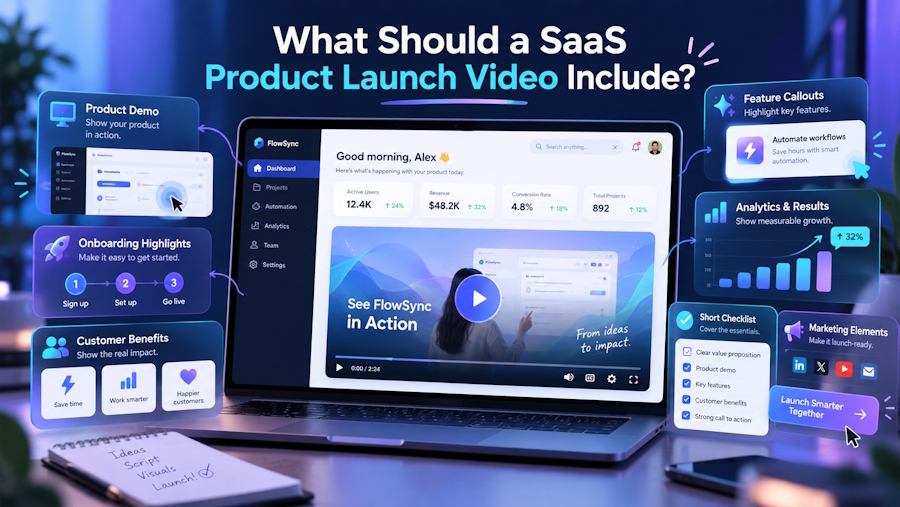
A SaaS product launch video has limited time to answer a few important questions: What is being launched? Who is it for? What problem does it solve? How does it work? And what should the viewer do next?
The challenge is deciding what deserves those limited seconds.
A launch video should not try to reproduce the product website, sales deck, or documentation. It should give viewers enough context to understand the product, see its value, and decide whether they want to learn more.
For most SaaS products, that means combining a clear product introduction, the problem it addresses, the core value proposition, product visuals, selected features, proof, differentiation, and a focused call to action.
1. A clear introduction to the product
The first few seconds should establish what is being launched.
That sounds obvious, but SaaS products often use their opening to explain the company, introduce a broad industry problem, or present an abstract brand message. By the time the product appears, the viewer still does not know what they are watching.
A stronger opening answers three basic questions:
- What is the product?
- Who is it designed for?
- What does it help them do?
For example, instead of opening with a broad statement about the challenges of managing customer data, a launch video for a customer-data platform could quickly establish that it gives revenue teams one place to collect, organize, and act on customer information.
The viewer should understand the product's category and intended user before the video moves into details.
2. The problem the product addresses
Once the product is established, give the viewer a reason to care about it.
This does not require a long explanation of the market problem. A short scenario is often enough to show what customers are dealing with before the product enters the picture.
For a project management platform, that might mean scattered updates, unclear ownership, and work spread across different tools. For an AI product, it could be the time spent manually completing a repetitive research or analysis task.
The problem should be specific enough that the product's value becomes easy to understand.
This section also helps prevent a common launch-video problem: showing product features before the audience understands why those features matter.
3. The core value proposition
After establishing the problem, explain what changes when the customer uses the product.
This is where the video moves from here is the problem to here is what the product does about it.
The value proposition should focus on the main outcome rather than a list of benefits.
For example: “The platform automatically turns customer conversations into structured product insights.”
is more useful than: “Our platform is fast, flexible, intelligent, secure, and easy to use.”
The first statement tells the viewer what the product actually does. The second could describe almost any SaaS product.
A good launch video should make its primary value proposition understandable without requiring the viewer to interpret marketing language.
4. The product in action
A SaaS launch video needs to show the product itself.
For software, this usually means showing real product UI, workflows, dashboards, interactions, or outputs. Animation can be useful when explaining an invisible process or simplifying something technically complex, but it should support the product rather than replace it.
What a Story’s analysis of more than 1,000 SaaS videos found that 72% used real product UI, compared with other visual approaches such as animation and screen capture. That reflects a basic communication principle: when the product is the subject, viewers benefit from seeing the product.
The UI does not need to be shown continuously. Select the screens and interactions that help explain the main product story.
A useful sequence is:
User problem → product action → result
For example:
Upload customer calls → AI analyzes the conversations → recurring product issues appear in a prioritized view.
That sequence explains more than simply moving through a dashboard while a voiceover lists features.
5. The features that support the launch message
A launch video does not need to show everything the product can do.
Trying to include every feature usually turns the video into a compressed product tour. Viewers receive more information but often leave with less understanding of what makes the product useful.
Instead, select the features that directly support the video's main message.
A useful test is: Does showing this feature help the viewer understand why the product is worth considering?
If the answer is no, it probably belongs elsewhere.
For a 60–90 second launch video, two to four capabilities may be enough, depending on the product's complexity and the audience.
The features should also be presented as part of a workflow rather than isolated items.
Instead of:
- Automated reporting
- Custom dashboards
- AI summaries
- Slack integration
show how those capabilities work together to solve the customer's problem.
6. What makes the product different
The viewer should have a reason to remember this product instead of another product in the same category.
Differentiation does not necessarily mean making a bold claim about being the “best” or “most advanced.” It can come from a specific product capability, workflow, technical approach, or customer outcome.
For example:
- A security platform may monitor a particular type of infrastructure that competitors do not.
- An analytics product may combine data sources that normally require several tools.
- An AI platform may automate a workflow that previously required several manual steps.
The important part is specificity.
If the differentiation cannot be demonstrated through the product, explained clearly, or supported by evidence, it is unlikely to add much value to the video.
7. Proof that supports the claims
A product launch video can make the product more credible by including evidence where it is available.
Depending on the product and launch stage, proof could include:
- Customer results
- Usage numbers
- Customer logos
- Testimonials
- Product adoption figures
- Security certifications
- Integration coverage
- Funding or company milestones, when relevant to the launch
Not every launch needs all of these.
The proof should support the claim being made. If the video says the product reduces a particular process from hours to minutes, for example, a customer result or measured product data is more useful than a generic statement about innovation.
For a new product without customer results, other forms of evidence may be more appropriate, such as a working product demonstration, technical validation, beta-user feedback, or information about the underlying technology.
8. A clear call to action
The final seconds should tell viewers what to do next.
The appropriate CTA depends on the product and the stage of the launch:
- Start a free trial for a self-serve product
- Book a demo for an enterprise SaaS product
- Join the waitlist for a product that is not yet available
- Try the product when immediate access is available
- Learn more when the video is introducing a larger product page or launch campaign
Avoid giving viewers several competing actions.
If the primary objective is demo requests, “Book a demo” should not compete with three other CTAs at the end of the video.
The CTA should feel like the natural next step after what the video has shown.
What Should You Leave Out of a SaaS Product Launch Video?
Knowing what to remove is as important as deciding what to include.
A launch video generally does not need:
Every product feature
The website, documentation, and sales process can provide the complete feature set. The video should focus on what matters most to the launch message.
A long company introduction
Unless the company's reputation is directly relevant to the launch, viewers usually need to understand the product before they need a history of the company.
Technical details without context
Technical capabilities can be useful, particularly for technical buyers. But they should be connected to a customer benefit or product capability rather than presented as a list of specifications.
Multiple unrelated messages
If the video tries to introduce the company, announce the product, explain every feature, recruit partners, attract investors, and promote a webinar, the central product story becomes difficult to follow.
Unsupported claims
Statements such as “the most advanced,” “revolutionary,” or “the only platform” should have a clear basis. If a claim cannot be demonstrated or supported, it is better to explain what the product actually does.
How Should a SaaS Product Launch Video Be Structured?
For a 60–90 second video, a simple structure can keep the story focused:
| Time | Section | Purpose |
|---|---|---|
| 0–10 sec | Problem / hook | Establish the situation or need |
| 10–25 sec | Product introduction | Explain what the product is and who it is for |
| 25–55 sec | Product in action | Show the core workflow and important capabilities |
| 55–75 sec | Differentiation / proof | Explain why the product is worth considering |
| 75–90 sec | CTA | Give the viewer one clear next step |
The exact timing will vary with product complexity and audience. A technical enterprise product may need more time to explain its workflow, while a simple self-serve product can communicate its value faster.
The important principle is the order: context first, product second, evidence and differentiation next, action last.
Final checklist
Before approving a SaaS product launch video, check whether it answers these questions:
- What is being launched?
- Who is it for?
- What problem does it address?
- What is the main value it provides?
- Can viewers see the product in use?
- Which features actually support the launch message?
- What makes the product different?
- Is there evidence behind important claims?
- Is the next action clear?
If the video answers those questions without trying to explain the entire product, it has the information needed to support a strong launch.
The goal is not to fit everything the product can do into 90 seconds. It is to give the right audience enough information to understand the product and take the next step.
For SaaS companies preparing a new product or major feature launch, What a Story's product launch video service can help turn the product story, UI, and key launch messages into a focused video built around the intended audience and action.

