

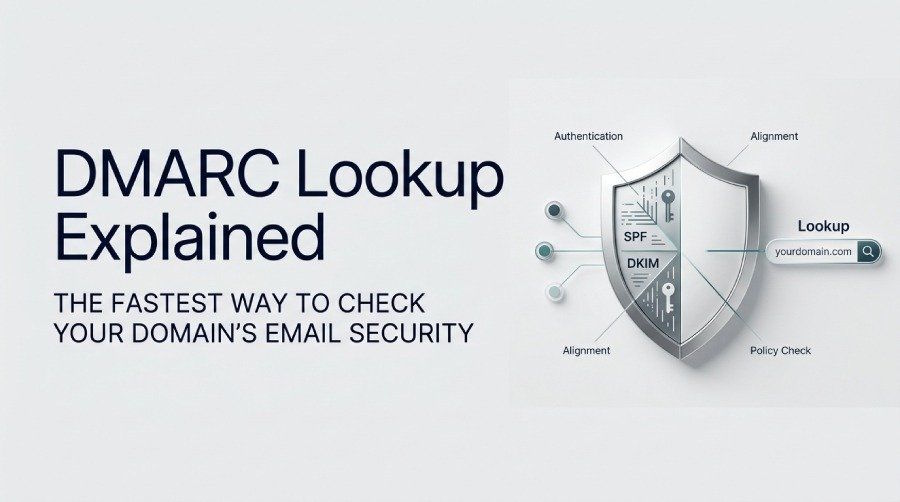
What a DMARC Lookup Is and Why It Matters
A DMARC lookup involves checking the DNS records linked to a specific domain to access and evaluate the existing DMARC record. This step is crucial for those tasked with maintaining email security, as DMARC (Domain-based Message Authentication, Reporting, & Conformance) acts as a safeguard against threats such as phishing and spoofing, as well as unauthorized email misuse. By performing a DMARC lookup, domain owners, IT administrators, and managed service providers can verify the proper setup of their DMARC policy, ensuring their domain is shielded from impersonation and fraudulent email activities.
Why is this important? In today’s email landscape, safeguarding brand reputation and protecting against phishing attacks has become increasingly vital. Major email providers like Google, Yahoo, and Microsoft now mandate that domains adopt strong email authentication measures. Failing to enforce and comply with DMARC can lead to your emails being blocked, landing in spam folders, or being exploited in attacks aimed at your clients.
Regularly testing your DMARC records with tools such as EasyDMARC, Dmarcian DMARC Inspector, MXToolbox, or any DMARC diagnostic tools can help pinpoint issues and misconfigurations before they escalate into deliverability or security challenges.
How DMARC Works with SPF and DKIM to Authenticate Email
DMARC enhances two pre-existing email verification systems: Sender Policy Framework (SPF) and DomainKeys Identified Mail (DKIM).
SPF Authentication
SPF authentication allows domain owners to specify authorized mail servers for sending emails on their behalf. Recipient servers check the domain’s DNS TXT record to verify the sender, while a DMARC lookup service can help review DMARC records and assess email authentication settings.
DKIM Authentication
DKIM authentication allows emails to be signed through public/private key cryptography. The recipient's mail server then checks the DKIM signature against the public key that is made available in the domain's DNS records.
DMARC Alignment and Compliance
DMARC mandates that at least one of the following authentication methods — SPF or DKIM — must be successful, and the domain employed in these methods must correspond to the domain in the From header (either matching exactly or as a subdomain). This requirement is referred to as DMARC alignment, which includes domain alignment. An email is considered DMARC compliant when it meets these alignment and authentication standards, enhancing deliverability and providing robust protection against spoofing.
Step-by-Step Guide to Performing a DMARC Lookup
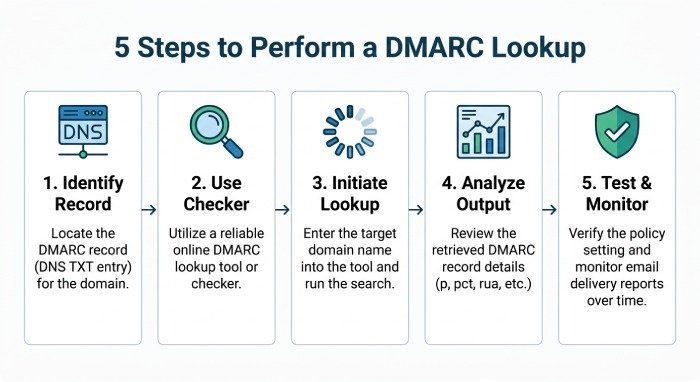
Verifying your DMARC record is a simple yet crucial task for all domain owners. Here’s a useful guide to help you perform a DMARC check:
Step 1: Identify Your Domain’s DMARC DNS Record
Go to the DNS settings for your domain, typically handled by your DNS provider or domain registrar. You can locate the DMARC record as a TXT record at _dmarc.yourdomain.com (substituting yourdomain.com with your specific domain).
Step 2: Use a Trusted DMARC Checker
Input your domain into a trusted DMARC checker or DMARC record validation tool, like EasyDMARC’s DMARC Record Checker, MXToolbox, Dmarcian DMARC Inspector, Google DMARC diagnostics, or through a dashboard provided by an Enterprise/Managed Services Provider (MSP).
Step 3: Initiate the DMARC Lookup
The DMARC lookup tool will access your DNS to fetch your DMARC DNS record and showcase all the set parameters, including the DMARC policy, reporting URIs (like the rua and ruf tags), the DMARC version (usually marked as “v=DMARC1”), alignment settings such as the aspf and adkim tags, report frequency indicated by the ri tag, and the policy mode (which can be none, quarantine, or reject). It may also display optional tags like the pct and sp tags.
Step 4: Analyze the DMARC Record Output
An effective DMARC record checker not only displays the record itself but also identifies any misconfigurations, points out absent tags, and may provide an interactive wizard to assist with suggestions or corrections.
Step 5: Test and Monitor
Consistent testing and monitoring of DMARC records for updates or misconfigurations guarantees continuing compliance with DMARC and enhances email authentication.
Automation and Bulk DMARC Checks
Businesses and managed service providers (MSPs) should leverage integrated DMARC diagnostic tools to automate the scanning of their domain portfolios, ensuring compliance and receiving notifications about any failures or suspicious alterations.
How to Read and Interpret a DMARC Record
Understanding the results of your DMARC check is essential for effective DMARC implementation and protecting your email security.
Key Tags and Their Functions
- v=DMARC1: Specifies the DMARC protocol version (only the version according to RFC 7489).
- p=policy: Defines the primary DMARC policy, which can be none, quarantine, or reject.
- sp=policy: Indicates the policy for subdomains (sp tag) that applies if subdomains are in use.
- rua=mailto: Identifies the recipient for aggregate reports (rua tag) that receive summary data.
- ruf=mailto: Indicates where detailed forensic reports (ruf tag) on failed emails are directed.
- adkim=s/r: Represents the DKIM alignment setting (adkim tag), which can be strict (s) or relaxed (r).
- aspf=s/r: Denotes the SPF alignment setting (aspf tag), available in strict or relaxed modes as well.
- pct=XX: Specifies the percentage of emails to which the DMARC policies are enforced (pct tag, e.g., pct=50 indicates application to 50% of emails).
- ri=seconds: Indicates the frequency at which aggregate report data is compiled.
DMARC Syntax and Record Structure
A typical DMARC record has the following format:
v=DMARC1; p=reject; rua=mailto:[email protected]; ruf=mailto:[email protected]; adkim=s; aspf=s; ri=86400; sp=quarantine; pct=100
- Each policy option is divided by a semicolon.
- DMARC alignment determines how closely the authentication identifiers match the domain in the "From" header.
- Aggregate reports are sent to the address specified in the rua tag, while forensic reports are directed to the ruf tag.
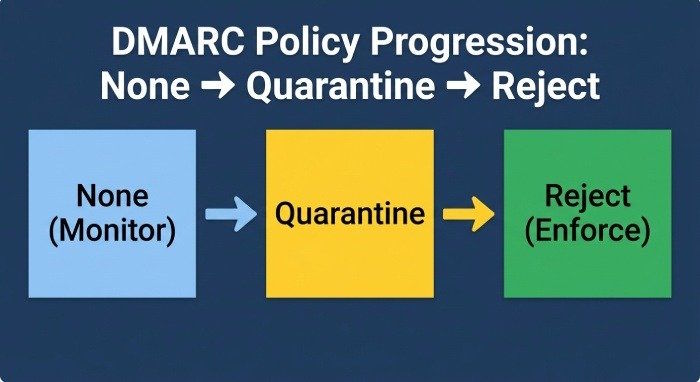
- The reject policy offers the highest level of protection, the quarantine policy is a middle-ground option, and the none policy is used solely for monitoring without any blocking.
DMARC Record Validation and Issues
Verify the DMARC syntax for correctness and identify frequent formatting mistakes, including missing semicolons, unsupported tags, lack of a DMARC version, or incorrect usage of report addresses. Validating DMARC records guarantees that implementations comply with RFC 7489 standards.
Common DMARC Lookup Results, Errors, and Next Steps
Typical DMARC Lookup Results
- Valid DMARC Record: The domain possesses a properly structured DMARC record and is actively implementing a policy. You will observe a defined reject, quarantine, or none policy, accompanied by reporting addresses.
- No DMARC Record Detected: This signifies the absence of a DMARC DNS record, creating a significant risk for email security and the protection of brand reputation.
- Improperly Configured DMARC Record: This involves syntax mistakes or the use of unsupported tags. Such issues often arise from personalized configurations or manual modifications.
Common Errors Detected by DMARC Checkers
DMARC Record Issues
- The policy tag (p=) is either absent or incorrect.
- There's an invalid email address in the rua or ruf tags.
- There are multiple or improperly formatted DMARC version entries.
- Unsupported or incorrect tags such as sp, pct, or ri are being used.
- The domains for SPF/DKIM do not align with the "From" header, indicating a failure in domain alignment.
What’s Next After a DMARC Check
When you identify problems through a DMARC check:
- Utilize a DMARC record wizard or specialized DMARC tool (like EasyDMARC or Dmarcian) for step-by-step fixes.
- If a record isn't present, generate a new DMARC TXT record following the standard DMARC syntax.
- If DMARC validation doesn't succeed, modify the DNS settings for correct syntax.
- Regularly examine your DMARC reports (both aggregate and forensic) for indications of unauthorized email activity or spoofing.
- Transition your DMARC policy from monitoring (none policy) to quarantine, and ultimately to reject for comprehensive enforcement and optimal protection against phishing.
In summary, regularly conducting DMARC checks and resolving issues with your DMARC record is crucial for maintaining a secure, compliant, and effective email authentication strategy. This not only protects your domain but also your users, brand, and the wider email community.

