

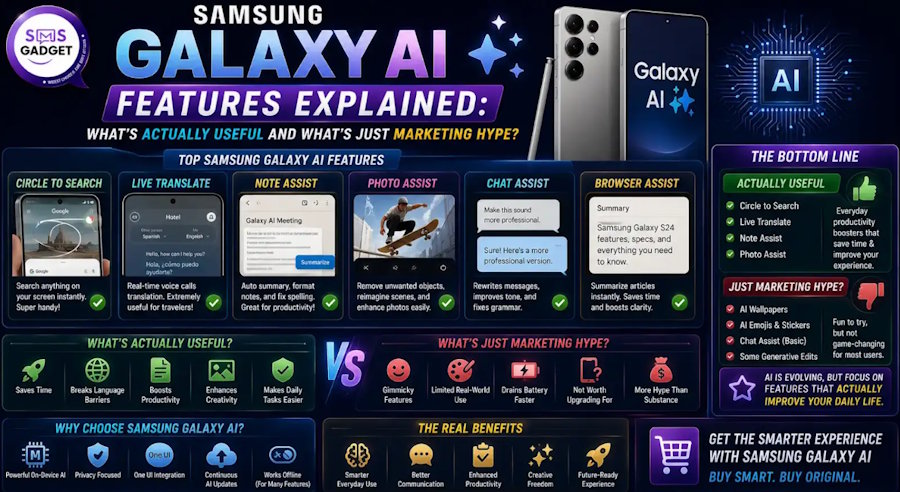
Samsung calls the Galaxy S26 its "third-generation AI phone." Every product page, every advertisement, and every Unpacked keynote is packed with the phrase "Galaxy AI." But here's the honest question most buyers are asking: Does any of this actually matter in real life, or is it just marketing dressed up in a star icon?
The short answer is that some of it is genuinely impressive and saves real time, some of it is useful occasionally, and some of it is flashy but forgettable. This guide cuts through the noise and tells you exactly which Galaxy AI features are worth your attention—and which ones you'll enable once, forget about, and never open again.
What Is Samsung Galaxy AI, Exactly?
Galaxy AI is Samsung's umbrella brand for all artificial intelligence features built into One UI. It launched with the Galaxy S24 in early 2024 and has expanded significantly with each generation. The Galaxy S26 series, announced in February 2026, is what Samsung describes as its most capable AI phone yet — adding agentic features, upgraded camera AI, and deeper integration with Google Gemini and Perplexity alongside Bixby.
The important thing to understand: Galaxy AI is not one feature. It is a collection of over a dozen distinct tools, each doing something different. Some run entirely on your device (on-device AI). Others send data to the cloud for processing. Samsung lets you choose, which is a meaningful privacy control.
As of early 2026, Samsung confirmed that core Galaxy AI features will remain free—after initially suggesting they might charge for them in 2026. That concern has been resolved.
Which Samsung Phones Support Galaxy AI?
Galaxy AI requires One UI 6.1 or later. It is available across a wide range of Samsung devices — not just flagships. Here's the general picture:
|
Device Category |
Galaxy AI Support |
|
Galaxy S26 / S25 / S24 Series |
Full, including exclusive features |
|
Galaxy Z Fold 7 / Flip 7 |
Full Galaxy AI |
|
Galaxy A56 / A36 (One UI 6.1+) |
Core features (Circle to Search, Writing Assist, etc.) |
|
Galaxy S23 / S22 Series (via updates) |
Most features via One UI 7 / 8 updates |
|
Galaxy M Series |
Basic features (Circle to Search) |
Not every feature reaches every phone. Hardware-dependent features like AI ISP camera processing and Now Nudge require the processing power of newer flagship chips.
The Genuinely Useful Features — Worth Your Time Every Day
1. Circle to Search — The Most Used Galaxy AI Feature
Verdict: Genuinely useful. Use it daily.
Circle to Search lets you draw a circle (or scribble, or highlight) around anything on your screen — text, images, objects in a video — and instantly search it via Google without leaving the app you're in. It works across every app: WhatsApp, YouTube, Instagram, Chrome, and anywhere.
The upgrade in the Galaxy S26 allows circling multiple objects at once—so you can circle an outfit worn by someone in a photo and find where to buy each piece simultaneously. Over 600 million Android devices support Circle to Search, but Samsung was among the first to integrate it deeply into One UI.
Real-world use: You're watching a YouTube video, see a product you like, circle it — done. No screenshotting, no switching apps, no copy-pasting. It genuinely saves time every single day, which is rare for AI features.
Limitation: It depends on Google's search quality. If the item is obscure or the image is poor, results suffer.
2. Transcript Assist — A Genuine Productivity Tool
Verdict: Genuinely useful. One of the best AI features available on any phone.
Open the Voice Recorder app, record a meeting, lecture, or interview, and tap Transcribe—and Galaxy AI converts the audio to text, identifies different speakers, and generates a summary. You can also translate the transcript into another language with a single tap. As of 2026, it supports 22 languages for transcription.
Real-world accuracy: In quiet environments with 2 speakers, speaker diarization accuracy is around 95%. With 4 speakers, it drops to roughly 80%. In noisy environments, it struggles, particularly with heavy accents. But for a meeting room or a one-on-one call, it performs remarkably well.
Real-world use: Students recording lectures, journalists interviewing sources, professionals taking meeting notes. Instead of scribbling or relying on memory, you record and review later. The timeline summary view is especially praised—it automatically organizes output into bullet points or action items.
Limitation: Struggles with overlapping dialogue and heavy background noise. Not a replacement for a dedicated recorder in professional settings with many speakers.
3. Live Translate — Real-Time Call Translation
Verdict: Genuinely impressive. Genuinely useful for the right users.
Live Translate works during phone calls. You speak in one language, the other person speaks in theirs, and Galaxy AI translates both sides in real time—displaying text on screen and optionally speaking the translation aloud. It notifies the other person that translation is active, which is a good transparency practice.
It also works in messaging apps through Writing Assist—translating incoming and outgoing messages in real time inside WhatsApp, Messages, and others.
Real-world use: If you regularly communicate with family abroad, deal with international clients, or travel often, this is genuinely valuable. For Bangladesh users dealing with business calls in English or communicating across language barriers, this is one of the most practical tools in Galaxy AI.
Limitation: Requires a network connection for most languages. Only one person should use Live Translate per call to avoid translation conflicts. Accuracy varies by language pair — common languages like English, Spanish, and French perform better than less common ones.
4. Photo Assist — AI Photo Editing That Actually Works
Verdict: Genuinely useful for social media users and creators. Impressive results.
Photo Assist lets you edit photos using natural language or simple gestures. You can move objects, remove people from the background, resize elements, or change the scene — for example, editing a daytime photo into a night scene. As of March 2026, it supports 41 languages for prompts.
The Galaxy S26 brought meaningful improvements: you can now describe what you want in plain language — "remove everyone except the person on the right" — and the AI handles it. On the S26 Ultra with its 200MP sensor, the results are detailed enough to be genuinely usable, not just gimmicky.
Real-world use: Removing a photobomber, cleaning up a background, adjusting composition after the fact. Things that previously required Photoshop or a dedicated editing app on a laptop.
Limitation: Complex edits in busy scenes can produce visible AI artifacts. Works best on clear, well-lit photos. Very complex requests still fall short of what a skilled editor could do manually.
5. Now Brief—Your AI Morning Summary
Verdict: Useful if you commit to it. Needs a few days to personalize properly.
Now Brief generates a personalized morning overview on your lock screen: your weather, calendar events, upcoming reservations, energy level (from Galaxy Watch data if connected), and reminders—including ones it finds in your notification history that you never manually added to your calendar. At Galaxy Unpacked 2026, Samsung's product team demonstrated this live: a restaurant booking confirmation in a notification had been automatically surfaced as a calendar reminder by Now Brief, even though the user had never added it manually.
Real-world use: Instead of checking your calendar app, weather app, and Gmail separately each morning, you get a single organized brief. For people with busy schedules, this is a genuine time-saver.
Limitation: Works best when you use Samsung's own apps—Calendar, Notes, and Samsung Email. If you live in Google Calendar and Gmail exclusively, Now Brief's contextual awareness is limited. It also takes several days to learn your patterns before becoming truly useful.
6. AI Call Screening — Spam Protection That Works
Verdict: Genuinely useful. Set it once and forget it.
Call Screening uses AI to handle calls from unknown numbers. When an unrecognized number calls, Galaxy AI intercepts it, asks the caller for their reason, and shows you a live transcription so you can decide whether to answer. It automatically terminates calls it identifies as spam or scams.
Real-world use: In Bangladesh, spam calls and scam calls are a real nuisance. This feature handles them without you even seeing them. You only engage with calls that pass the screen. It is one of the most quietly practical Galaxy AI features available.
Limitation: The screening prompt may confuse legitimate callers who are not used to it. Some callers hang up before speaking. It works best with the Phone app—third-party dialers may not support it.
Situationally Useful — Good Features, But Not for Everyone
7. Writing Assist — AI Tone and Grammar Help
What it does: Writing Assist (formerly Chat Assist) refines your text messages and emails. You type a draft, and it can adjust the tone—making it more professional, more casual, or more concise—or fix grammar and spelling. It works inside messaging apps via the Samsung keyboard toolbar.
Who it's for: People who write a lot of messages for work or who communicate in a second language. For casual texting with friends, it is complete overkill. For drafting professional emails or client messages on your phone, it's genuinely handy.
The honest truth: Most users will use this occasionally and forget about it. It is not a daily-driver feature for the average person.
8. Document Scan — Underrated Productivity Tool
What it does: Document Scan detects documents in your camera frame and automatically cleans up the scan—removing distortions, corner folds, stray fingers, and creases—then exports a clean PDF.
Who it's for: Anyone who regularly scans receipts, forms, contracts, or notes. This is one of Galaxy AI's most underrated features, described even by reviewers who test these things professionally as more practically useful than many of the flashier tools.
The truth: If you scan documents even occasionally, this feature saves real time compared to using a separate scanning app. If you never scan documents, you'll never open it.
9. Note Assist — Smart Notes for Students and Professionals
What it does: In the Samsung Notes app, Note Assist can auto-format messy notes, generate summaries, correct spelling, translate the entire note, and — for S Pen users — clean up handwriting and convert it to typed text.
Who it's for: Students, writers, and people who take a lot of notes. Requires a minimum of 200 characters to work, so short notes won't trigger it.
The honest truth: If you use Samsung Notes regularly, this is a strong feature. If you use Google Keep or Notion instead, you won't benefit at all.
10. Browsing Assist — Long Article Summaries
What it does: Inside the Samsung Internet browser, Browsing Assist can summarize long articles into concise overviews and translate web content. Look for the Galaxy AI icon in the browser toolbar.
Who it's for: People who research heavily on their phones and want quick summaries before deciding whether to read in full.
The truth: Genuinely useful for the right person. But if you use Chrome instead of Samsung Internet, this feature is completely inaccessible. Samsung Internet is a good browser, but most users in Bangladesh default to Chrome, making Browsing Assist invisible to the majority.
The Overhyped Features — Real But Rarely Used
11. Creative Studio — AI Art and Style Transfer
What it does: Creative Studio lets you transform photos into oil paintings, anime illustrations, or custom styles. It can generate images from text prompts, create sticker sets, and design wallpapers. Shown prominently at every Samsung Unpacked event.
The honest verdict: It works. But so does every other AI image generator. There is nothing here that is exclusive to Samsung or dramatically better than what you can do in Canva, Bing Image Creator, or dozens of free apps. The demo always looks impressive. In day-to-day use, the novelty wears off quickly. Most users generate one or two images, show their friends, and never open it again.
It is not a bad feature. It is simply not a reason to choose a Samsung phone.
12. Now Nudge — The Agentic Feature That Isn't Quite There Yet
What it does: Now, Nudge is Galaxy AI's most ambitious 2026 feature. It runs in the background, reads context across apps, and surfaces relevant prompts without you asking. If a friend texts asking for photos from last weekend, it surfaces relevant images from your gallery inside the chat. If a message mentions evening plans, it checks your calendar for conflicts and shows a pop-up.
The honest verdict: When it works, it genuinely feels like the future of smartphone AI. The problem is consistency. It works well in controlled demonstrations and in specific scenarios, but in real-world use it can miss context, fire at the wrong moment, or simply not trigger when you expect it to. It requires the newer NPU hardware in the S26 series to work at all.
This is a feature that will genuinely improve over time and could become indispensable within a generation or two. Right now, it is impressive in flashes and unreliable in others.
13. ProScaler — Display Upscaling
What it does: ProScaler upscales lower-resolution video on the display itself, making lower-quality streams look sharper without streaming in 4K. Useful if you want to save data while watching YouTube.
The honest verdict: It works. You probably will not notice it is running. It is the kind of background feature that improves the experience without ever being consciously appreciated, which is actually the best kind of feature. It just is not something to make a purchasing decision over.
14. Privacy Display — S26 Ultra Exclusive
What it does: The Galaxy S26 Ultra introduces the world's first built-in Privacy Display on a smartphone. Unlike a physical privacy screen protector, this is software-driven — it can be toggled on or off instantly and applied selectively to specific apps or notifications. People looking at your screen from an angle see nothing.
The honest verdict: This is genuinely innovative and solves a real problem. But it is exclusive to the S26 Ultra. If you travel frequently, work in public spaces, or handle sensitive information on your phone, this feature alone may be a meaningful differentiator. For everyone else, it's a neat trick.
Galaxy AI Privacy — Is Your Data Safe?
This is a fair concern, and Samsung has addressed it with real structure:
On-device processing: For features like Now Brief and personal context awareness, Galaxy AI uses Samsung's Personal Data Engine (PDE) — your data is processed locally and encrypted using Knox Enhanced Encrypted Protection (KEEP). It never leaves your device.
Cloud processing: Some features, like higher-quality Photo Assist edits, may use cloud processing. Samsung lets you choose which mode each feature uses in Settings → Galaxy AI. This is a genuine privacy control, not just a marketing promise.
Knox Vault: Sensitive AI data is stored in Knox Vault — a hardware-isolated secure enclave, separate from the main processor. This is the same security architecture used in enterprise Samsung devices.
Samsung Account: Some features require a Samsung Account login. If you use Galaxy AI without an account for basic features, most core tools still work.
The bottom line: Samsung's on-device AI approach is more privacy-respecting than many cloud-first competitors. The key is checking your settings and understanding which features use local vs. cloud processing.
Galaxy AI on Older Samsung Phones — What Do You Actually Get?
A common question among Samsung users is: "I have a Galaxy S23 or Galaxy A55—can I use Galaxy AI?" The answer is yes, in most cases. Samsung has expanded Galaxy AI through One UI updates, making many AI-powered features available on older flagship and selected mid-range devices.
If you own a Galaxy S25 or S24, you'll get almost the complete Galaxy AI experience, including Circle to Search, Photo Assist, Live Translate, Transcript Assist, Now Brief, and Creative Studio. Most of these features also work on the Galaxy S23 and S22 series after software updates, although some functions—such as Now Brief—may have limited capabilities compared to newer models.
Users of mid-range phones like the Galaxy A56 and A36 can also enjoy several AI tools. Features such as Circle to Search, Live Translate, Transcript Assist, and Creative Studio are available, while Photo Assist offers a more basic version. However, advanced experiences like Now Nudge are not supported on these devices, and Now Brief is only partially available.
The latest Galaxy S26 series introduces the most advanced AI features thanks to its upgraded hardware. Exclusive capabilities such as the AI ISP Camera and Privacy Display are available only on the Galaxy S26 Ultra, while Now Nudge delivers its full functionality on the S26 lineup. These features rely on Samsung's newest Neural Processing Unit (NPU), making them difficult to bring to older smartphones through software updates alone.
Overall, Samsung has done an excellent job of bringing Galaxy AI to previous generations of Galaxy devices. However, the most hardware-intensive AI features remain exclusive to the newest flagship models, ensuring that users who upgrade to the Galaxy S26 series receive the most powerful and complete AI experience.
Galaxy AI vs. Apple Intelligence — The Honest Comparison
|
Feature |
Galaxy AI |
Apple Intelligence |
|
Photo Editing |
Photo Assist — strong, 41 languages |
Clean Up — excellent, more natural |
|
Translation |
Live Translate (calls + messages) — 4 ways |
Translate app + on-screen — 3 ways |
|
Writing Help |
Writing Assist — solid |
Writing Tools — comparable |
|
Summaries |
Now Brief, Note Assist, Browsing Assist |
Notification summaries, Mail summaries |
|
AI Search |
Circle to Search (Google-powered) |
Visual Intelligence (Safari + Maps) |
|
Privacy |
On-device option + Knox |
On-device by default |
|
Agent AI |
Gemini, Perplexity, Bixby—your choice |
Siri + ChatGPT — less open |
|
Availability |
S24 and newer, many A-series |
iPhone 15 Pro and newer |
The honest verdict: Galaxy AI offers more features and more flexibility. Apple Intelligence is more consistent and more private by default. Neither is dramatically superior—the right choice depends on which ecosystem you're already in and which specific features match your workflow.
Which Samsung Phones Support the Best Galaxy AI Experience?
If Galaxy AI features matter to you, here are the phones to consider in Bangladesh:
Best Galaxy AI experience overall: Galaxy S26 Ultra (Tk 1,99,999) — every feature, the best hardware, Now Nudge, AI ISP on front and rear cameras, and Privacy Display exclusive.
Best Galaxy AI experience for the money: Galaxy A56 5G (Tk 54,999) — Circle to Search, Photo Assist, Live Translate, Transcript Assist, Writing Assist. The core features that matter most are all here.
Galaxy AI on a budget: Galaxy M56 (Tk 30,000–35,000) — Circle to Search and basic Galaxy AI features. Not the full suite, but the most-used features are present.
For full pricing across the Samsung range, check the current Samsung Mobile price in Bangladesh before buying; prices update regularly.
Where to Buy a Samsung Phone with Galaxy AI in Bangladesh?
Galaxy AI works best on officially purchased, BTRC-registered Samsung phones with the latest One UI version. Grey-market phones sometimes arrive with regional One UI builds that restrict certain AI features or languages.
Always buy from an authorized Samsung reseller or a trusted Samsung Mobile shop in Bangladesh to ensure you receive the correct regional software, official warranty, and access to Samsung's full AI feature set from day one.
Samsung Galaxy AI Questions Answered
Is Samsung Galaxy AI free to use?
Yes. Samsung confirmed in early 2026 that core Galaxy AI features will continue to be free for all users. This includes Circle to Search, Photo Assist, Live Translate, Transcript Assist, Writing Assist, Now Brief, and Note Assist. There are no subscription fees currently in place.
Does Galaxy AI work offline?
Several features work fully on-device without an internet connection—including basic Note Assist, AI camera processing, and notification summaries. Features like Live Translate, higher-quality Photo Assist edits, and Browsing Assist typically require a network connection. You can check and adjust each feature's processing mode in Settings → Galaxy AI.
Which Galaxy AI features are available in Bangladesh?
Core features—Circle to Search, Photo Assist, Writing Assist, Transcript Assist, Live Translate, and Now Brief—are available in Bangladesh. Some features have regional limitations based on language support. Live Translate supports English and major global languages, which covers most use cases in Bangladesh. Availability may vary slightly by carrier.
Does Galaxy AI drain battery faster?
On-device AI processing does use more battery than idle use, but Samsung's newer chips (Exynos 2600, Snapdragon 8 Elite Gen 5) are designed with dedicated NPUs (Neural Processing Units) that handle AI tasks efficiently without the main processor doing heavy lifting. In practice, the battery impact is negligible for most Galaxy AI features in daily use.
What is the difference between Bixby and Galaxy AI?
Bixby is Samsung's voice assistant—you speak commands, and it responds. Galaxy AI is the broader suite of AI-powered tools across the phone. In 2026, Bixby has been significantly upgraded with natural language device control, meaning you can ask it to adjust settings in plain English without knowing exact menu locations. Gemini and Perplexity are also available as alternative AI agents on Galaxy S26 devices, giving you a choice between three different AI models.
Is Galaxy AI better than Google Gemini on Android?
Galaxy AI and Google Gemini are not direct competitors — they overlap. On Samsung phones, Gemini is one of the AI agents available inside Galaxy AI, alongside Bixby and Perplexity. Galaxy AI is the container; Gemini is one of the engines running inside it. Samsung's integration means you can use Gemini to book a taxi, set reminders, or search the web, all without leaving your current app, triggered through the same Galaxy AI entry point.
Conclusion
Galaxy AI in 2026 is not marketing fiction, but it is not uniformly excellent either. The features that genuinely improve daily life are Circle to Search, Transcript Assist, Live Translate, Photo Assist, Now Brief, and AI Call Screening. These work reliably, save real time, and become habits quickly. The rest range from situationally useful to cleverly demoed but rarely opened.
The good news: you do not need to buy the Galaxy S26 Ultra to benefit from the best of Galaxy AI. The Galaxy A56 5G at Tk 54,999 carries most of the features that actually matter in daily use.
Buy from an authorized source, keep One UI updated, and spend an afternoon exploring Settings → Galaxy AI—you might be surprised how many tools are already sitting there, waiting to be used. Smsgadget and other Samsung Phone Shops carry the full Samsung lineup with official warranties and the latest One UI software, making them a reliable starting point for buyers in Bangladesh.

